 Urumi.AI
Migrate WooCommerce to EmDash: What Moves, What Doesn't
EmDash WooCommerce migration with Otta: what imports, what you re-enter, what has no path yet, and the 301 redirect rules. Tested 2026-11-21.
Updated 2026-11-21 · Import run on EmDash 1.5.0 with Otta’s development build; feature claims checked against Otta’s v0.2.0 source · about 13 min read
Disclosure: Urumi builds Otta, the commerce plugin this guide uses.
Can you migrate WooCommerce to EmDash?
Partly. EmDash’s WordPress importer brings WooCommerce product titles, slugs, descriptions and featured images across as content. Prices, SKUs, stock, variations, coupons, tax and shipping must be re-entered in Otta. Order history, customer accounts and saved cards have no import path today.
Otta is an open-source commerce plugin for EmDash that runs products, cart, checkout, orders and inventory inside the CMS on Cloudflare Workers, with no separate backend, database server or Redis.
Check this first: after the import, EmDash’s summary screen looks complete, but the storefront shows bare titles until you copy two fields across and publish each product. We found that by running a real import, not by reading the docs.
Try it before you plan anything: run a copy of your catalog’s WXR export through the import in a test store (the Deploy to Cloudflare button creates one), or look around the disposable playground store first.
How we tested, in short: one import run on 2026-11-21 of WooCommerce’s own sample data (18 products, 7 variations) into EmDash 1.5.0 with Otta’s development build; feature claims checked against Otta’s v0.2.0 source; redirects tested locally. Full method in "How we tested this guide" near the end.
Terms used below. WXR is WordPress’s XML export format (Tools → Export). HPOS is WooCommerce’s High-Performance Order Storage, which keeps orders in their own tables. A WooCommerce variation is what Otta calls a variant. Minor units means money stored as whole cents (19.99 is stored as 1999).
Quick path: WooCommerce to EmDash in eight steps
- Export products (WXR and CSV), orders, tax rates and your URL list from WooCommerce.
- Deploy an EmDash store with Otta using the Deploy to Cloudflare button.
- Import the WXR file in EmDash, with
product_variationswitched off. - Copy each product’s description and image into Otta’s Description and Images fields, then click Publish changes.
- Re-enter price, compare-at price, SKU, stock and variants from your CSV, by hand or by script. An AI agent can help with price, SKU and stock.
- Re-create tax, shipping and coupons.
- Add three 301 redirect rules and connect Stripe or cash on delivery.
- Test an order, check the redirects, then select Go live.
Each step is covered in "How to move a WooCommerce store to EmDash, step by step" below, which splits them into 10.
What carries over from a WooCommerce store to EmDash and Otta
Each kind of WooCommerce data has its own row. Status uses six values: Imports (arrives and works), Copy (arrives, then you copy it into an Otta field), Re-enter (typed into Otta), Rebuild (recreated as settings or rules), No path (no route in Otta 0.2.0) and Not verified (we could not test it with our input file). Verified how labels are explained in "How we tested this guide".
| WooCommerce data | What happens on EmDash + Otta | Status | Verified how |
|---|---|---|---|
| Product title | Imported into the products collection’s Title | Imports | Import run |
| Product slug | Kept (v-neck-t-shirt stayed v-neck-t-shirt) | Imports | Import run |
| Product description | Imported into a new content field. Otta’s storefront reads description, so copy it across | Copy | Import run + Source (v0.2.0) |
| Short description | Imported into a new excerpt field. Not shown on the storefront | Copy | Import run |
| Featured image | Downloaded into EmDash media as a new featured_image field. Otta’s storefront reads images, so select it there | Copy | Import run |
| Product categories and tags | Our sample file defines no category terms, so our run could not test them. EmDash’s importer skips terms for a taxonomy EmDash doesn’t have. Otta 0.2.0’s template has no category field or category route | Not verified | Source (EmDash 1.3.1 importer) + Source (v0.2.0) |
| Regular and sale price | Sale price becomes Price, regular price becomes Compare-at price, in Otta’s Pricing card | Re-enter | Import run + Source (v0.2.0) |
| Cost of goods | Otta’s Pricing card has a "Cost per item" field (not shown to customers) | Re-enter | Source (v0.2.0) |
| SKU and stock quantity | Entered in Otta’s Inventory card. The importer skips WooCommerce’s _sku and _stock meta | Re-enter | Import run + Source diff (1.3.1 vs 1.5.0) |
| Variable products and variations | Rows in the product’s Variants list, then priced per variant. Don’t import the product_variation type | Re-enter | Import run + Source (v0.2.0) |
| Scheduled sale dates, backorders | Otta 0.2.0 has no sale-date fields and doesn’t support backorders | No path | Source (v0.2.0) |
| Coupons | Re-created in Otta’s Coupons screen. Otta 0.2.0 coupons lack include/exclude products, maximum spend and allowed emails | Rebuild | Source (v0.2.0) |
| Tax classes, rates and options | Re-created. Otta 0.2.0 has a Tax options screen with WooCommerce-style settings | Rebuild | Source (v0.2.0) |
| Shipping zones and methods | Re-created (flat rate or free shipping, by zone) | Rebuild | Source (v0.2.0) |
| Customer accounts and passwords | Not imported. Sign-in is by emailed link, so there are no passwords to move; a customer’s first sign-in creates a fresh account | No path | Source (v0.2.0) |
| Order history | Stays in WooCommerce or your export | No path | Source (v0.2.0) |
| Saved cards and subscriptions | Stay with Stripe and WooCommerce Subscriptions | No path | Source (v0.2.0) |
| Blog posts and pages | Handled by EmDash’s WordPress importer (EmDash docs) | Imports | Vendor docs |
| Old product, shop and category URLs | One 301 pattern rule each in EmDash’s Redirects manager | Rebuild | Tested locally on 2026-11-21 |
| WooCommerce extensions | Look for an EmDash plugin or an Astro component | No path | Not tested; depends on the extension |
WooCommerce categories on EmDash, precisely. WooCommerce’s bundled sample_products.xml assigns products to categories but contains no category term definitions, and EmDash’s Categories list stayed empty after our import. That run therefore does not show what a real store export would do. EmDash’s importer source (the WXR taxonomy module in emdash 1.3.1) creates terms only for taxonomies that already exist in EmDash; terms for any other taxonomy, such as WooCommerce’s product_cat, are listed as missing and skipped. Otta 0.2.0’s products collection has only title, description, images, pricing and variants fields, and the template storefront serves /products and /products/<slug> with no category route. A developer or coding agent could define a taxonomy before importing and add a category route to the Astro storefront. We haven’t built or tested that, and the template doesn’t do it.
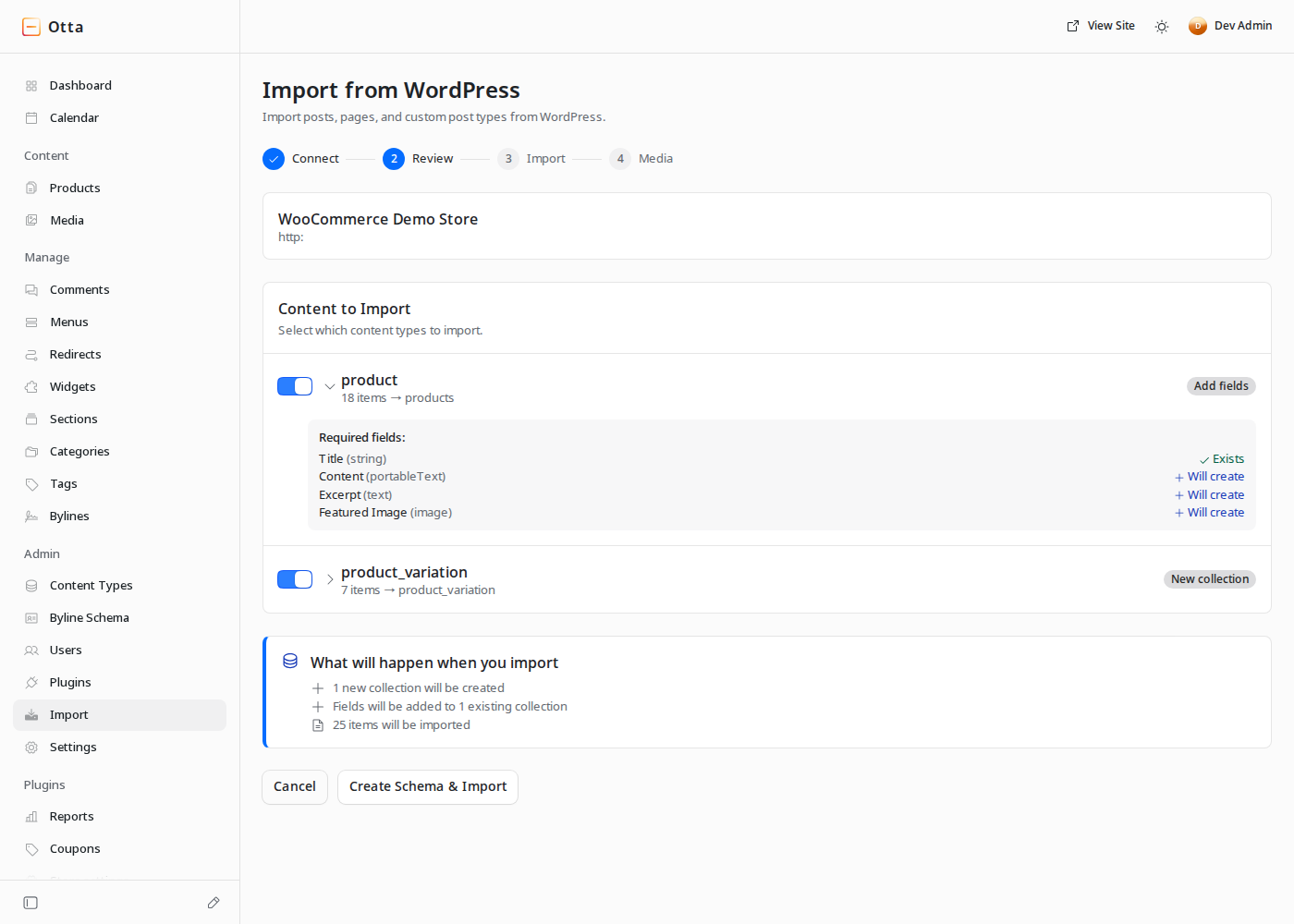
The Review step is where the field mismatch first shows. For WooCommerce’s sample file (18 products), the importer adds its own Content, Excerpt and Featured Image fields instead of writing to Otta’s Description and Images, and offers product_variation (7 items) as a separate new collection.
Should a WooCommerce store migrate to EmDash now?
It depends on what your store relies on. WooCommerce is large: W3Techs reports it on 7.6% of all websites and 11.3% of sites whose CMS it can identify (W3Techs, data dated 2026-11-21). EmDash is young: Cloudflare released EmDash 1.0 on 2026-09-28, and its announcement says more than 175 people had contributed "across more than 1,800 commits" (Cloudflare blog). Many WooCommerce extensions have no EmDash equivalent yet.
| Your WooCommerce store has… | Recommendation |
|---|---|
| A small-to-mid catalog of physical or digital goods, card or cash-on-delivery payments | Good fit |
| Content-heavy site where the shop is a section | Good fit. EmDash imports the content side |
| Already on Cloudflare, or want one deploy for site and shop | Good fit |
| Thousands of SKUs and no one to supervise an AI agent or a script | Wait. Someone has to check the re-entered data |
| Order history you need inside the store admin | Wait, or keep WooCommerce read-only for look-ups |
| Category pages your shoppers browse by | Budget build work for a developer or coding agent; Otta 0.2.0’s template has no category pages |
| Many paid extensions doing core work | Wait, unless each has an EmDash plugin or Astro replacement |
| Subscriptions, bookings, memberships or B2B price lists | Wait. Otta has none of these |
The store that fits best today sells a small-to-mid catalog, runs a content-heavy site where the shop is one section, and is already on Cloudflare or wants site and shop in one deploy.
Independent advice raises the same concern for extension-heavy stores. Seahawk Media’s agency guide to moving from WordPress to EmDash lists "WooCommerce stores, memberships, LMS and bookings" first among the sites it says are not ready to move, alongside sites that "lean on many plugins with no EmDash equivalent yet" (Seahawk Media, checked 2026-11-21). That guide covers WordPress sites in general and does not assess Otta or any EmDash commerce plugin. For a store that depends on extensions, the gap is real: Otta does not replace them today.
Does EmDash’s WordPress importer cover WooCommerce products?
Only as content. EmDash’s official migration guide, when we checked on 2026-11-21, did not mention WooCommerce or products (EmDash docs). It covers posts, pages, custom post types, taxonomy terms, menus and media. It says WXR import "writes the standard imported fields rather than copying every arbitrary meta key". In EmDash’s importer source (the isInternalMetaKey function in the WordPress import analyze route, the same in emdash 1.3.1 and 1.5.0), any meta key starting with an underscore is treated as internal and skipped, apart from _thumbnail_id and SEO-plugin keys. WooCommerce stores its commercial data under exactly such keys (_price, _regular_price, _sale_price, _sku, _stock, _stock_status), so none of it arrives. A related open EmDash issue, #3820, tracks the importer ignoring WXR custom fields.
EmDash adds commerce through plugins, not core, so store data belongs to whichever commerce plugin you choose. When Cloudflare announced EmDash 1.0 on 2026-09-28, it wrote: "Urumi is using their WooCommerce expertise to release EmDash’s first eCommerce plugin." (Cloudflare, "EmDash 1.0: the stable CMS with a secure plugin registry"). That sentence names Urumi, the company that builds Otta.
As of 2026-11-21, other EmDash commerce plugins include Vendwick, DashCommerce, Catalog Studio and Ritely. Their product fields differ, so their import behavior will differ too. We have not checked whether any of them ships a WooCommerce importer, and we will update this guide if we learn of one.
The EmDash Exporter plugin, which we did not test. EmDash’s docs describe an alternative to WXR upload: the EmDash Exporter plugin, installed on the WordPress site. The docs say it "can copy custom meta and Advanced Custom Fields (ACF) values" into matching fields on the target collection. It is unlikely to help with prices or stock, because Otta keeps price, SKU and stock in its own commerce record, not in CMS fields the Exporter could fill.
| Migration path | What it moves into EmDash + Otta | Effort | Status (2026-11-21) |
|---|---|---|---|
| EmDash WXR importer | Titles, slugs, descriptions, short descriptions, featured images, posts and pages | Low; then a copy step per product | Tested (one run, EmDash 1.5.0) |
| EmDash Exporter plugin | Content plus custom meta and ACF values, per EmDash’s docs; not Otta’s commerce record | Low to medium | Not tested |
| Scripted write through Otta’s admin route | Price, SKU and stock per product | Script work for a developer or coding agent; internal, unsupported interface | Pattern in Otta’s demo seed script |
@urumi.ai/otta-mcp plus EmDash’s content tools | EmDash’s content tools: product content. Otta’s tools: price, SKU and stock | An agent does the entry; you review it | Not tested for this migration |
| Manual entry in Otta’s editor | Everything Otta has a field for | Six actions per product, more per variation | Tested on single products |
What we’d like the EmDash importer to do. Let the Review step map WooCommerce’s description and featured image onto a collection’s existing fields (Otta’s Description and Images) instead of always creating Content, Excerpt and Featured Image. That alone would remove two of the six manual actions per product.
What redirects does a WooCommerce to EmDash migration need?
Three 301 rules in EmDash’s Redirects manager keep old WooCommerce URLs working: /product/[slug] to /products/[slug], /shop to /products, and /product-category/[...rest] to /products. We tested all three locally on 2026-11-21 against EmDash 1.5.0. The slug rule works because the importer keeps product slugs unchanged.
WooCommerce’s default product base is /product/ and its default category base is /product-category/. If you chose the permalink option that uses the shop page’s name, product URLs sit under that name, usually /shop/ (WooCommerce permalinks docs, checked 2026-11-21). Otta’s storefront serves /products and /products/<slug>.
EmDash’s Redirects manager is under admin → Redirects. Its in-app hint reads "Use [param] or […rest] in paths for pattern matching." That text appears in the EmDash admin package in both 1.3.1 and 1.5.0; EmDash’s migration docs don’t describe the manager. The rules:
Source                          Destination          Code
/product/[slug]                 /products/[slug]     301
/shop                           /products            301
/product-category/[...rest]     /products            301
To check them, run these against your store:
curl -sI https://<your-site>/product/v-neck-t-shirt/ | grep -iE '^(HTTP|location)'
curl -sI https://<your-site>/shop/ | grep -iE '^(HTTP|location)'
curl -sI https://<your-site>/product-category/tshirts/ | grep -iE '^(HTTP|location)'
Results, tested locally on 2026-11-21 against EmDash 1.5.0: /product/v-neck-t-shirt/ returned 301 to /products/v-neck-t-shirt (the trailing slash was handled). /shop and /shop/ returned 301 to /products. /product-category/tshirts/ returned 404 until the third rule was added, then 301. If your WooCommerce site uses custom bases, change the source paths to match.
The manager also has a 404 Errors tab. Check it for a week after launch to catch URLs you missed. EmDash’s migration docs give the same advice: "Crawl old public URLs and prepare redirects for every changed route."
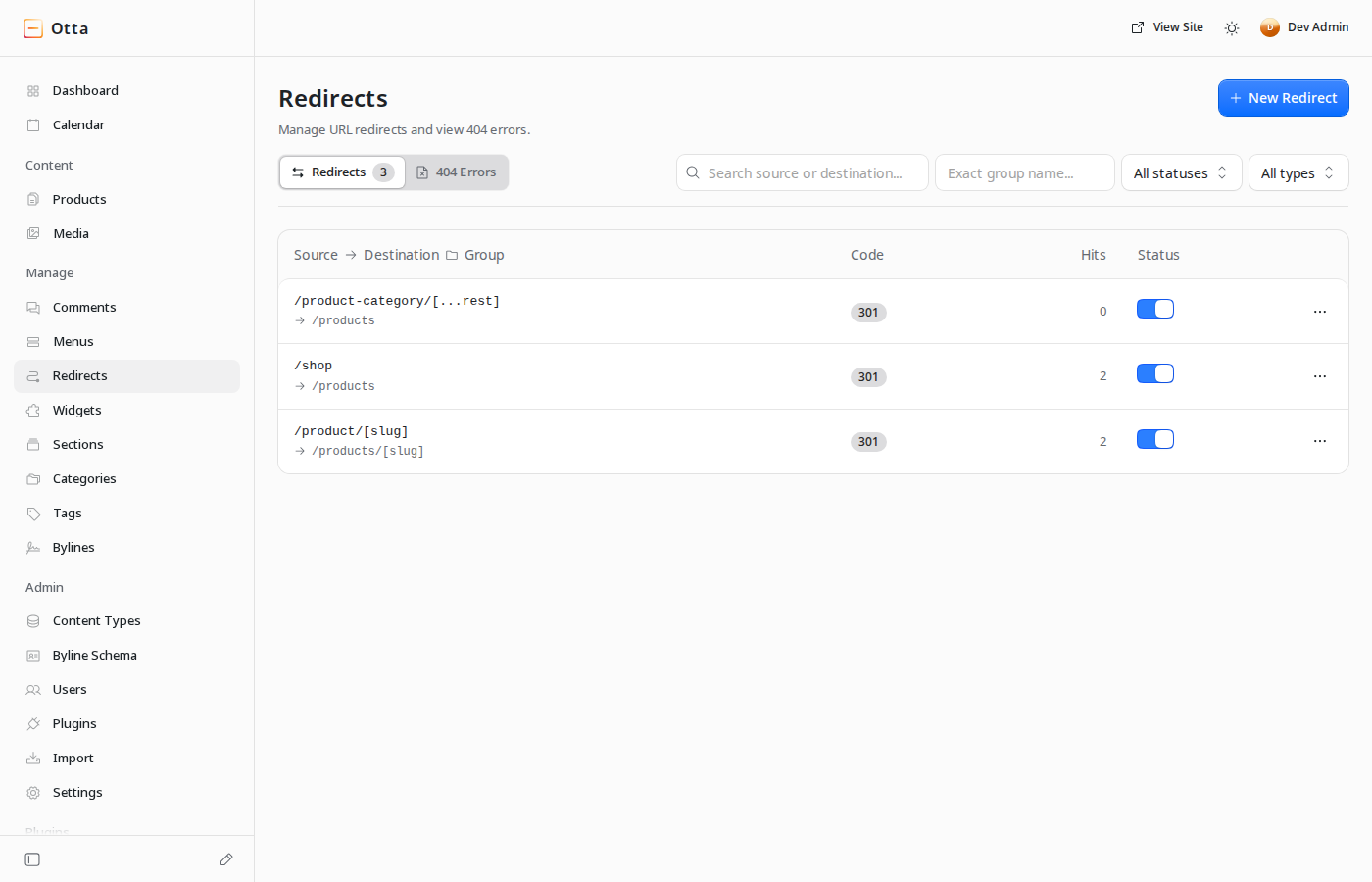
The three rules in EmDash’s Redirects manager. The hit counters here do not reflect the /product-category/ check: that rule shows 0 hits, so treat the curl results above, not the counter, as the evidence for it.
Before you start: export everything from your WooCommerce store
Since WooCommerce 8.2 (October 2023), "HPOS is enabled by default for new installations" (WooCommerce developer docs, checked 2026-11-21). Order data then lives in WooCommerce’s own tables, not in posts. That is one reason a WXR content export is the wrong tool for orders. Export each kind of data separately:
| Data | Where in WooCommerce | File | Notes (docs checked 2026-11-21) |
|---|---|---|---|
| Products as content | Tools → Export → All content (or Products) | WXR (.xml) | Feeds EmDash’s importer |
| Products with prices, SKUs, stock, variations | Products → All Products → Export | CSV | Select "Yes, export all custom meta"; "Metadata columns use a meta: prefix" (docs). Your re-entry worksheet |
| Full orders and customers | REST API orders and customers endpoints, or an export extension | CSV/JSON | See below |
| Report summaries | WooCommerce → Analytics → a report → Download | CSV | Aggregated report rows, not full orders. Large reports are emailed; "The emailed download link remains available for one week" (docs) |
| Tax rates | WooCommerce → Settings → Tax → a rate table → Export CSV | CSV | "Tax rates can also be exported to or imported from comma-separated value (CSV) files" (docs) |
| Coupons, shipping zones | Screenshots or notes of each settings page | — | Your worksheet for re-entry |
| URL list | Your sitemap or a crawl | — | For the redirect check |
Orders need a real export. We did not find a complete order-history export in core WooCommerce; Analytics downloads are report tables. For a full record, pull orders and customers through the WooCommerce REST API or use an export extension such as WooCommerce’s own Customer / Order / Coupon Export. Check that the export holds what you need for refunds and accounting before you rely on it.
Keep the WooCommerce site running until the new store passes testing. EmDash’s docs say: "Keep the WordPress site available until the imported site has passed verification."
How to move a WooCommerce store to EmDash, step by step
The per-product cost. Once the import finishes, each product needs six manual actions in Otta:
- Copy the description into Description.
- Pick the imported image in Images.
- Click Publish changes (this creates Otta’s commerce record).
- Enter the price and compare-at price.
- Enter the SKU.
- Add stock.
Each variation adds a Variants row plus its own SKU, price and stock. Multiply by your catalog to size the job; we haven’t timed it by hand.
Catalog over about 50 products? Plan price, SKU and stock as a scripted or agent-run job (see "Scripting price and stock" below). Otta has no product importer.
1. Deploy an EmDash store with Otta
Use the Deploy to Cloudflare button. It works on Workers Free, though R2 needs a payment method on the account. Turn off preview builds, then claim the store with its setup link. The full walkthrough is in our one-click EmDash store template guide.
2. Import the WXR file
In the EmDash admin, open Import and upload the WXR file. The Review step shows product → products with Add fields: Content, Excerpt and Featured Image are marked "Will create". It also shows product_variation as a New collection, switched on. Switch product_variation off, because Otta rebuilds variations as variants on each product. Continue through author mapping and Import Media.
The completion screen read "Fields created: products.content, products.excerpt, products.featured_image".
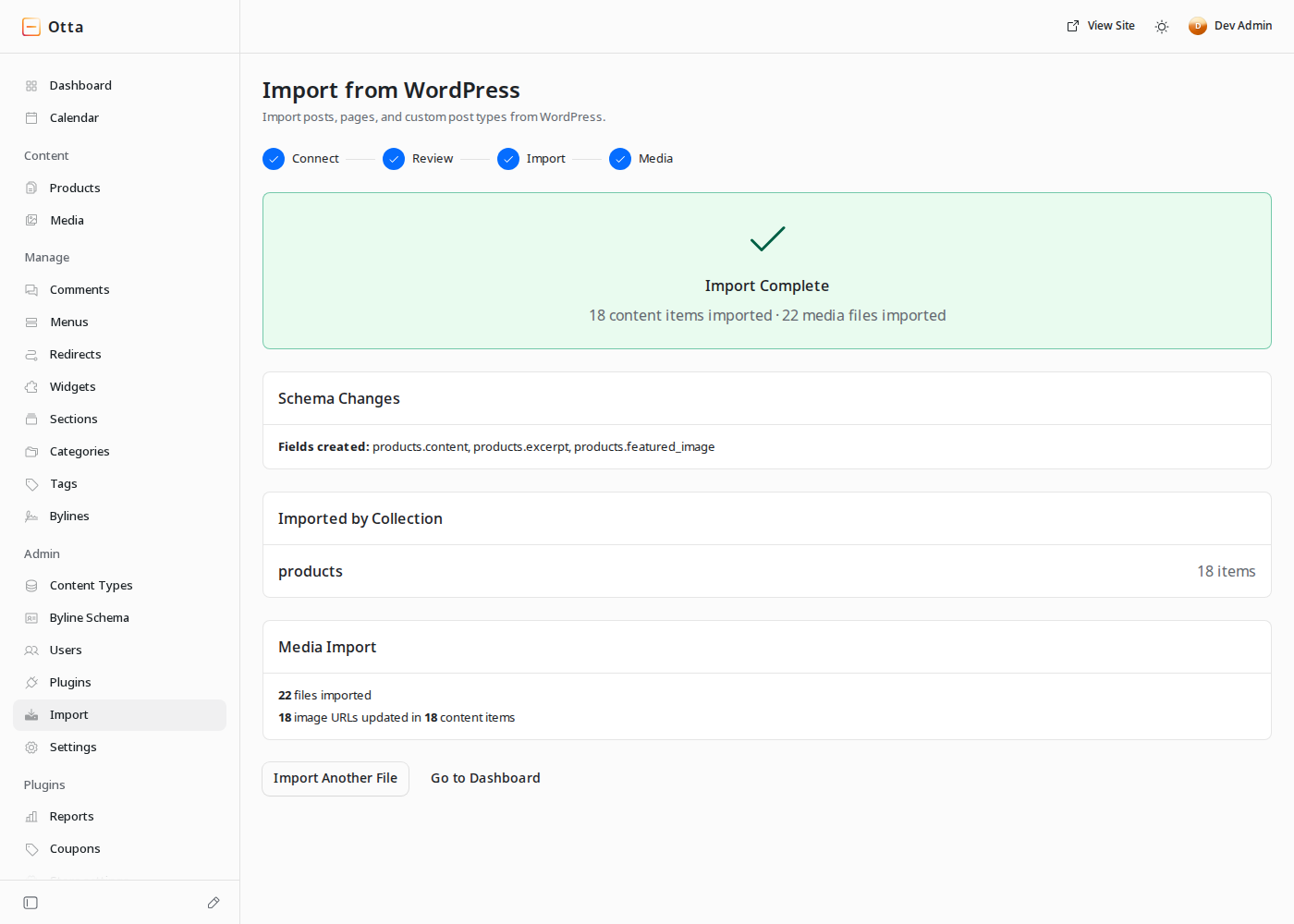
The completion screen reports success, but the new content, excerpt and featured_image fields are not the ones Otta’s storefront reads.
3. Copy description and image into Otta’s fields
After the import, every product appeared on /products with its title, placeholder artwork and "Not currently available for purchase", and nothing else. The importer had written the WooCommerce description to content and the image to featured_image. Otta’s storefront reads description and images, which were empty.
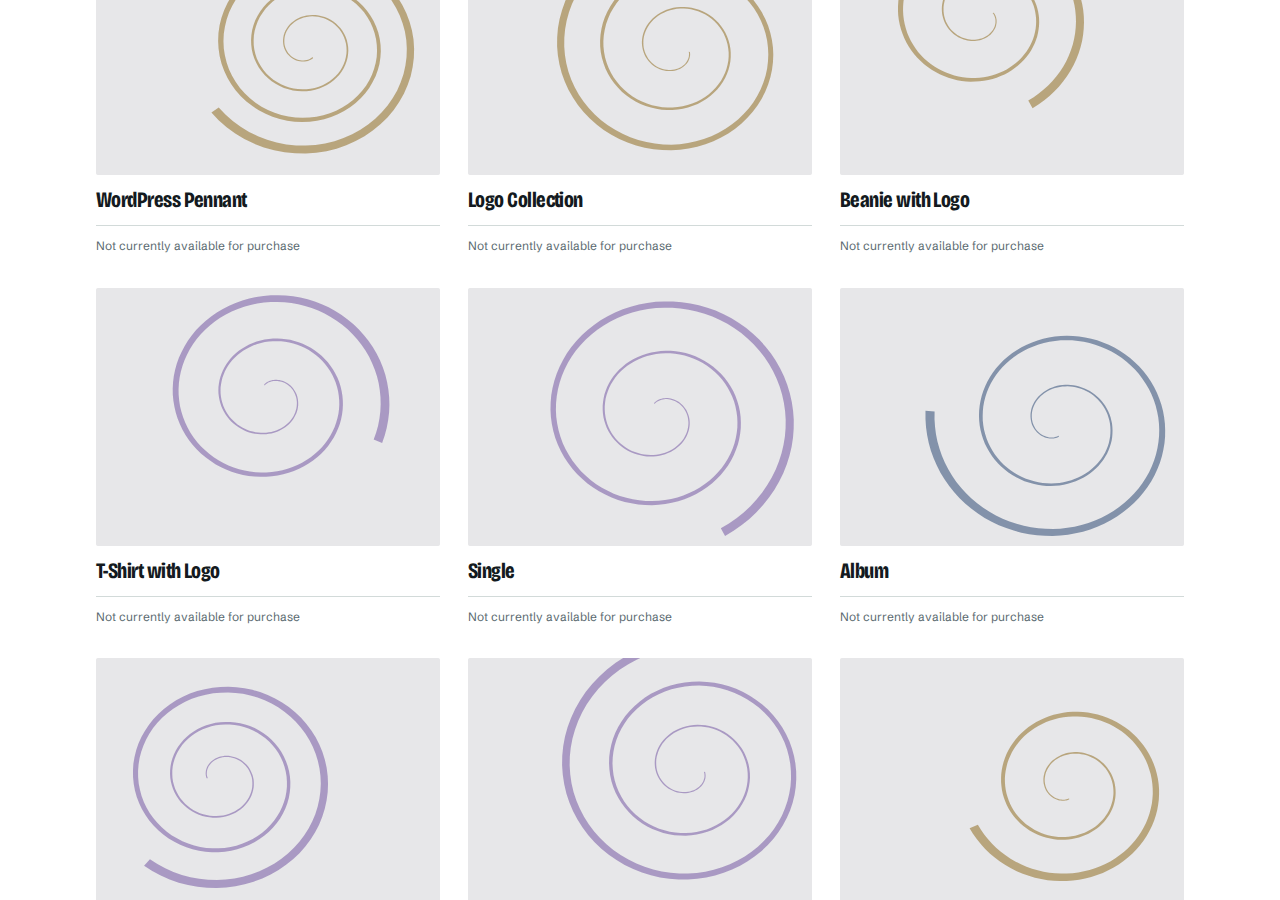
Straight after the import: no price, stock or description on any product.
For each product, open it in the editor. Copy the text from Content (or Excerpt, if you want the short version) into Description. Then pick the already-imported image in Images.
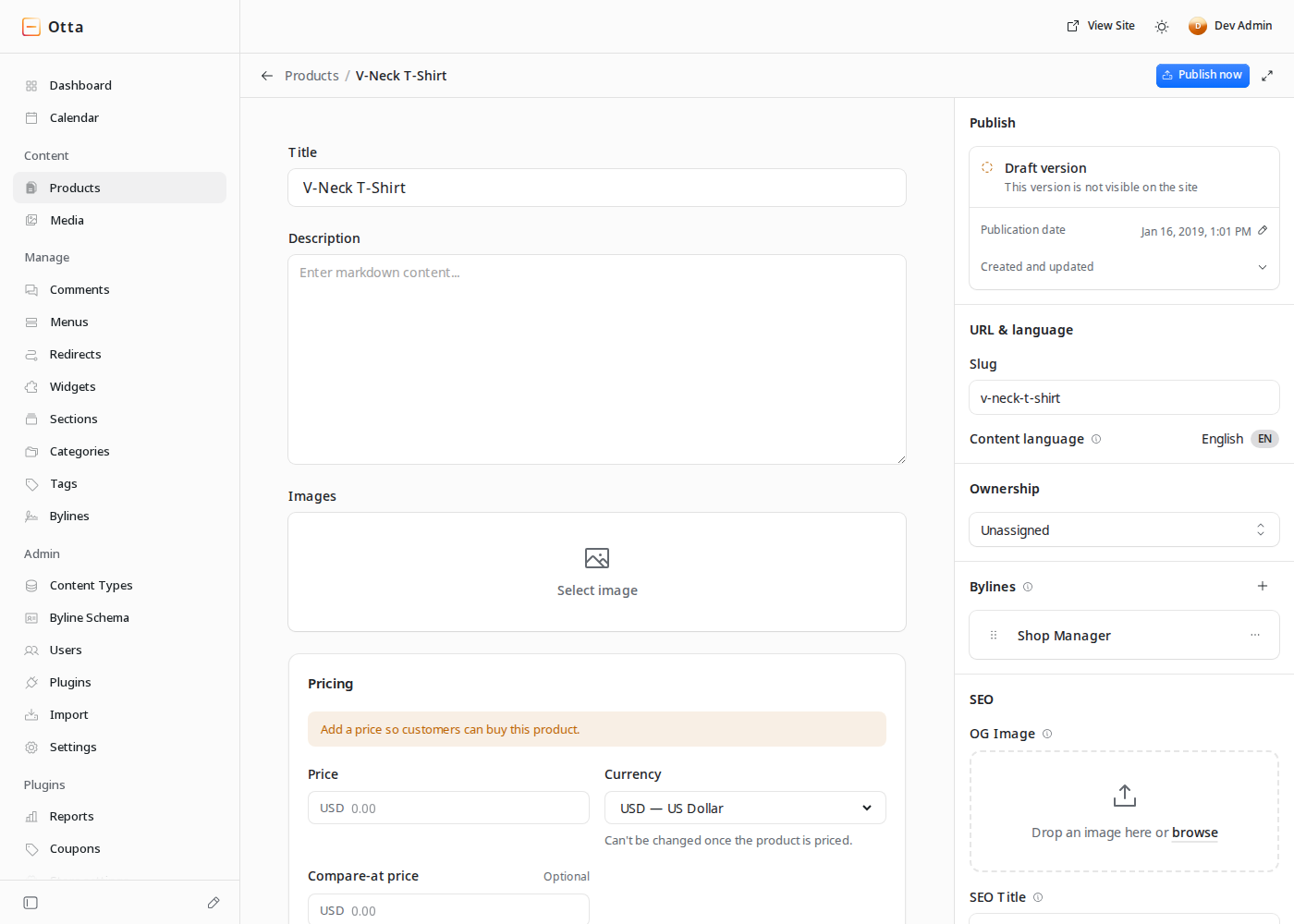
Title and slug are filled, but Otta’s Description and Images are empty and the pricing section is not yet usable.
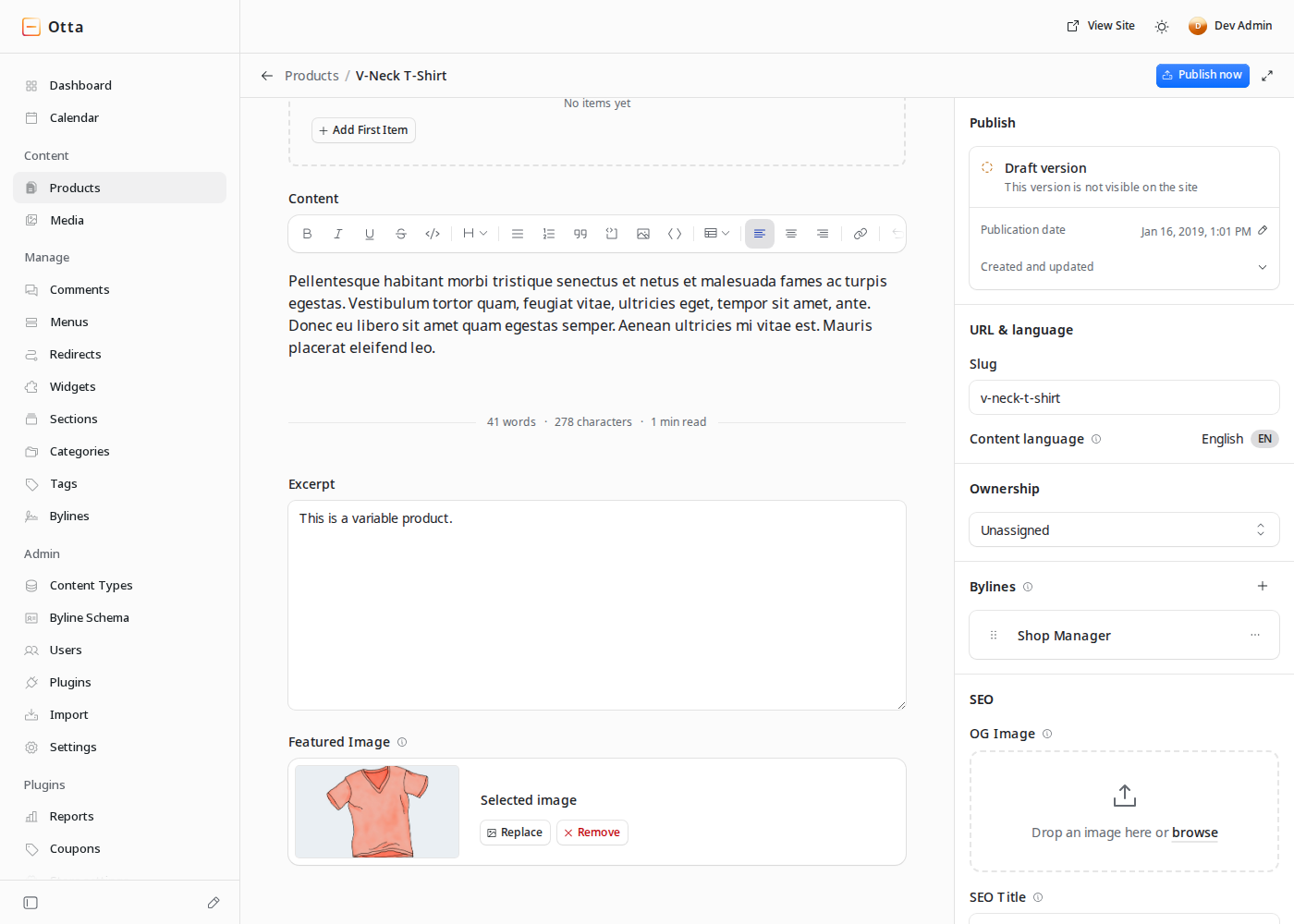
Lower in the same editor: the importer’s fields hold the WooCommerce description, short description and image that Otta’s storefront does not read.
4. Publish each product, then price it
Imported products have no Otta commerce record yet, and the importer doesn’t create one. Imported products are usually already published (our sample shows Unpublish Product in the toolbar), so there is no plain Publish button. Make a change, such as copying the description into Otta’s Description field, and click Publish changes. Otta’s README describes the same fix for products without a commerce record: their pricing card says "Product not found" until you "edit the product … and click Publish changes, which creates it at once" (Otta README). The README adds that a background sweep also creates records, "but with the default "Background work per minute" setting that can take up to a day".
Order matters. In our run, a price saved on an imported product before publishing never reached the storefront; publishing first, then pricing, worked first time. Otta’s source is consistent with that: its price write answers "not found" when no commerce record exists.
Then fill in the Pricing & stock section, using your products CSV as the worksheet. It has two cards:
- Pricing: WooCommerce’s sale price goes in Price and its regular price in Compare-at price, which the storefront shows as a sale. Cost per item is the home for cost-of-goods data; customers don’t see it.
- Inventory: add stock, and enter the SKU.
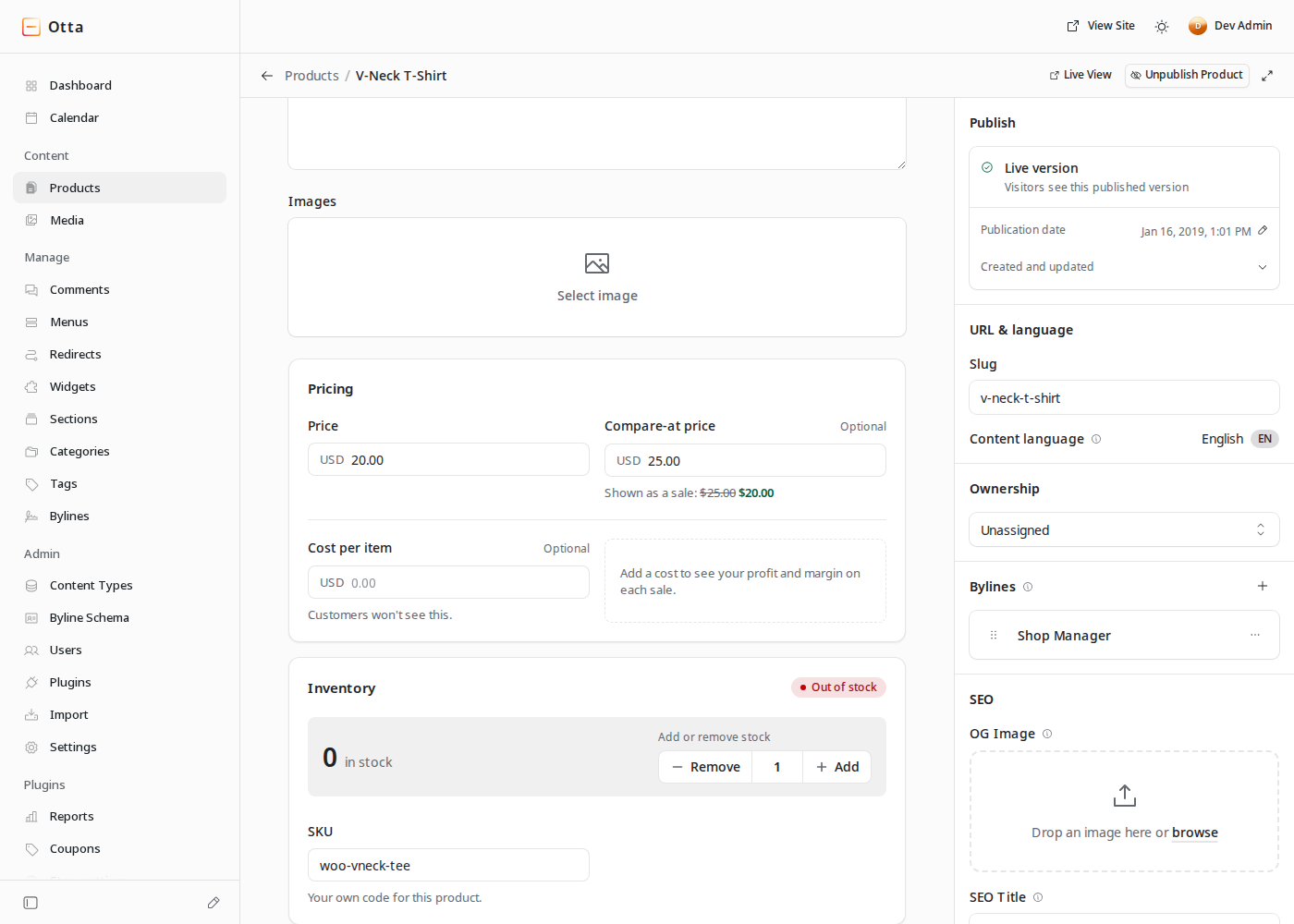
A re-entered WooCommerce product: the compare-at price shows as a sale, and Cost per item is left empty.
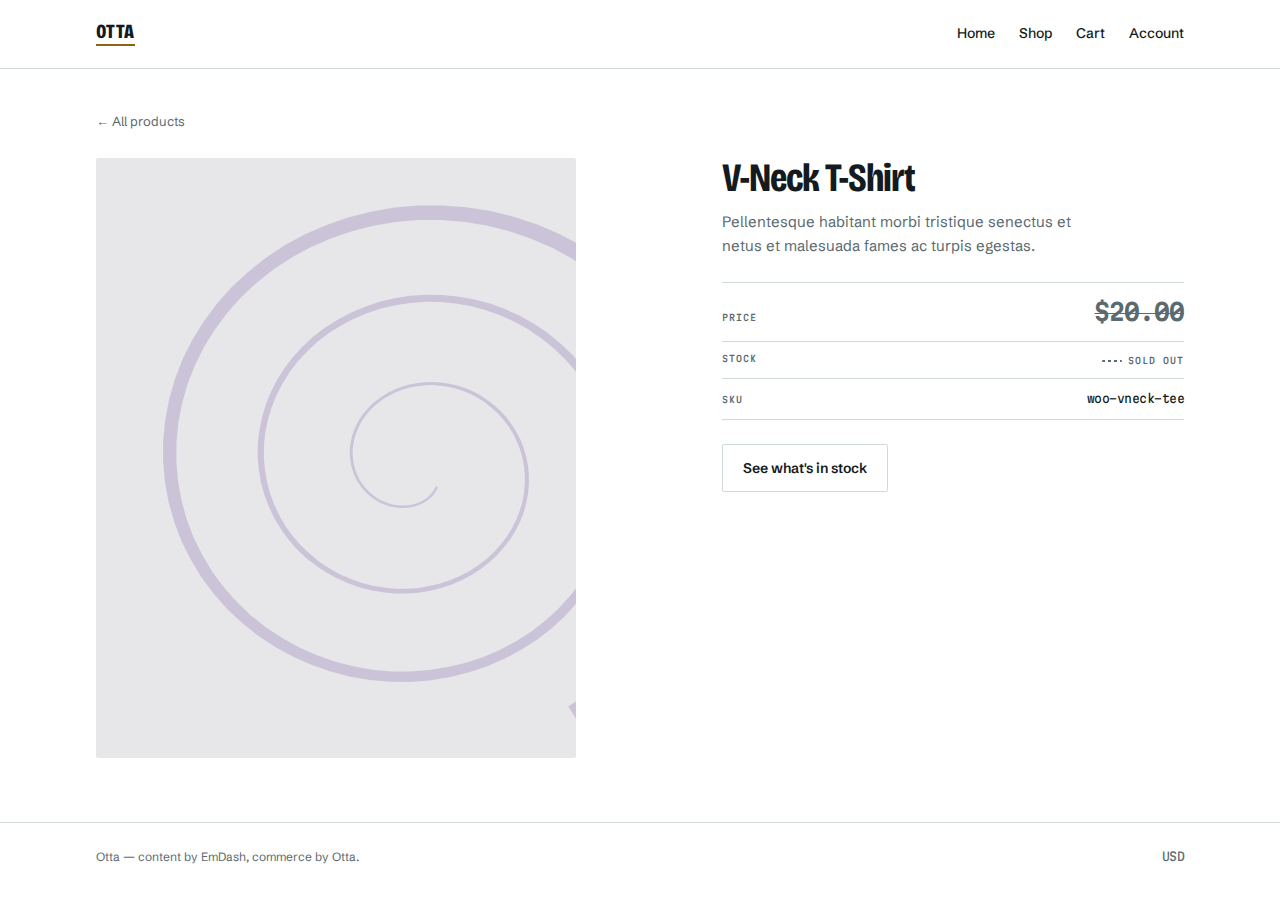
The same product on the storefront once the description is copied and the price entered.
5. Rebuild variable products
For each variable product, add one row per variation in the product’s Variants list: a stable key (for example large-blue) and a display name. Then set each variant’s SKU, price and stock in Pricing & stock. Money can’t go in the Variants list. Otta keeps content in the CMS and price and stock in the commerce record.
6. Re-create tax and shipping
Otta 0.2.0’s Tax options screen covers the settings found on WooCommerce’s Tax tab: enable tax, prices entered with tax, calculate tax based on the customer’s shipping address or the shop base address, shipping tax class, rounding at subtotal, how prices display in the shop and cart, and itemized or single tax totals. Otta ships no rates, so re-create your tax classes and rates from the exported CSV. There is no rate CSV import. Shipping zones are re-created with flat rate or free shipping methods. Free shipping can have a minimum order amount.
7. Scripting price and stock (optional)
Otta has no documented bulk-write API. The supported route for an AI agent uses two tool sets on EmDash’s MCP endpoint. EmDash’s own content tools create and edit product content, and the opt-in @urumi.ai/otta-mcp package (design note) sets price, SKU and stock once the product is published, logging each call to its tools. The agent’s API token needs content:read and content:write for EmDash’s tools and mcp:tools:otta for Otta’s. We have not tested it for this migration.
For a script, the closest worked example is the repository’s own demo seed script (sites/store/scripts/seed-demo-commerce.ts in the Otta repo). It prices and stocks products through the same admin route the product editor uses, authenticated with an EmDash API token that has publish rights and plugins:manage. For each product it does three things:
- Publishes the product through EmDash’s content API, which creates the commerce record.
- Saves SKU and price with the
products:save-identityaction, sent as anotta_console_actrequest. - Adds stock with
products:restock.
The save-identity value carries five fields, and every one must be a string: the EmDash product id, an expectedUpdatedAt timestamp read back from the product (the route refuses a write without it), the SKU, the price as the decimal string the form would submit (for example "19.99"), and the currency code. The script’s comments warn that a numeric price is silently dropped, saving the product with no price. Otta stores the price in integer minor units, so 19.99 USD becomes 1999 (design note). Copy the exact payloads from the script’s priceBody and restockBody functions rather than from this summary.
This route is the admin’s internal interface, not a supported public API, and Otta’s README warns that admin screens and APIs may still change before 1.0. Read the script before copying it.
8. Re-create coupons
Otta 0.2.0 coupons support the following, and a cart takes one code per order:
- Discount types: fixed amount, and percentage with an optional cap.
- Restrictions: minimum spend.
- Validity: start date and expiry date.
- Usage limits: a total limit and a per-customer limit.
WooCommerce coupon settings with no equivalent in Otta 0.2.0: the fixed product discount type, maximum spend, include or exclude products and categories, exclude sale items, allowed emails, and the "allow free shipping" checkbox. To give free shipping, use a free-shipping method with a minimum instead.
9. Reconnect payments
In Stripe, add a webhook endpoint at https://<your-site>/webhooks/stripe subscribed to payment_intent.succeeded and payment_intent.payment_failed. Then enter the publishable key, secret key and signing secret in Store settings. Keys are encrypted at rest (design note). Cash on delivery needs no provider. Saved cards and WooCommerce Subscriptions tokens don’t transfer.
10. Tell customers, then test and go live
Customer accounts in Otta are passwordless. A customer enters their email and gets a sign-in link, and the first sign-in creates their account (design note). Past WooCommerce orders won’t appear in it, so tell customers before launch. Keep the WooCommerce admin read-only, or keep your order export, for refunds on older orders. Cut over between order cycles.
Before you switch DNS, run through this checklist:
- Priced products appear on
/products. - You can add to cart.
- A Stripe test-mode order or a cash-on-delivery order goes through.
- A tax line and a shipping rate appear.
- The order email arrives.
- The three redirects work.
Finally, select Go live in Settings → General → Site Status. On EmDash 1.5.0 and later, a store set up through the wizard shows a Staging badge in the admin until you do; Otta’s storefront pages stay open to shoppers either way.
What a WooCommerce store gives up and gains on EmDash with Otta
You give up:
- the WooCommerce extension ecosystem
- subscriptions, bookings and memberships
- backorders and scheduled sales
- product category pages, unless you or a coding agent add them
- a product CSV importer
- order-history import
Otta is production-ready today, and it is pre-1.0: its README warns that "APIs, storage document shapes, settings and admin screens may still change between releases."
You gain: Otta runs the whole store inside EmDash, in one Cloudflare Worker. One deploy ships the site and the shop together. One admin covers content, products, orders, coupons, tax and shipping. The code is MIT-licensed. If you are still comparing the two platforms, see Otta vs WooCommerce. We haven’t measured performance or hosting cost for this guide, so we make no claims about either.
How we tested this guide
- Input file: WooCommerce’s own bundled sample data,
sample_products.xmlfrom the WooCommerce repository. We counted 18 products, 7 variations and 22 image attachments in it on 2026-11-21. It assigns products to categories but defines no category terms, which is why the categories row is marked Not verified. - Import run (2026-11-21): one run on EmDash 1.5.0 (released 2026-11-11 on npm) with Otta’s current development build, on a local machine (4 vCPU, 16 GB RAM). Screen sequence: Import → upload WXR → Review → author mapping → Import Media → completion screen, then the storefront’s
/productspage. The import step took about 19 seconds for the 18 products in that single run; it is an observation, not a benchmark. Screenshots in this guide come from this build. - What the Deploy button installs: EmDash 1.5.0 with the current Otta release; 1.5.0 is the EmDash version of our import run. The Source labels that name 1.3.1 record an earlier source comparison: the importer’s internal-meta filter (
isInternalMetaKey) and the fields it creates (Title, Content, Excerpt, Featured Image) are identical inemdash1.3.1 and 1.5.0. - Feature claims (coupons, tax options, shipping methods, sign-in, card labels) were checked against the source at Otta’s
v0.2.0tag. - Redirect rules were tested locally on 2026-11-21 against the 1.5.0 build with the curl commands shown above. The pattern hint we quote is present in both the 1.3.1 and 1.5.0 EmDash admin packages.
The "Verified how" column uses the same labels: Import run, Source (v0.2.0), Source (EmDash 1.3.1 importer), Source diff (1.3.1 vs 1.5.0), Vendor docs, Tested locally.
Next steps for your WooCommerce migration
- Deploy to Cloudflare, then run a copy of your catalog’s WXR file through steps 2–4.
- Star the repo on GitHub and read the source and ADRs.
- Try it first in the disposable playground store. Otta’s README says the copy "lasts about an hour" and that card payments are not connected there, "so checkout will not charge a card".
- Open an issue if your WooCommerce setup needs something listed under "No path". The gaps above are where we want input.
WooCommerce to EmDash migration FAQ
Does EmDash support WooCommerce?
EmDash does not run WooCommerce. As of 2026-11-21 we found no WooCommerce compatibility layer in EmDash or its docs, and EmDash uses its own plugin format rather than WordPress plugins. Its WordPress importer reads a WooCommerce export for product text and images. To sell on EmDash you add a commerce plugin such as Otta.
Can I import WooCommerce products into EmDash?
Partly. EmDash’s importer brings product titles, slugs, descriptions, short descriptions and featured images into the products collection. With Otta you then copy the description and image into Otta’s fields, and re-enter prices, SKUs, stock and variations.
Will my WooCommerce product URLs break?
Not if you add three 301 rules in EmDash’s Redirects manager: /product/[slug] to /products/[slug], /shop to /products, and /product-category/[...rest] to /products. We tested these locally on 2026-11-21.
Can I import WooCommerce orders and customers into EmDash?
Not today. Export full orders through the WooCommerce REST API or an export extension, or keep the old admin read-only. Customers get a new account the first time they sign in with their email, and their order history starts fresh.
Do my customers need new passwords?
No. Otta uses passwordless sign-in by emailed link, so there is nothing to reset or migrate.
How long does a WooCommerce to EmDash migration take?
No benchmarked figure exists. The import itself is quick; the per-product manual work is the real cost. Each product needs six actions in Otta (copy description, pick image, publish, price, SKU, stock), plus a Variants row and its own SKU, price and stock for each variation.
About the author: Vedanshu Jain is a former WooCommerce core engineer and tech lead, and builds Otta at Urumi. GitHub · WordPress.org
Last updated Nov 23, 2026