 Urumi.AI
EmDash ecommerce: how to add a store to EmDash
EmDash has no built-in store. Compare the commerce plugins, deploy one to Cloudflare in one click, or try a live demo. Updated Nov 2026.
Does EmDash have ecommerce?
No. As of EmDash 1.5.0, the latest release on 2026-11-21, EmDash has no built-in product catalog, cart or order management, so you add a store with a commerce plugin. We build and recommend Otta; DashCommerce and Vendwick also exist. Otta’s one-click Cloudflare template runs EmDash 1.5.0, the version its published release supports.
Try the Otta playground (a disposable store that lasts about an hour, with no account and no card payments) · Deploy to Cloudflare · Code on GitHub
Updated 2026-11-21 · Part of a series on EmDash stores
We build Otta, so read the comparison with that in mind. Every competitor fact below links to its source and is dated.
| Path | Used when | Examples |
|---|---|---|
| A full commerce plugin | You need a catalog, cart, checkout and orders inside EmDash | Otta (our recommendation); DashCommerce and Vendwick also exist (Table 1) |
| A payments-only or membership plugin | You sell a few items or paid access and need no catalog | emdash-stripe in the EmDash plugin registry |
| An external store embedded in the site | Your store already lives on another platform | Shopify’s Buy Button |
Otta is an open-source (MIT) commerce plugin for EmDash that adds products, variants, cart, checkout, orders, inventory, coupons, Stripe and cash-on-delivery payments, and an admin console, and runs inside the CMS on Cloudflare Workers.
Why that design is worth evaluating: with Otta, the site and the store are one deploy, one Worker and one D1 database, with no separate commerce backend, database server or Redis to run. The trade-off is that Otta runs in the site’s own process rather than in EmDash’s plugin sandbox, which the sandbox section explains.
EmDash’s own materials confirm the gap as of 2026-11-21. The features list in the EmDash README describes content as "Blog posts, pages, custom content types" and mentions no products, cart or orders. The only payments page in the EmDash docs covers x402, which charges per request to view a page, for example to charge bots. x402 is not a catalog or a checkout.
EmDash itself is a real platform to build on. Cloudflare released EmDash 1.0 on 2026-09-28 under the MIT license. Its EmDash 1.0 announcement said: "At the time of writing, more than 175 people have contributed to the project, across more than 1,800 commits." Those figures date from 2026-09-28. The EmDash repository page showed 14.5k stars and 1.4k forks when we opened it on 2026-11-21.
What are your options for selling on EmDash?
You can sell on EmDash in three ways: a full commerce plugin with a catalog, cart, checkout and orders; a payments-only or membership plugin when you sell a few items and need no catalog; or an external store, such as Shopify’s Buy Button, embedded in the EmDash site. Table 1 compares the EmDash full commerce plugins we found. If your site is Astro-first, see Astro ecommerce without a separate backend.
| Plugin | Released? (version, date) | Works with EmDash | License | Price | Payments | Runs where |
|---|---|---|---|---|---|---|
| Otta | Yes: on npm, pre-1.0. Installed from npm, not from the EmDash admin | ^1.5.0; the one-click template pins 1.5.0 | MIT | Free | Stripe (cards), cash on delivery | In-process; Workers Free |
| DashCommerce (core) | Yes: @dashcommerce/core 0.3.6 on npm (2026-11-22) | >=1.1.0 <1.6.0 (npm peer range) | MIT | Free (MIT) | Stripe: Checkout, Payment Element, Subscriptions, Connect | Workers or Node |
| DashCommerce Lite | Yes: 0.2.0 | Not stated | MIT | Free | Stripe Checkout | Sandboxed; Workers Paid |
| Vendwick | Yes: 0.2.0 (vendor’s page) | 1.5 or later | Not stated | $249 one time or $59 per year | Stripe, PayPal, Razorpay, Polar (Polar sells no physical goods and takes no tax or coupons) | Workers with D1 and R2 |
| Catalog Studio (Katalore) | Plugin is free and MIT per the vendor’s site; cart and Stripe checkout are in a separate early-access boilerplate | Not verified | MIT (vendor’s claim) | Plugin free (vendor’s claim) | Stripe in the early-access boilerplate (vendor’s claim) | Not verified |
| Ritely eCommerce | No: “Coming Soon” (vendor’s page) | Not stated | “MIT licensed” (vendor’s claim) | Free; Pro $29/mo | Stripe; Pro adds PayPal, Square and subscriptions | Not released |
| Emcommerce | No: pre-launch, Kickstarter signup (vendor’s page) | Not stated | Not stated (“Open source on GitHub”, vendor’s claim) | “Free core” (vendor’s claim) | Stripe checkout planned | Not released |
Install and runtime notes (checked 2026-11-21; DashCommerce core and Catalog Studio rechecked 2026-11-23):
- Otta: installed from npm and registered in the site config. Otta runs in the site’s own process, not in the sandbox. Workers Free works, but R2 needs a payment method on file.
- DashCommerce core: installed from npm via
astro.config. Its npm peer range for 0.3.6 is EmDash>=1.1.0 <1.6.0. Its page states no Cloudflare plan requirement. - DashCommerce Lite: installed from the EmDash admin and sandboxed. "On Cloudflare it needs the Workers Paid plan."
- Vendwick: "Version 0.2.0 needs EmDash 1.5 or later." The page says buyers "add 2 lines to their project’s .npmrc, with their license key as the token" and then install with
pnpm add. The page does not state a source license. - Catalog Studio: its vendor site describes a free, MIT catalog plugin and a separate early-access commerce boilerplate. We found no public npm package and have not tested it.
Which EmDash version each works with. DashCommerce core 0.3.6 supports EmDash below 1.6.0 (npm, 2026-11-23), Vendwick 0.2.0 needs EmDash 1.5 or later (vendor’s page, 2026-11-21), and the current Otta release declares ^1.5.0, with its one-click template pinned to EmDash 1.5.0, which also meets Vendwick’s requirement.
How we chose the rows. We included plugins that offer, or say they will offer, a cart or checkout, and that appeared in a search for "EmDash ecommerce" or in the Commerce category of the community plugin directory on 2026-11-21. We reviewed and excluded @emdash-plugins/ecommerce, documented on emdash-marketing.pages.dev: the package returned "not found" on npm on 2026-11-21, and the site does not say who publishes it. The directory listed more than 25 Commerce plugins on that date, including Dullaz Commerce, Moksa Commerce Core and Milo Subscriptions. We have not evaluated those. Versions change quickly, so check each plugin’s own page for current details.
Which EmDash commerce plugin should you pick?
- Subscriptions or Stripe Connect marketplaces: Otta has neither, and we make no recommendation for this case.
- Digital products and software license keys: Otta sells digital products but does not issue license keys.
- Cash on delivery with no payment provider: Otta.
- A Stripe checkout installed from the EmDash admin registry: Otta is not in the EmDash plugin registry, so it cannot be installed this way or run sandboxed from there.
In one line: we recommend Otta, which we build, for a store that sells with Stripe or cash on delivery, unless you need a feature listed above that it lacks. It deploys on Workers Free, but we have not yet tested a card checkout on that plan, so plan on Workers Paid ($5 a month) for a live store taking cards.
What Otta does not cover. Otta has no subscriptions, Stripe Connect marketplaces or software license keys. DashCommerce core and Vendwick list those features. Otta’s distinguishing design is that commerce runs inside the CMS on Workers, with no separate backend, database server or Redis. That is a trade-off: Otta runs in-process, so it does not get the sandbox’s runtime isolation in production.
Otta is built to be set up and run with an AI agent. A coding agent such as Claude Code can work in the store’s open-source code, and an agent you authorize can run the store through the MCP endpoint EmDash already serves. EmDash’s own content tools create and edit product content, and the opt-in @urumi.ai/otta-mcp package sets price and stock and manages orders, coupons, shipping, tax, reports and settings. Otta’s tools are off by default and admin-only, use the same guarded operations as the Otta admin, and log every call to them. The agent’s API token needs mcp:tools:otta for Otta’s tools, plus content:read and content:write for EmDash’s. You still bring a Cloudflare account, claim the store’s admin with your own passkey, connect a Stripe account to take cards, and approve what ships.
Who should not use Otta yet: stores that need subscriptions, marketplaces with payouts to sellers, or a supported 1.0 release.
Can you try an EmDash store before installing anything?
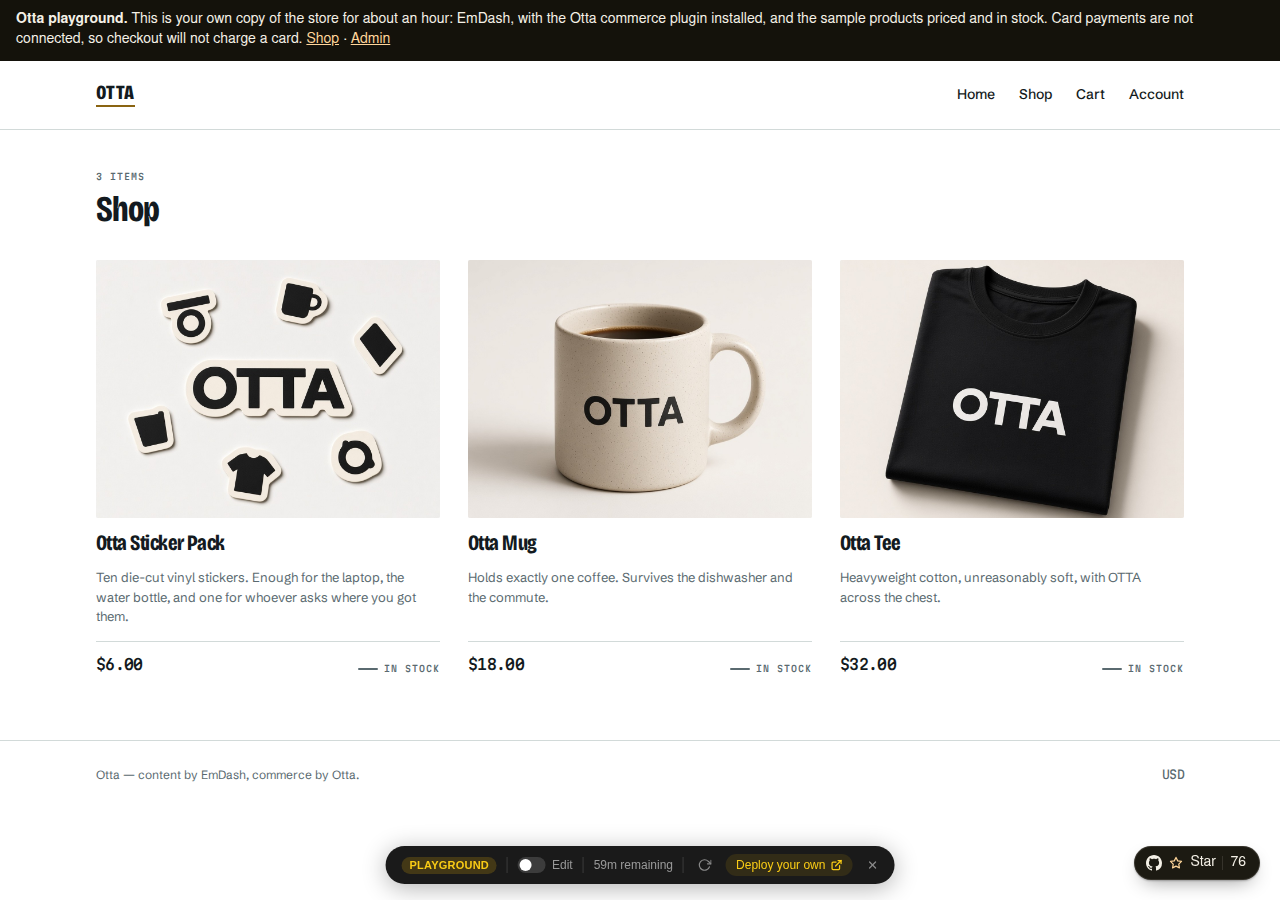
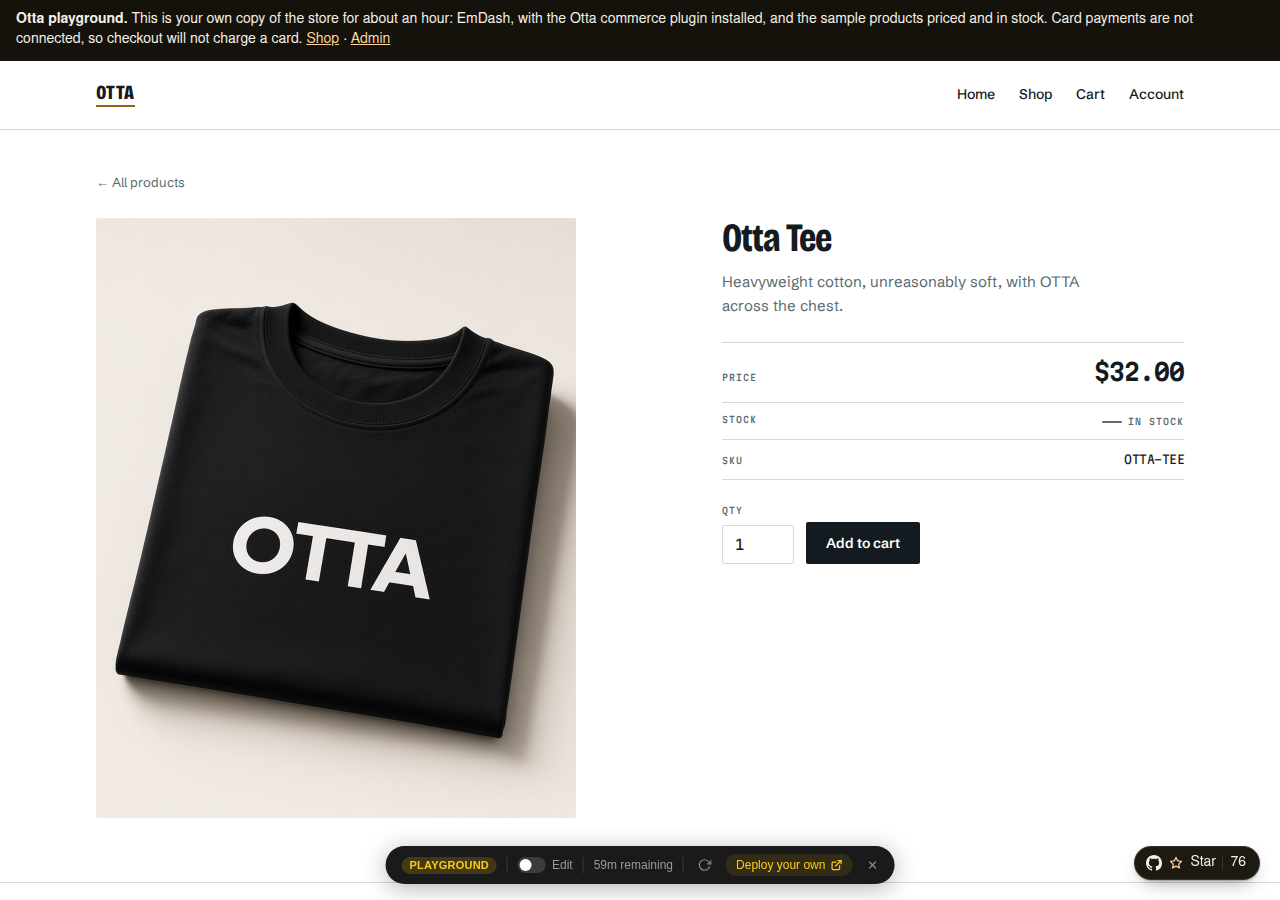
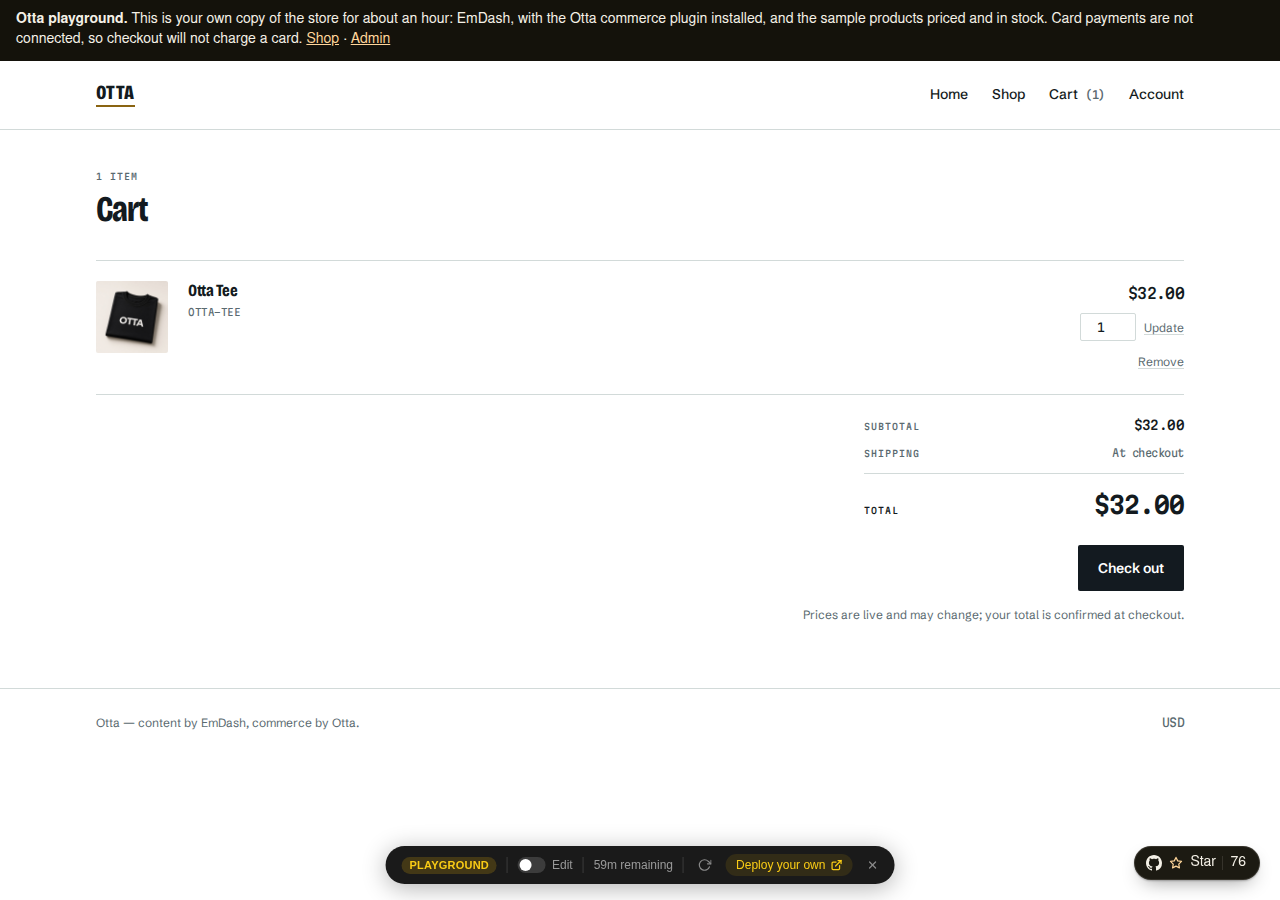
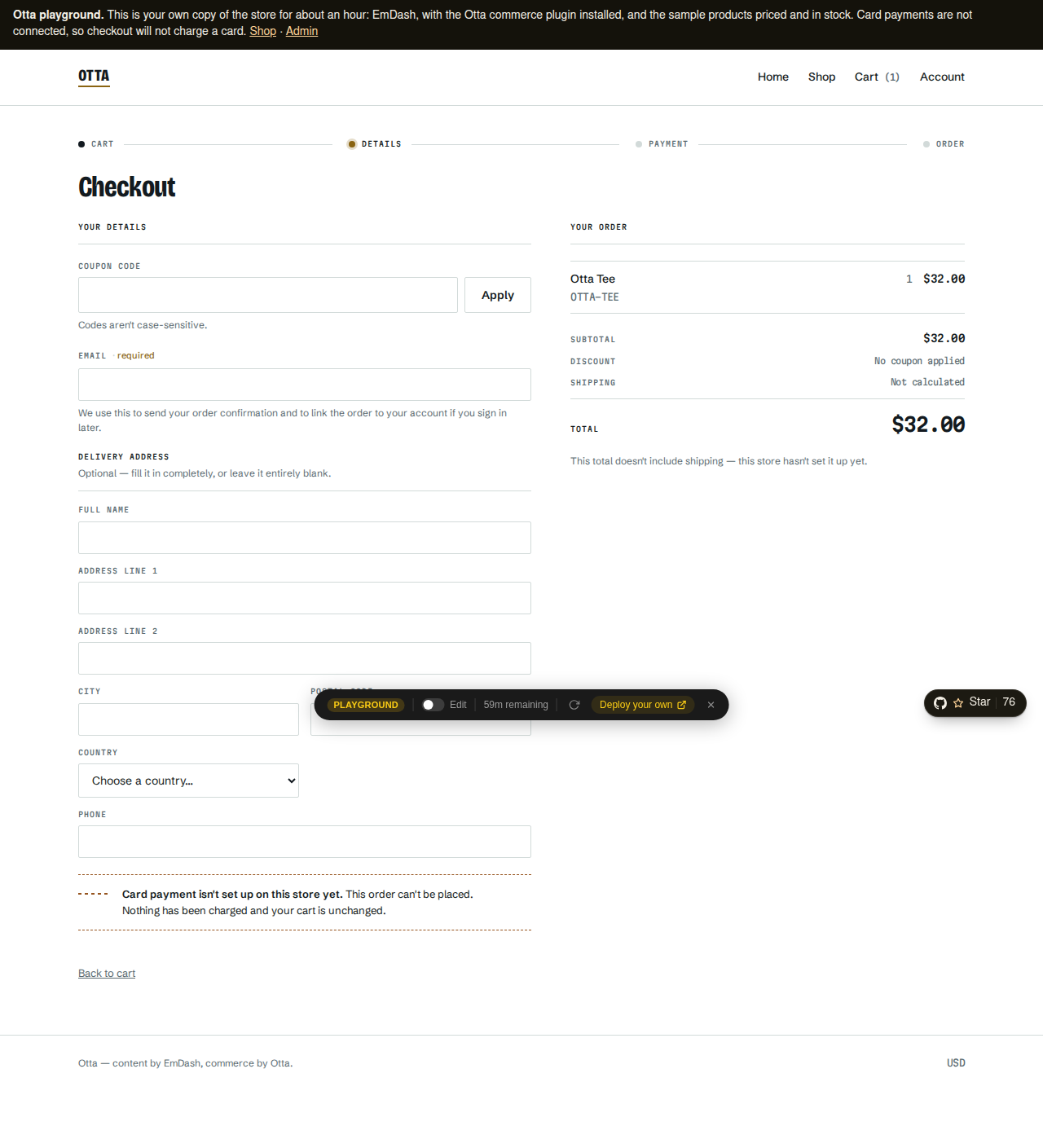
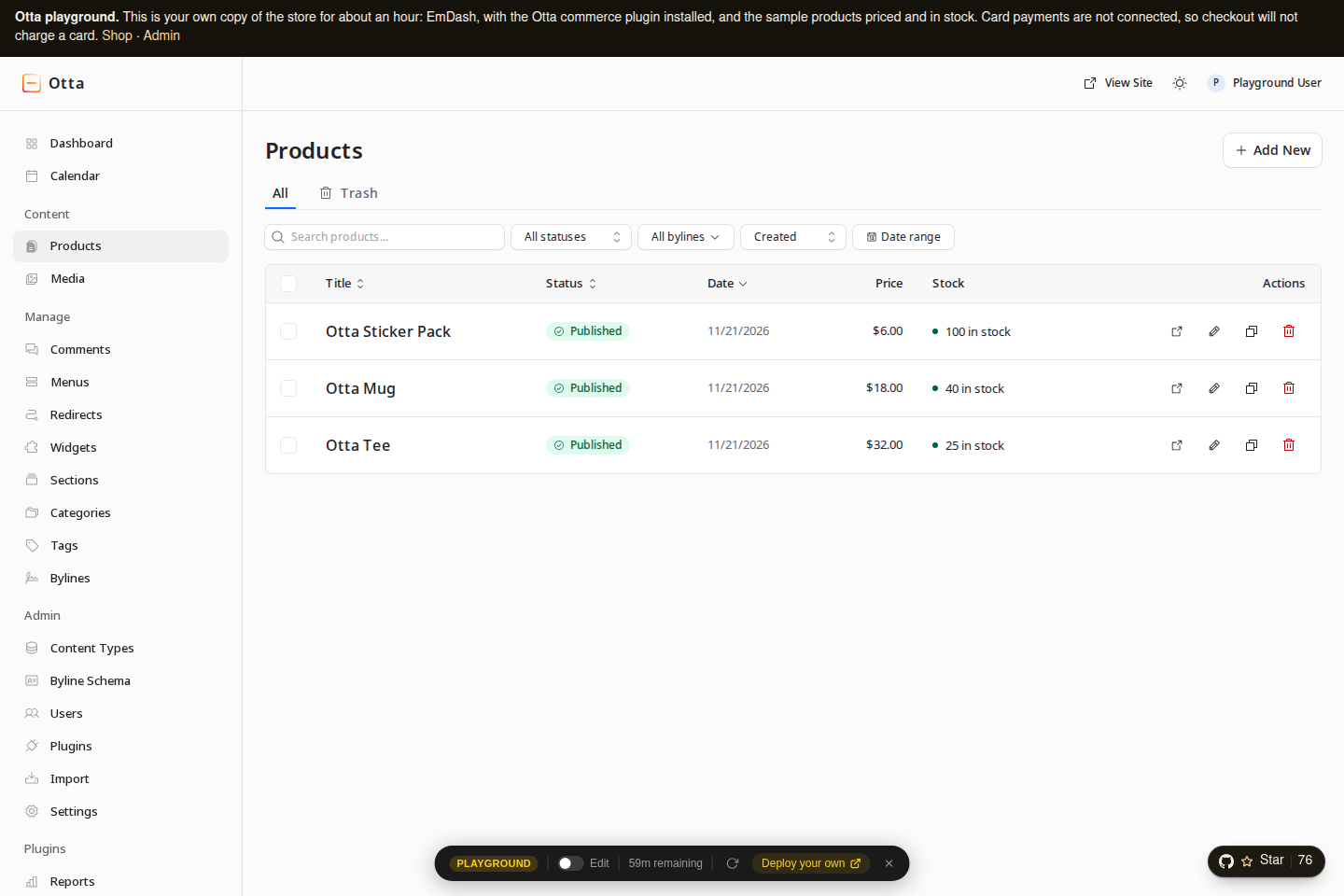
You can try an EmDash store with Otta at try.otta.sh/playground, with no account and no install. Each visitor gets a disposable copy of the Otta store that lasts about an hour. The playground signs you in as an administrator and opens the storefront at /products. The EmDash admin is at /_emdash/admin. Card payments are not connected and no email is sent, so the playground shows everything except a completed payment.
Setting up the copy takes about a minute. How we measured: three headless Playwright runs on 2026-11-21, from a single cloud server, timing from opening the link to the first priced product on /products. The three runs took 46 to 59 seconds. The page shows "Creating your playground…" while it works. If setup fails, it shows a Try again button.
How do you deploy an EmDash store to Cloudflare in one click?
You can deploy an EmDash store to Cloudflare in one click with Otta’s Deploy to Cloudflare button. It copies a public template to your GitHub account, then creates the database, storage and Worker in your Cloudflare account. The template pins EmDash 1.5.0 and the matching Otta release.
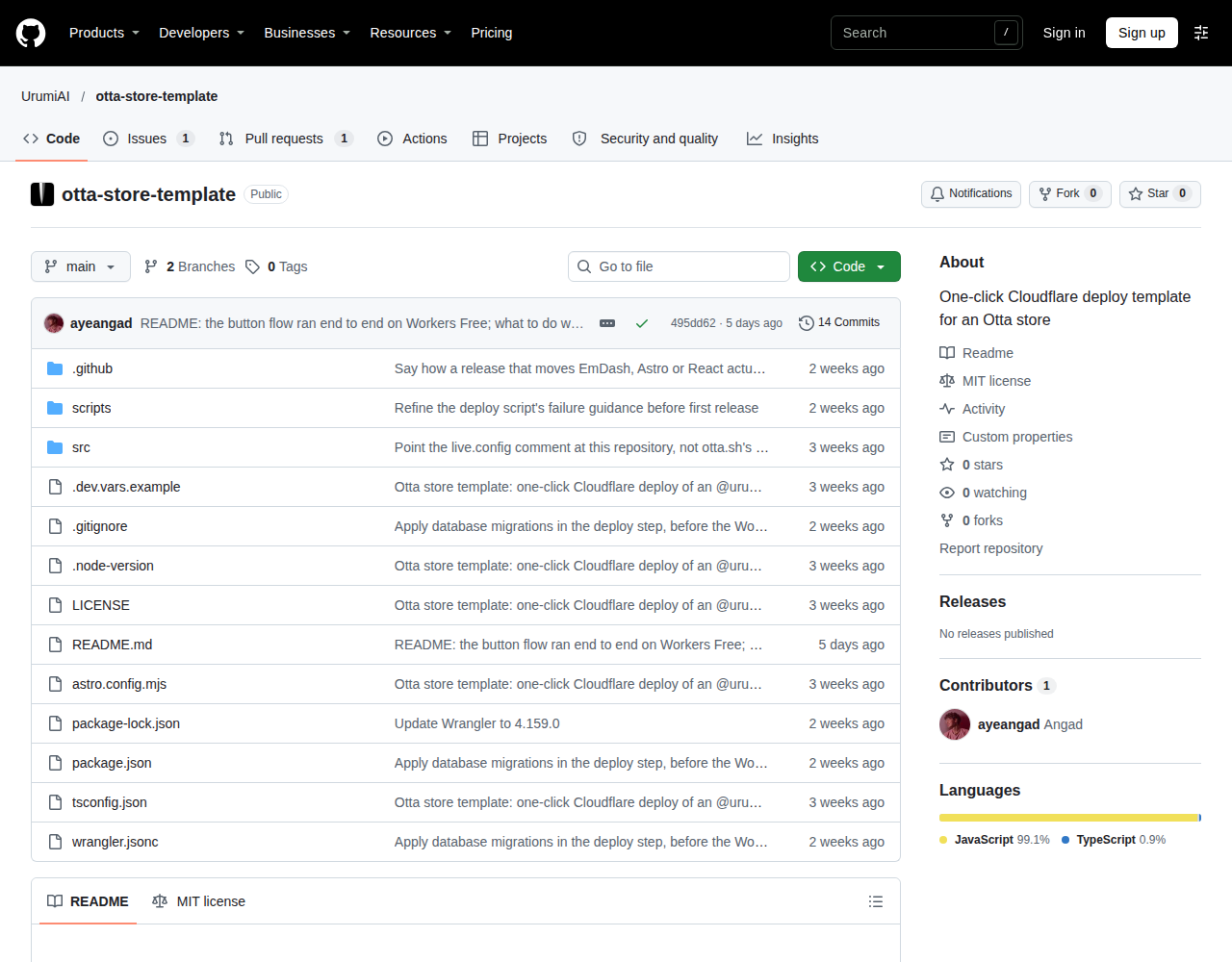
- Get ready. You need a Cloudflare account (Workers Free works, but R2 needs a payment method on file) and a GitHub account. The Deploy flow asks for one secret,
EMDASH_ENCRYPTION_KEY. Make one before you click withnpx emdash secrets generate, paste it into that field, and keep a copy, because it encrypts the payment keys you save in the admin. - Click Deploy to Cloudflare. It creates the following, and applies the database migrations before the Worker goes live:
- a D1 database for content, orders, carts and customers
- two R2 buckets, one for public media and one for private downloads
- a KV namespace for admin sessions
- the Images binding
- two rate limits
- a cron that runs every minute
- Turn off preview builds. In the Cloudflare dashboard, open your Worker, go to Settings → Build → Branch control and clear Enable Preview Builds.
- Claim the store promptly. Visit
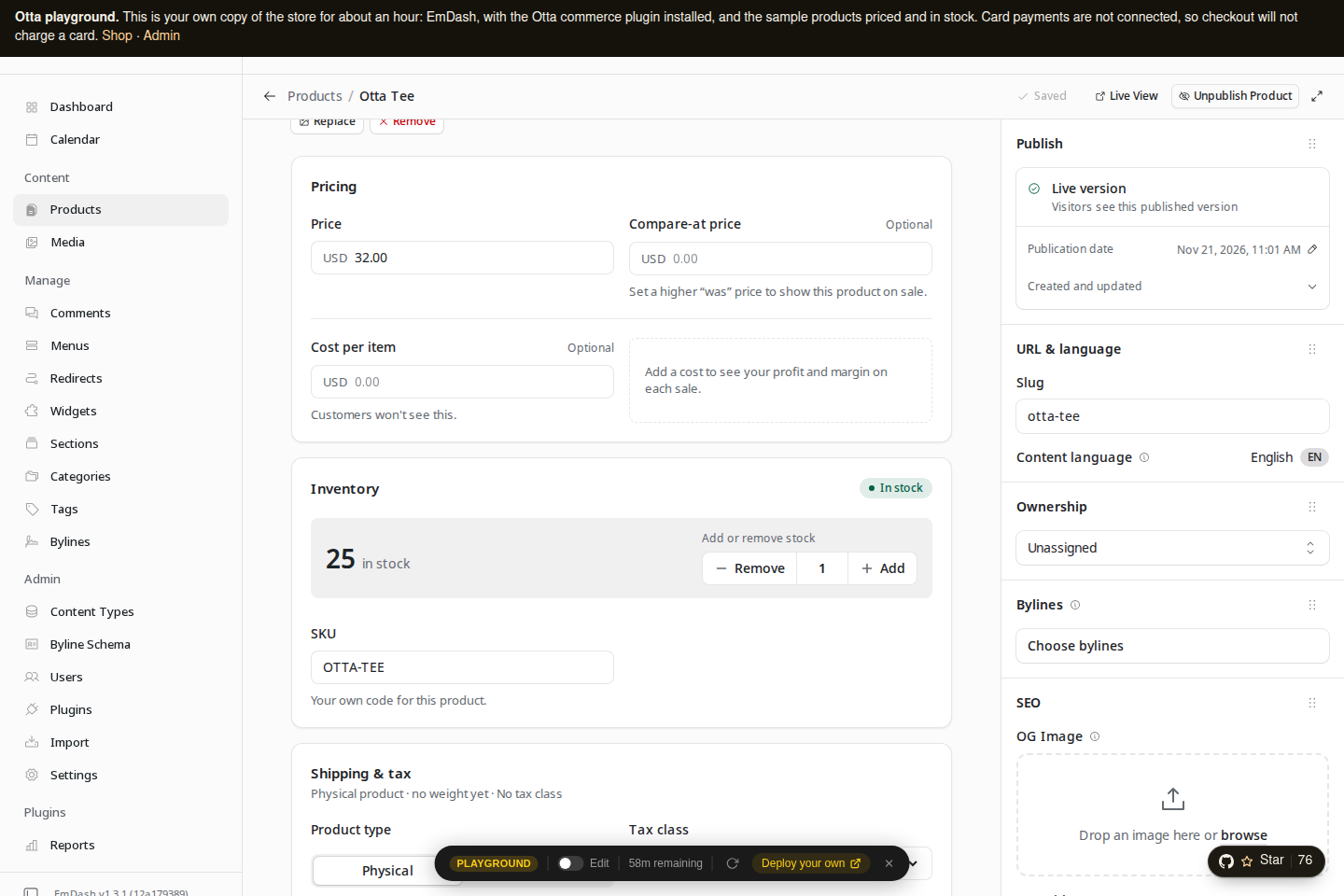
/_emdash/admin, then open the setup link from the[otta-setup]line in the Worker’s logs. If you would rather keep it out of the logs, set anOTTA_SETUP_TOKENsecret first. In the wizard, choose Sample content, then create your account and passkey. - Publish each sample product once. If a sample product’s Pricing & stock card says "Product not found", open the product, edit any field and click Publish changes (a known issue, listed below).
- Price your products in each product’s Pricing & stock cards.
- Turn on payments. For Stripe, add a webhook in the Stripe Dashboard at
https://YOUR-SITE/webhooks/stripe, then enter your keys in Store settings. Or turn on cash on delivery, which needs no provider. - Go live under Settings → General.
We tested this flow end to end on Workers Free on 2026-11-10, on the template’s earlier release (EmDash 1.3.1, Otta 0.2.0), covering the deploy, the storefront and claiming the store.
To update the store, merge the weekly Dependabot pull request. Merging deploys to production. Releases that move EmDash, Astro or React need a manual step, described in UPGRADING.md.
Add Otta to an existing EmDash site
Not tested for this post: we have not run this path end to end on a fresh EmDash site, so follow the Otta README’s npm install section rather than a copy here. In outline:
- The current Otta release on npm declares EmDash
^1.5.0as its peer dependency. You install@urumi.ai/otta-pluginand@urumi.ai/otta-admin-react. - The packages ship no ready-made plugin descriptor, so each site writes its own. The reference site registers two:
otta-plugin-descriptor.ts, the in-process commerce plugin with its admin pages (reports, coupons, store settings, tax, shipping and more), andotta-console-descriptor.ts, the React admin for the Orders and Products screens. Those two files are the complete worked example; match them to the version you install. - The plugin descriptor must declare
PAYMENT_SECRET_SETTINGS_SCHEMAas its settings schema, and the site must setEMDASH_ENCRYPTION_KEY. Without the schema, Stripe keys are stored as plain text.
The @urumi.ai/otta-store package, which bundles the storefront and admin as one Astro integration, is meant for new sites built from the template. It pins EmDash 1.5.0 exactly.
Do EmDash plugins run sandboxed or in-process?
EmDash plugins run in one of two ways. A plugin installed from the registry runs sandboxed in its own Worker, which needs Workers Paid. A plugin installed from npm through astro.config can run sandboxed or in the site’s own process. Which way an EmDash commerce plugin runs decides your Cloudflare plan, how its updates arrive and how isolated it is.
| Question | Registry plugin | Config-based (npm) plugin |
|---|---|---|
| How you install it | From the EmDash admin | Add the npm package and register it in astro.config |
| Where it runs | Sandboxed, in its own Worker via Worker Loader | “Config-based plugins can run in the sandbox or in the site process.” |
| Cloudflare plan | “It requires the Workers Paid plan and a worker_loaders binding named LOADER.” | Free works for in-process plugins |
| How updates arrive | You approve each update in the admin | “Config-managed plugins change when you update the npm dependency and deploy the site.” |
The EmDash docs describe what the sandbox buys you: "Runtime isolation and capability checks limit a sandboxed plugin." A sandboxed plugin gets "Only declared plugin APIs", while a plugin in the site process gets "Declared plugin APIs plus direct process access." The docs also note that EmDash’s Cloudflare templates "leave the Worker Loader binding commented out, so new projects can deploy on the Workers free plan."
Otta takes the config-based path. Otta is registered as a trusted plugin and runs in-process, so it needs no Worker Loader and fits Workers Free. The cost is that you cannot install Otta from the admin registry, and you do not get the sandbox’s runtime isolation in production. The Otta plugin is built to be sandbox-compatible: its admin uses Block Kit, and its code makes outbound calls only through ctx.http to the hosts it allows. Otta’s test suite boots real workerd and runs the plugin through Otta’s own harness, which mirrors EmDash’s sandbox contract.
How does Otta add a store to EmDash?
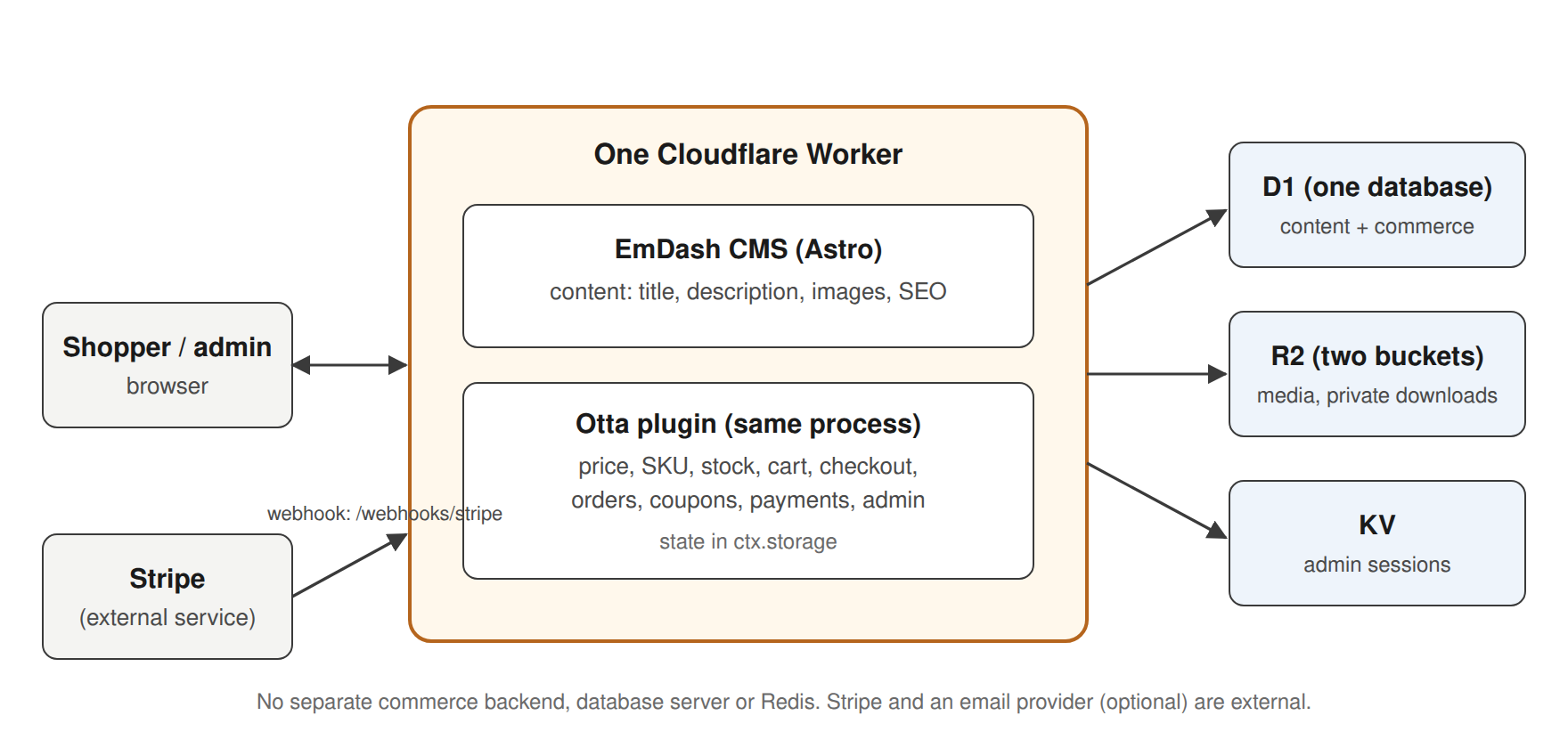
Otta adds the store as a plugin inside EmDash, so the catalog, cart, checkout, orders and admin console run in the same Cloudflare Worker as the CMS.
Cloudflare’s EmDash 1.0 announcement of 2026-09-28 names Urumi, the team behind Otta:
"Urumi is using their WooCommerce expertise to release EmDash’s first eCommerce plugin."
Disclosure: Urumi publishes this post. Other vendors, including Emcommerce and Ritely, also describe their EmDash plugins as the first.
Otta adds a store by splitting each product between the CMS and the plugin. EmDash owns the content: title, description, images and SEO. Otta owns the commercial fields, including price, SKU, stock, tax and shipping. Otta keeps them in EmDash’s per-plugin document store (ctx.storage), in the site’s single D1 database. So an Otta store has no separate backend, database server or Redis: one Worker and one database hold both the site and the store.
Two outside services remain: Stripe for card payments, and an email provider if you want order emails.
What Otta includes
- Catalog with variants, inventory and SKUs. Add-to-cart takes an inventory hold, which expires after 15 minutes by default.
- Cart, checkout and coupons
- Orders and refunds
- Customer accounts with magic-link sign-in, which needs an email provider
- Stripe card payments and cash on delivery
- Tax and shipping rules
- Paid digital downloads, served from a private R2 bucket
- Reports, plus an admin console inside EmDash’s admin
What Otta does not do yet
- No subscriptions. Otta has no subscription or recurring-billing feature. The README’s feature list does not include one, and we found none in the source on 2026-11-21.
- No WooCommerce importer. Otta has no built-in importer for WooCommerce products, orders or customers.
- Delayed payment methods fail. Methods that confirm days later, such as SEPA Direct Debit, ACH, Bacs and bank transfer, end in an expired order and an automatic refund. Workaround: turn them off in Stripe (#606, open as of 2026-11-21).
- Large variant edits fail on Free. On Workers Free, dropping or re-adding more than about 16 to 20 sized variants with SKUs in one save fails. Workaround: save in smaller batches (#637, open as of 2026-11-21).
- Sample products need one publish. A sample product’s Pricing & stock card can say "Product not found" until you publish the product once (#691, open as of 2026-11-21).
- Email needs a provider. Without one, order emails wait up to 72 hours and are then skipped. Cloudflare Email Sending needs Workers Paid.
- Pre-1.0. Otta is production-ready today. Pin exact versions and review each update, because APIs and admin screens can change between releases.
Not every reviewer is convinced that EmDash is ready for stores. Ben Ryan’s independent review on benryan.com.au, updated 15 November 2026, still advised: "Ecommerce sites should not consider EmDash until a proper commerce layer is available." That is a fair point about EmDash core, and the list above sets out what Otta does not do yet. For what leaving Cloudflare would involve, see our EmDash Cloudflare lock-in audit.
What does it cost to run an EmDash store on Cloudflare?
An EmDash store with Otta can start on Cloudflare’s Workers Free plan at $0 a month. R2 still needs a payment method on file, and Stripe charges its own processing fees. Workers Paid starts at $5 a month. Treat the free plan as a starting point, because we have not measured a real store’s traffic against its limits.
| Limit | Workers Free | Workers Paid |
|---|---|---|
| Requests | 100,000 per day | 10 million per month included, then $0.30 per million |
| CPU time per request | 10 ms | Up to 5 min (default 30 s) |
| D1 rows read | 5 million per day | 25 billion per month included |
| D1 rows written | 100,000 per day | 50 million per month included |
| D1 storage | 5 GB total | 5 GB included, then $0.75 per GB-month |
| D1 queries per Worker invocation | 50 | 1,000 |
| Price | $0 | From $5 per month |
What 10 ms of CPU means. Cloudflare counts only the time your code spends computing. "Waiting on network requests (such as fetch() calls, KV reads, or database queries) does not count toward CPU time." Database waits do not count, but page rendering and checkout logic do, and we have not measured Otta’s CPU time per checkout request.
Otta’s every-minute background job, which expires holds and sends order emails, keeps itself to 30 database queries per run by default, leaving room under Workers Free’s limit of 50 per invocation for EmDash’s own scheduled work. For a full breakdown, see what it costs to run an online store at zero revenue.
What we did and did not test
Tested by us:
- Playground load time: three headless Playwright runs on 2026-11-21 from a single cloud server, 46 to 59 seconds from opening the link to the first priced product.
- One-click deploy on Workers Free (2026-11-10, EmDash 1.3.1 with Otta 0.2.0): the deploy, the storefront and claiming the store.
Not tested for this post:
- A card checkout on Workers Free, and Otta’s CPU time per checkout request against the 10 ms limit.
- A real store’s traffic against the free plan’s limits.
- Adding Otta to an existing EmDash site with
pnpm addand hand-written descriptors.
Versions. This post describes the current Otta release, which declares EmDash ^1.5.0, and the one-click template, which pins EmDash 1.5.0. The Workers Free deploy test above ran on the template’s earlier release (EmDash 1.3.1, Otta 0.2.0).
What else do people ask about EmDash ecommerce?
Does EmDash’s x402 feature work for selling products?
No. As of EmDash 1.5.0 (checked 2026-11-21), x402 is EmDash’s only built-in payments feature, and it charges per request to view a page, for example to charge bots. It is not a catalog or a checkout. To sell physical or digital products on EmDash, you install a commerce plugin; we build and recommend Otta.
What is the best ecommerce plugin for EmDash?
We build and recommend Otta, a free, MIT-licensed store that runs in one Cloudflare Worker, with Stripe and cash on delivery. It deploys on Workers Free; card checkout on Free is not yet tested. Otta is production-ready today, is pre-1.0 and has no subscriptions. DashCommerce core offers Stripe Subscriptions and Connect marketplaces. Vendwick sells digital products with software license keys, and handles subscriptions. They differ mainly on subscriptions, marketplaces and license keys.
Can I run an EmDash store on Cloudflare’s free plan?
Yes, with conditions. An EmDash store with Otta runs on Workers Free because Otta runs in-process, not in the registry sandbox; the trade-off is that Otta does not get the sandbox’s runtime isolation. R2 needs a payment method on file, outbound email through Cloudflare needs Workers Paid, and Free allows 100,000 requests per day. We have not yet tested a card checkout on Free. Registry-installed, sandboxed plugins need Workers Paid.
Can EmDash take Stripe payments?
Yes, through a commerce plugin. With Otta, you add a Stripe webhook for https://YOUR-SITE/webhooks/stripe subscribed to payment_intent.succeeded and payment_intent.payment_failed. Then you enter the publishable key, secret key and signing secret in Store settings. Keys are encrypted at rest with EMDASH_ENCRYPTION_KEY.
Is there a WooCommerce alternative for EmDash?
Yes. Several EmDash commerce plugins now exist, including Otta, DashCommerce and Vendwick. Otta is an open-source commerce plugin for EmDash that runs inside the CMS on Cloudflare Workers, with products, variants, cart, checkout, orders, inventory, coupons, and Stripe and cash-on-delivery payments. It is pre-1.0 and has no subscriptions.
Can I move my WooCommerce store to EmDash?
Partly. EmDash’s admin includes a WordPress importer for content, but Otta has no built-in WooCommerce importer for products with prices, orders or customers. Moving a WooCommerce store to EmDash today means re-entering your commercial data, or having an agent or script do it.
What else should you read about EmDash stores?
- Deploying: EmDash Store Template: Deploy to Cloudflare in One Click
- Moving from WooCommerce: Migrate WooCommerce to EmDash
- Comparing platforms: Otta vs WooCommerce, Otta vs Shopify total cost and Otta vs Medusa
- Costs: The Cheapest Way to Run an Online Store
- Risk: EmDash Cloudflare lock-in audit and Sandboxed plugins and store security
What should you do next?
- Try the Otta playground. It needs no account; setup took 46 to 59 seconds in our three runs on 2026-11-21.
- Deploy your own store on Workers Free.
- Read the code and star the repo on GitHub.
About the author: Vedanshu Jain is a former WooCommerce core engineer and tech lead, and builds Otta at Urumi. GitHub · WordPress.org
Last updated Nov 23, 2026