 Urumi.AI
Ecommerce on Cloudflare Workers: Run a Store Step by Step (2026)
Run an online store on Cloudflare Workers with D1, R2 and one Deploy button: what works on the Free plan, setup steps, limits and trade-offs.
Can you run an ecommerce store on Cloudflare Workers?
Yes. A store can run as one Worker: pages, cart and checkout run on Workers, orders and stock live in D1 (SQLite), and images and paid downloads sit in R2. Otta packages this as a one-click Deploy to Cloudflare template.
We deployed this store template on a Workers Free account on 2026-11-10 and measured its Worker build on 2026-11-21, both on its earlier release (EmDash 1.3.1, Otta 0.2.0). Here is what worked, what we measured, and what we have not tested yet.
On Workers Free, deploy, storefront and store setup were verified on 2026-11-10 on that earlier release; card checkout and per-request CPU time were not (see what we tested).
Otta is an open-source commerce plugin for EmDash that runs products, cart, checkout, orders and inventory inside the CMS on Cloudflare Workers, with no separate backend, database server or Redis.
Updated 2026-11-21 · about 13 min read · Urumi builds Otta.
What you get at the end: a store on your own Cloudflare account with an admin at /_emdash/admin, priced product pages, and a test order placed through cash on delivery or Stripe.
Deploy to Cloudflare · Try the Otta playground (a disposable store that lasts about an hour, with no account and no card payments) · Star the code on GitHub
How does an online store run on Cloudflare Workers?
An Otta store on Cloudflare Workers is one Worker with no origin server. EmDash, the open-source, Astro-based CMS that Cloudflare released as 1.0 on 2026-09-28 (Cloudflare blog), serves pages, content and the admin. Otta runs inside the same Worker and handles prices, stock, carts, checkout and orders. Everything the store keeps goes into Cloudflare storage products bound to that Worker. If EmDash is new to you, start with EmDash ecommerce: how to add a store to EmDash.
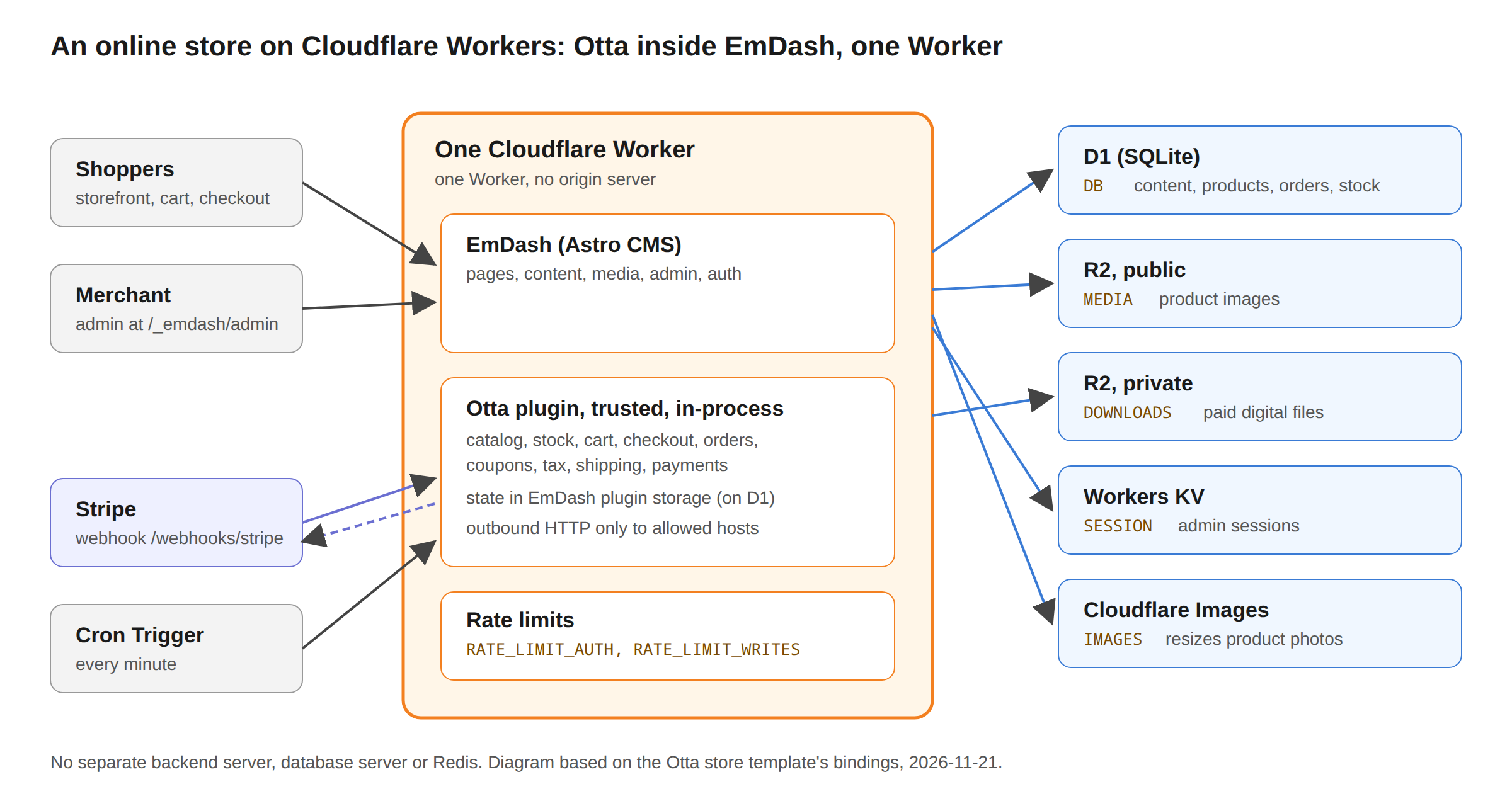
How an Otta store maps onto Cloudflare products: one Worker running EmDash with Otta inside it, plus its storage bindings. Diagram drawn from the template’s bindings, 2026-11-21. Table A gives the same information as text.
Table A: what each part of an Otta store runs on
| Store function | Cloudflare product | Binding in the template |
|---|---|---|
| Storefront pages, cart, checkout, admin, Stripe webhooks | Workers (one Worker: EmDash with Otta in-process) | — |
| Content, products, orders, carts, customers, stock | D1 (SQLite) | DB |
| Product images (public) | R2 | MEDIA |
| Paid digital downloads (private, re-authorized on every request) | R2 | DOWNLOADS |
| Admin sign-in sessions | Workers KV | SESSION |
| Product photo resizing | Cloudflare Images | IMAGES |
| Abuse limits on sign-in and on cart and checkout writes | Workers Rate Limiting | RATE_LIMIT_AUTH, RATE_LIMIT_WRITES |
| Order expiry, housekeeping, queued email | Cron Trigger, every minute | — |
| Card payments | Stripe (external, via webhook) | — |
Much of what ranks for this topic describes an older stack. Cloudflare’s own Building Black Friday e-commerce experiences with JAMstack and Cloudflare Workers (2020-11-26) kept product data in Sanity, download tokens in Workers KV and payments in Stripe, with no store database. It predates D1 and R2; it is still a good read on the payment flow.
Why Otta runs commerce inside EmDash instead of a separate backend
Otta keeps money and stock state in EmDash’s per-plugin storage, on the same D1 database as the site’s content, so an Otta store on Workers has no second service or second database to run. A headless commerce backend is a different shape. Medusa’s deployment guide says a Medusa app needs a Node.js host, and "Your server connects to a PostgreSQL database, Redis, and other services relevant for your setup" (Medusa docs). Otta vs Medusa compares the two in depth.
A detail about isolation. EmDash can run plugins in a sandbox, but the sandbox runner (Worker Loaders) needs Workers Paid. To stay on Workers Free, the template registers Otta as a trusted plugin: it runs in-process with EmDash, not sandboxed. Otta’s code makes outbound calls only through EmDash’s HTTP API and an allowed-hosts list, but in the template that is how the code is written, not a boundary Cloudflare enforces. The project tests the plugin in workerd through its own sandbox harness in CI, but a sandboxed Otta deployment is not a supported path yet. Why a store plugin shouldn’t have full database access covers the isolation model.
A single every-minute Cron Trigger expires unpaid orders, releases their stock holds, sends queued email and cleans up idle carts. Its query and write budgets are in the project’s Operations & scaling notes.
What does an Otta store on Workers measure?
When we measured it, an Otta store’s Worker uploaded about 19.8 MiB, under a third of Cloudflare’s 64 MiB Worker size limit on both plans, and its deploy applied 90 database migrations before the Worker went live. We measured this ourselves on 2026-11-21 by building the public template locally, on its earlier release (EmDash 1.3.1, Otta 0.2.0).
Table D: our own measurements of the Otta store template on EmDash 1.3.1 and Otta 0.2.0 (2026-11-21)
| What we measured | Result | How |
|---|---|---|
| Worker upload size | 20,276 KiB (about 19.8 MiB); gzip 5,375 KiB | wrangler deploy --dry-run on the build output. Cloudflare counts only the uncompressed size, against 64 MiB on Free and Paid; "There is no compressed size limit" (Workers limits) |
| Server modules and static assets | 670 modules; 117 asset files | Same dry run |
| Database migrations the deploy applies to a new store | 90 | Counted in the migration manifest the build writes (EmDash 1.3.1, as pinned by the template) |
| Bindings the button wires up | 7, plus one cron trigger | D1, two R2 buckets, KV, Images and two rate limits, read from the template’s wrangler.jsonc |
| Clean install and build | 18 s npm ci, 26 s npm run build | On our own Linux build machine with Node 22; Workers Builds timings will differ |
Template at commit 495dd62 (2026-11-16), installing @urumi.ai/otta-* 0.2.0. Measured locally; nothing here was timed on Cloudflare’s network. These figures predate the template’s move to EmDash 1.5.
What are the Cloudflare Workers Free limits for an online store?
Cloudflare Workers Free can run a small Otta store, but every ceiling applies to the whole store, because storefront, admin and cron share one Worker. "Accounts on the Workers Free plan have a daily request limit of 100,000 requests, resetting at midnight UTC" (Workers limits). Past D1’s daily allowance, "you will not be able to run queries against D1" until 00:00 UTC (D1 pricing). For costs, see the cheapest way to run an online store in 2026.
Verdict: Workers Free is enough to evaluate Otta or run a very small cash-on-delivery store. Plan on Workers Paid ($5/month minimum) for a real store, because on a busy day the background sweep may use up to about 85% of D1 Free’s daily writes.
Otta on Cloudflare Workers at a glance
- Stack: one Worker, plus D1, R2, Workers KV and Cloudflare Images.
- Cost: $0 on Workers Free. Workers Paid carries "a minimum charge of $5 USD per month for an account" (Workers pricing). The template’s README says R2 needs a payment method on the account even when usage stays inside the free allowance.
- License and status: MIT; production-ready and pre-1.0, published as
@urumi.ai/otta-*on npm.
Running the store with an AI agent adds no infrastructure on Workers: the opt-in @urumi.ai/otta-mcp package serves its admin tools through EmDash’s existing MCP endpoint, in the same Worker. An agent you authorize can create and edit product content with EmDash’s own content tools, and use Otta’s to set prices and stock and manage orders, coupons, shipping, tax, reports and settings. The Cloudflare account, the admin passkey, the Stripe connection and approval of what ships stay with you.
Which Workers plan do I need?
| Your store needs | Plan |
|---|---|
| Catalog, cart, orders, cash on delivery | Workers Free (deploy, storefront and setup verified 2026-11-10); R2 needs a card on file |
| Card checkout with Stripe | Works on Paid; on Free, see what we did not test |
| Order confirmation and sign-in emails | Cloudflare Email Sending needs Workers Paid; it is not available on Free |
| Plugins running in EmDash’s sandbox | Workers Paid (Worker Loaders is a paid feature) |
| Busy store or a large catalog | Workers Paid (thresholds below) |
Table B: Workers Free vs Paid, applied to a store
| Limit | Workers Free | Workers Paid | What it means for an Otta store | Source (page modified) |
|---|---|---|---|---|
| Requests | 100,000/day | No daily limit | Every page view, cart action, admin click and webhook counts | Workers limits (2026-11-19) |
| CPU per HTTP request | 10 ms | 30 s default, up to 5 min | Not measured for Otta yet; check your Worker’s CPU time | Workers limits (2026-11-19) |
| D1 rows read | 5 million/day | 25 billion/month included | A large catalog’s daily sync pass is the main consumer | D1 pricing (2026-10-30) |
| D1 rows written | 100,000/day | 50 million/month included | The background sweep is budgeted at about 80,000–85,000 of these, leaving roughly 15,000–20,000 a day for orders, carts and admin edits. The project derives this from its index model; it has not measured it on D1 | D1 pricing (2026-10-30); DEPLOYMENT.md |
| D1 database size | 500 MB | 10 GB | Content, orders and stock share one database | D1 limits (2026-11-20) |
| Email sending | Not available | 3,000/month included | Order and sign-in email | Email Service pricing (2026-06-09) |
| Price | $0 | $5/month minimum | — | Workers pricing (2026-11-18) |
Full limits: subrequests, cron, Worker size, Time Travel, R2, KV, Images
| Limit | Workers Free | Workers Paid | What it means for an Otta store | Source (page modified) |
|---|---|---|---|---|
| Subrequests per request | 50 | 10,000 | Stripe calls count as subrequests | Workers limits (2026-11-19) |
| Cron triggers per account | 5 | 1,000 | Each store uses one | Workers limits (2026-11-19) |
| Worker size (uncompressed) | 64 MiB | 64 MiB | The template’s Worker measured about 19.8 MiB on EmDash 1.3.1 (Table D) | Workers limits (2026-11-19) |
| D1 queries per Worker invocation | 50 | 1,000 | The cron caps itself at 30 at the Free preset, per the project’s documentation | D1 limits (2026-11-20) |
| D1 Time Travel (restore) | 7 days | 30 days | Your undo window after a bad migration | D1 Time Travel (2026-11-20) |
| R2 storage | 10 GB-month free | Same free tier, then metered | Product images and downloads; R2 egress is free | R2 pricing (2026-10-30) |
| KV | 100,000 reads, 1,000 writes/day | Higher, metered | Admin sessions only | Workers pricing (2026-11-18) |
| Images transformations | 5,000 unique/month | Metered | Product photo resizing | Images pricing (2026-10-19) |
Limits as of 2026-11-21, re-read on each linked page that day; dates in the Source column are each page’s own modified date.
When does an Otta store need Workers Paid?
An Otta store on Cloudflare Workers needs Workers Paid in these cases:
- You want Cloudflare’s email service. Cloudflare lists Email Sending as "Not available" on Workers Free (Email Service pricing). Without an email provider, Otta keeps order emails queued for up to 72 hours and then skips them, and customer sign-in links are not sent.
- Your store writes more than about 15,000–20,000 rows a day. The project’s documentation budgets the background sweep at about 80,000–85,000 of D1 Free’s 100,000 daily rows written, leaving the rest for carts, checkouts, orders and admin edits (DEPLOYMENT.md).
- You have more than about 15,000 products. By the same documentation, one daily catalog sync pass over 20,000 products reads about 4 million of D1 Free’s 5 million daily rows.
- Checkouts lapse faster than about one per minute. The documentation measures about 0.7 expiries per minute under a backlog at the Free preset.
- You edit many sized variants at once. Dropping or re-adding more than about 16 to 20 variants with SKUs in one save fails on Free (issue #637).
- You want EmDash’s plugin sandbox. Worker Loaders need Paid.
What we tested and what we did not
- Tested: the one-click template, installing
@urumi.ai/otta-*0.2.0, with EmDash 1.3.1, ran end to end on a Workers Free account on 2026-11-10: deploy, storefront, and claiming the store. The template has since moved to EmDash 1.5, and we have not repeated this run.- Measured: the Worker build in Table D, on 2026-11-21, on EmDash 1.3.1.
- Re-read: every Cloudflare limit and price on this page, on 2026-11-21.
- Derived, not measured: the D1 write budget in Table B, which comes from the project’s index model.
- Not tested: card checkout with Stripe on Workers Free; per-request CPU time for storefront and checkout pages against Free’s 10 ms; an Otta store on Free past 5,000 image transformations in a month. Check your own Worker’s CPU time in the Cloudflare dashboard before you rely on Free.
What does deploying a store on Workers involve?
You deploy an Otta store to Cloudflare Workers with the Deploy to Cloudflare button on the Otta store template. Per Cloudflare, "Cloudflare clones your source repository into the user’s GitHub/GitLab account", and "Any required resources are automatically provisioned and bound to the Worker without additional setup" (Deploy buttons, modified 2026-10-12). EmDash Store Template: Deploy to Cloudflare in One Click walks through the button screen by screen.
- Prepare your accounts. You need a Cloudflare account with a payment method on file (for R2) and a GitHub account. For card payments you also need a Stripe account. Cash on delivery needs no provider.
- Generate two secrets. The encryption key encrypts the payment keys you later save in the admin; keep a copy in a password manager. The setup token lets you claim the store in step 6 without a link appearing in the logs.
npx emdash secrets generate     # prints emdash_enc_v1_…
openssl rand -hex 32            # your OTTA_SETUP_TOKEN
Without Node, the template’s README gives an openssl equivalent for the encryption key:
printf 'emdash_enc_v1_%s\n' "$(openssl rand -base64 32 | tr '+/' '-_' | tr -d '=')"- Click Deploy to Cloudflare and paste the key when asked for
EMDASH_ENCRYPTION_KEY. The button asks for no other secret. It creates your copy of the repository, a D1 database, two R2 buckets (public media and private downloads), a KV namespace, the Images binding, two rate limits and an every-minute cron, then connects Workers Builds, which builds and deploys on every push to your production branch. Heads-up: the storefront is public as soon as the first build finishes, so plan to finish steps 6 to 8 in the same sitting.
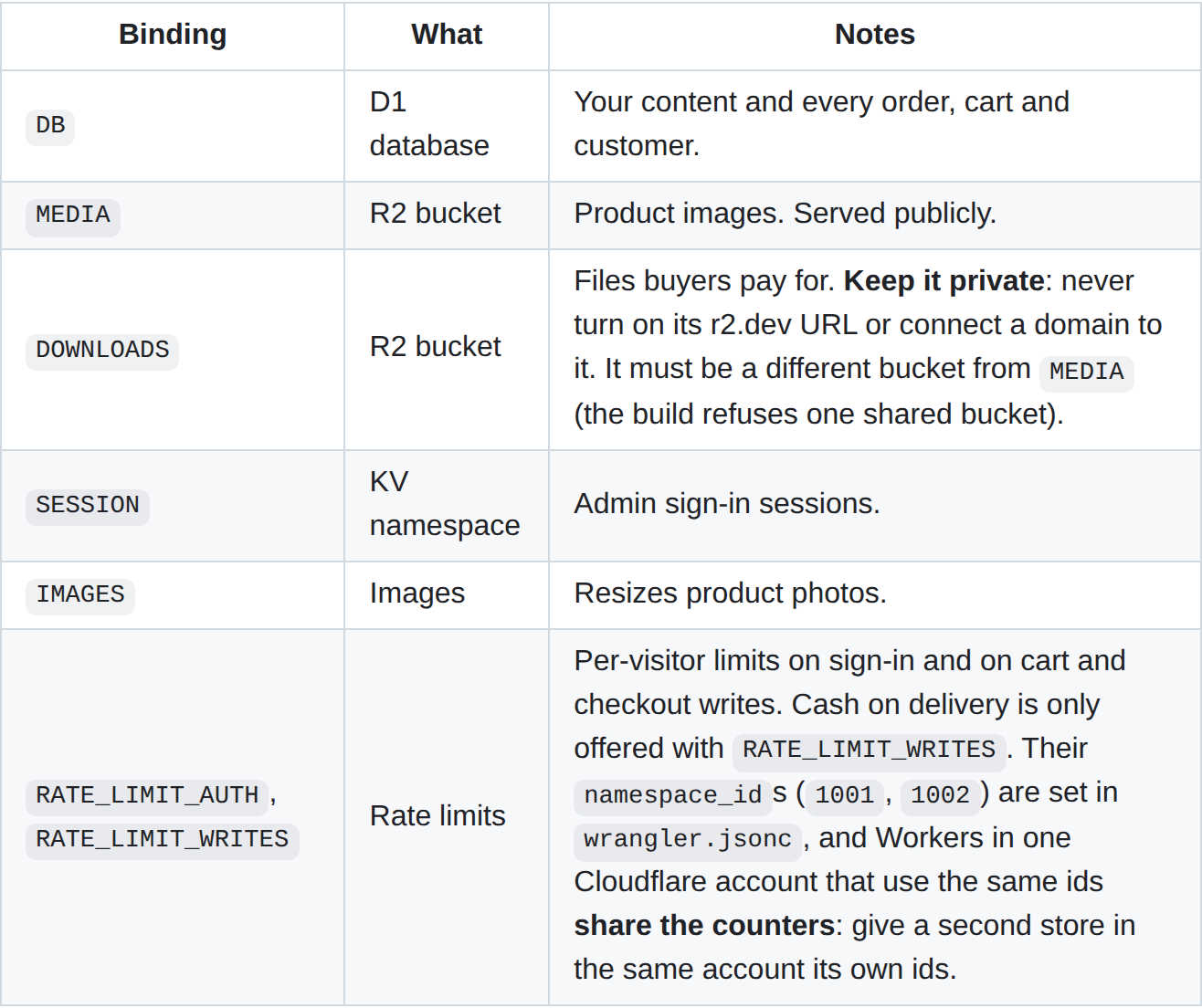
The bindings the Deploy to Cloudflare button creates for an Otta store, from the template’s README on GitHub. Captured 2026-11-21. The button’s own page needs a Cloudflare sign-in, so we show the README instead.
- Wait for the first build, and always deploy through it. The build’s deploy step applies the database migrations a new store needs (90 when we counted on EmDash 1.3.1) before the Worker goes live. Do not deploy a new store with plain
wrangler deploy: the Worker would then migrate the database on its first request, and on a real Workers Free account that was cut off after 34 of 90 migrations on EmDash 1.3.1, leaving the migration lock held and every request answering 503. Use the button or a push to your production branch. If a build fails, its log ends withDeploy stopped.and the fix; see the README’s If the deploy or the first visit fails. - After the first deploy, before you merge or push anything else, turn off preview builds. Workers Builds also builds other branches, such as the weekly update branch, and a version uploaded that way can run on your production resources, including the live database, so opening it could run that release’s forward-only migrations on your live data. The template already sets
"preview_urls": false. As a second safeguard, go to your Worker → Settings → Build → Branch control and clear Enable Preview Builds.
- Claim the store. The admin stays unclaimed until someone completes setup. Add the token from step 2 as a secret named
OTTA_SETUP_TOKEN(Worker → Settings → Variables and Secrets, at least 32 characters) and openhttps://<your-site>/_emdash/admin/setup?setup_token=<token>. If you add it before the first visit to the admin, no setup link is written to the logs.
The fallback is to visit /_emdash/admin once and find the line starting [otta-setup] in the Worker’s logs; it holds the setup link. That link does not expire until setup is finished, and anyone who can read your logs can use it until then, so claim promptly and never screenshot or share that log line. In the wizard, choose Sample content for three demo products, then create your account and passkey. After that the link stops working and you sign in with the passkey.
- Price the products. Open each product in the admin and fill in its Pricing & stock cards. Sample products start unpriced. If a sample product’s card says "Product not found", edit the product, click Publish changes once, and the card appears.
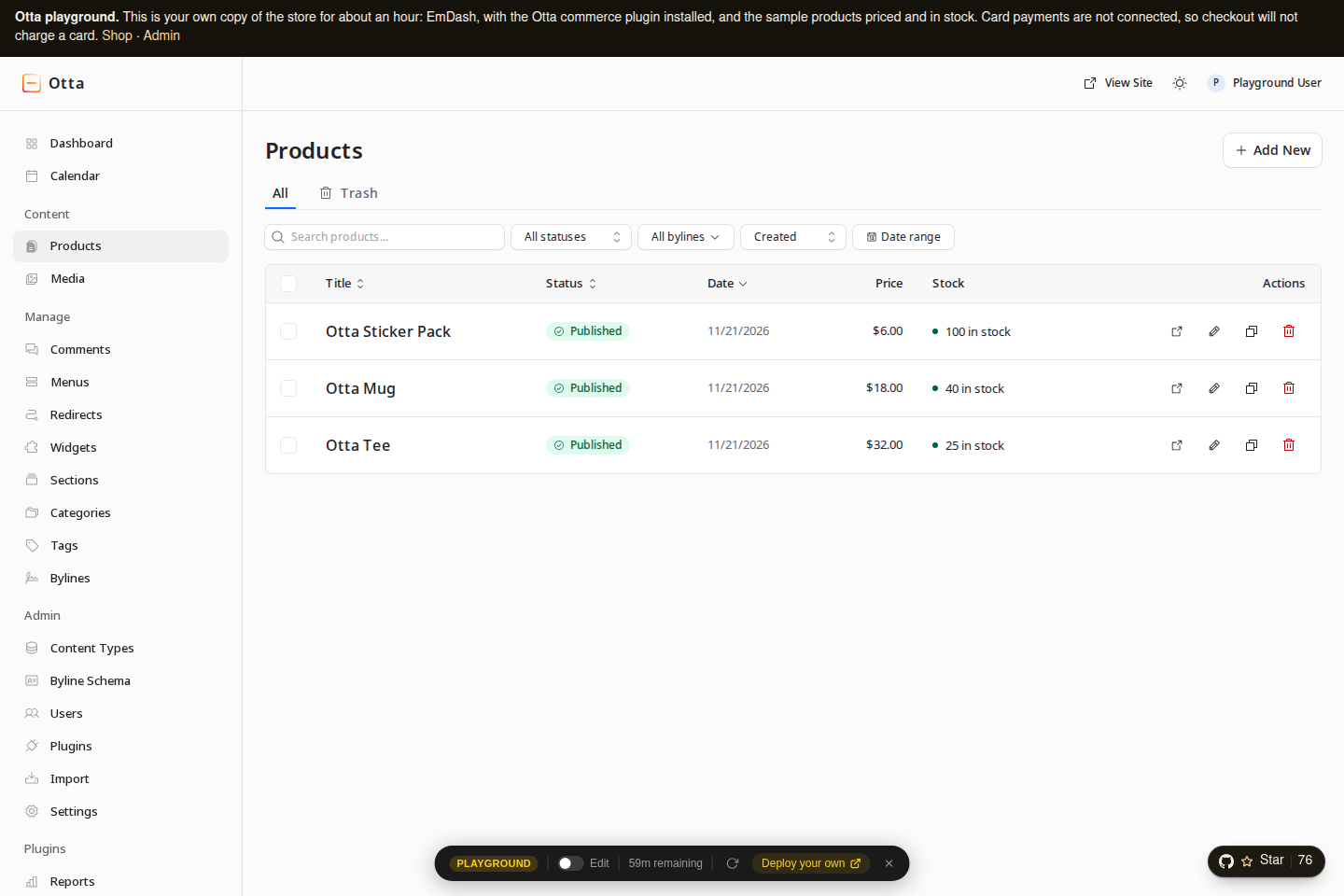
The Products list in the EmDash admin with Otta’s Price and Stock columns, from the Otta playground. Captured 2026-11-21.
- Configure payments. For cards, add a webhook endpoint in the Stripe Dashboard for
https://<your-site>/webhooks/stripe, subscribed to exactlypayment_intent.succeededandpayment_intent.payment_failed. Then, in Store settings, enter the publishable key, the secret key and that endpoint’s signing secret. For physical goods you can also turn on cash on delivery. Optional webhook hardening is described in the secrets checklist. - Go live. Go live changes only the Staging badge in the admin; it does not publish anything, because the storefront has been public since step 3. A store set up through the wizard shows that badge until you select Go live in Settings → General → Site Status (DEPLOYMENT.md). Finish steps 7 and 8 first.
- Optional: email and a custom domain. Cloudflare’s email service needs Workers Paid: "Sending to arbitrary recipients requires the Workers Paid plan" (Email Service pricing). Onboard a sender domain to Cloudflare Email Sending, then enable the
send_emailbinding and set the sender address, as described in the template README.
How do you update and roll back an Otta store on Workers?
An Otta store on Workers gets updates through Dependabot, which opens one pull request a week for Otta’s packages. Merging that pull request deploys the update to production. If a build fails, nothing new is deployed and the store keeps running the last good version. Releases that move EmDash, Astro or React need a manual step described in the project’s upgrade guide. Migrations are forward-only, so code rollback (Worker → Deployments) does not undo them. To undo a bad migration, restore the database with D1 Time Travel, which can restore "to any minute within the last 7 days on the Workers Free plan or 30 days on the Workers Paid plan" (D1 Time Travel). A restore erases orders written after that point, and Stripe payments for those orders are not refunded automatically.
Can you try an Otta store on Cloudflare before deploying?
Yes. The Otta playground is the project’s live demo: a disposable copy of a store on Cloudflare Workers, with three priced sample products and the full admin, for about an hour. Card payments are not connected there, so checkout does not charge a card, and no sign-in email is sent. There is no permanent public demo storefront yet. To keep a store running, deploy your own store to your Cloudflare account.
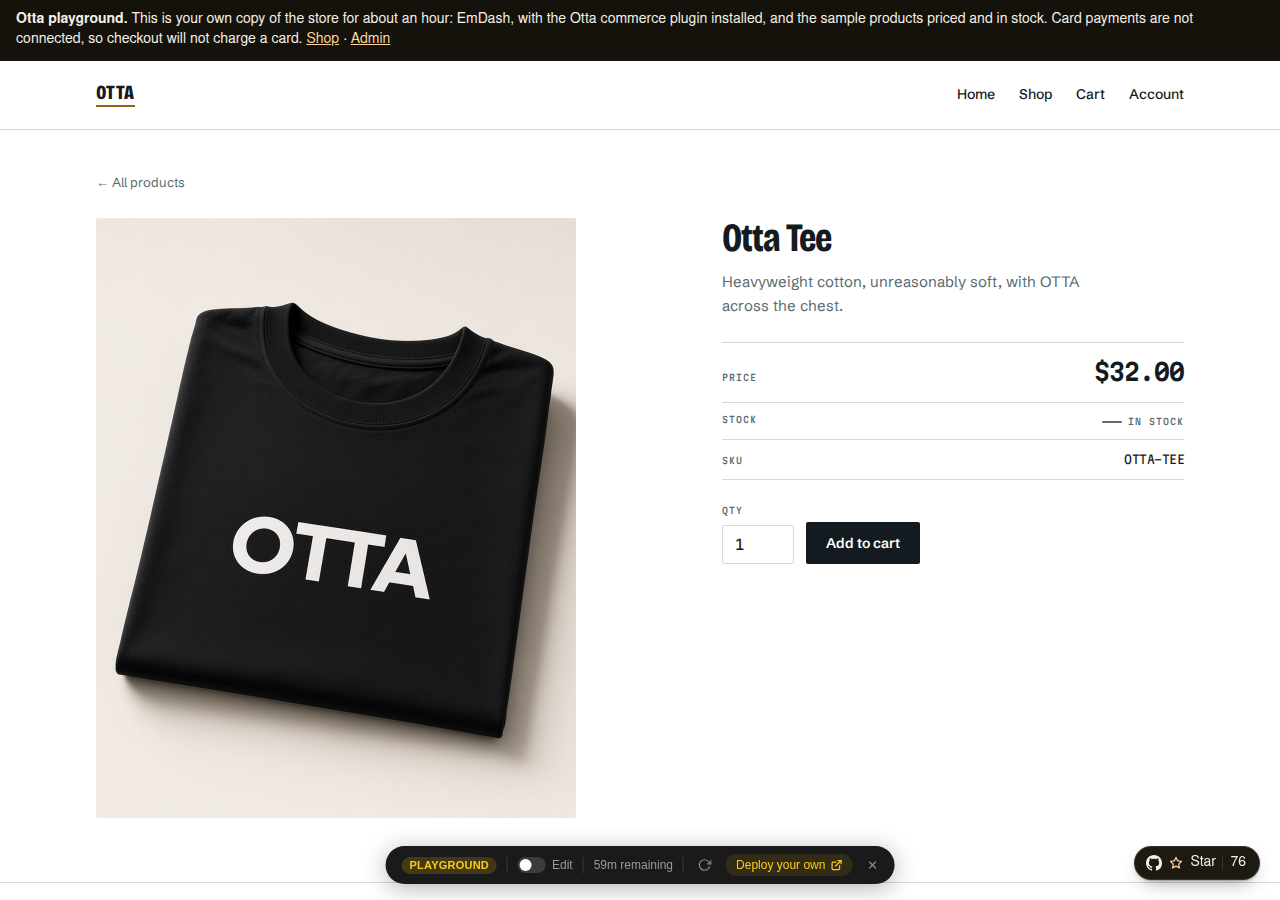
A product page from the Otta playground, which runs on Cloudflare Workers. Captured 2026-11-21.
To run your copy of the template locally, you need no Cloudflare account: D1 and R2 are emulated.
npm install
cp .dev.vars.example .dev.vars   # then fill in EMDASH_ENCRYPTION_KEY
npm run dev
Testing Stripe locally with the Stripe CLI is covered in the project’s Test card payments locally guide.
What would we do first?
If you are evaluating Otta on Workers, this is the order we would follow:
- Spend ten minutes in the playground: price a product, place a cash-on-delivery order, look at the order in the admin.
- Deploy to Workers Free with cash on delivery only, and watch the Worker’s CPU time and D1 usage in the Cloudflare dashboard for a few days.
- Add Stripe in test mode, and move to Workers Paid when you need email or your D1 writes approach the Free budget.
What are the trade-offs of running ecommerce on Workers with Otta?
Running ecommerce on Cloudflare Workers with Otta means you run the infrastructure yourself and accept a pre-1.0 project. These are the trade-offs we would want to know first:
- Otta is pre-1.0. It is production-ready today, but APIs, storage shapes and admin screens can change between releases. Pin exact versions and review each update.
- Delayed payment methods don’t work yet. SEPA Direct Debit, ACH, Bacs and bank transfer confirm days later and currently end in an expired order and an automatic refund (issue #606). Turn them off in Stripe until that is fixed.
- No Cloudflare email on Workers Free. Without a provider, order emails wait up to 72 hours and are then skipped.
- Little guaranteed D1 write room on Free. The background sweep can use up to about 80,000-85,000 of the 100,000 daily rows when it has backlog to clear (figures).
- Untested parts on Free. Card checkout, per-request CPU time and image resizing past the free allowance (what we did not test). Cloudflare documents that past 5,000 unique transformations a month on Free, "New transformations will return a 9422 error", while cached ones keep serving (Images pricing).
- Trusted, not sandboxed. On Free, Otta runs in-process with EmDash rather than in the sandbox. The sandbox needs Workers Paid.
- Workers is not Shopify. There is no app store and no hosted support, and you own operations: backups, updates and Stripe settings. Otta vs Shopify: Total Cost compares the two directly, and our lock-in audit covers how portable an Otta store is off Cloudflare.
Who this is not for: stores with very large catalogs or heavy daily write traffic that want to stay on Workers Free, teams that need hosted support or an app marketplace, sellers who depend on delayed payment methods today, and anyone without appetite for pre-1.0 changes.
What are the other ways to sell on Cloudflare Workers?
We build and recommend Otta. Other ways to sell on Cloudflare Workers exist, and they differ mainly in where the commerce data and admin live. For an Astro-first site, see Astro ecommerce without a separate backend.
Table C: ways to sell on Workers
| Approach | What you build yourself | Who runs the admin | Extra servers or databases |
|---|---|---|---|
| DIY with Hono and D1 (Cloudflare D1 e-commerce tutorial) | Cart, checkout, payments, orders, admin | You build it | None beyond Cloudflare |
| Remix on Workers with a Turso database (Turso tutorial, 2023-08-14) | The store app and its data layer | You build it | A Turso database outside Cloudflare |
| Storefront on Workers with a Medusa backend (Sanity’s Medusa DTC starter; Medusa deployment docs) | The storefront | Medusa’s admin, plus Sanity for content | A Node.js server, PostgreSQL and Redis for Medusa |
| Shopify Hydrogen on Oxygen (Shopify docs) | The storefront | Shopify admin | None to run, but it needs a Shopify store with the Hydrogen sales channel |
| EmDash with a commerce plugin, such as the Otta template (template) | Theme and content | The plugin, inside the EmDash admin | None beyond Cloudflare |
The D1 tutorial is a good read on read replication for a product catalog; it stops before checkout. Turso now notes that its 2023 tutorial uses SDKs it has since replaced. Shopify’s Oxygen "runs your storefront as a Web Worker on Cloudflare’s open-source workerd runtime", but products, checkout and orders stay in Shopify, so Shopify’s plans and fees apply.
Commerce plugins for EmDash
Cloudflare’s EmDash 1.0 post (2026-09-28) said of Urumi, the team behind Otta: "Urumi is using their WooCommerce expertise to release EmDash’s first eCommerce plugin." (Cloudflare blog)
Otta is not the only EmDash commerce plugin now. DashCommerce is an MIT-licensed EmDash commerce plugin built on Stripe that runs on Workers or Node.js. Its README says the sandboxed Lite edition needs Workers Paid on Cloudflare, and that subscriptions and Stripe Connect marketplaces are in the full @dashcommerce/core package (re-read 2026-11-21). Vendwick is a store system for EmDash on Workers whose deploy guide covers private release downloads and license keys; the guide says it was "Verified locally on workerd for 0.1.0, not on a deployed Worker" (re-read 2026-11-21). Ritely announced a planned EmDash commerce plugin on 2026-04-06; we have not verified a release. We compare them in Best EmDash Plugins (2026): 332 Listings Audited.
FAQ
Is Cloudflare Workers free for ecommerce?
Partly. Workers Free costs $0 and allows 100,000 requests a day, 5 million D1 rows read and 100,000 rows written a day (Workers limits, D1 pricing). An Otta store’s deploy, storefront and setup ran on Workers Free on 2026-11-10. R2 needs a payment method on file, Cloudflare’s email service needs Workers Paid ($5/month minimum), and a store with steady traffic can outgrow Free’s daily D1 writes.
Can Cloudflare Workers handle checkout and payments?
Yes. In an Otta store, checkout runs in the Worker and card payments use Stripe PaymentIntents, with Stripe calling the Worker’s /webhooks/stripe endpoint to confirm each payment. Cash on delivery is available for physical goods without a provider. Card checkout on Workers Free is not yet tested by the project (details).
What database does an online store on Cloudflare Workers use?
An Otta store uses D1, Cloudflare’s SQLite-based database, for both content and commerce data. D1 allows databases of up to 500 MB on Workers Free and 10 GB on Workers Paid (D1 limits, modified 2026-11-20). Product images and paid downloads go in R2, not in the database.
Do I need a separate backend server or Redis to sell on Workers?
No, not with Otta. Commerce runs inside the same Worker as the EmDash CMS, and its state lives in EmDash’s plugin storage on the store’s D1 database. A headless setup such as Medusa is different: its docs say the server connects to PostgreSQL and Redis (Medusa docs).
How many products can an Otta store on Workers Free handle?
About 15,000, by the project’s own guidance, because the daily catalog sync pass reads most of D1 Free’s daily row allowance as the catalog grows. Daily writes and bulk variant edits set other limits; the full list is under When does an Otta store need Workers Paid?
Is Otta production-ready?
Yes. Otta is production-ready today. It is pre-1.0, MIT-licensed and published on npm as @urumi.ai/otta-*, so pin exact versions and review each update, because the project expects breaking changes before 1.0. Known open issues include delayed payment methods (#606) and bulk variant edits on Free (#637).
How do you start an Otta store on Cloudflare Workers?
To start an Otta store on Cloudflare Workers, generate an encryption key with npx emdash secrets generate, then click the button below. The deploy creates your repository, database and buckets on your own Cloudflare account. Try the playground first if you want to look around without deploying anything.
- Deploy to Cloudflare: deploy the store to your own Cloudflare account.
- Try the Otta playground: a disposable store with the full admin.
- Star the repo on GitHub: follow releases, file issues, or check the open limitations yourself.
Otta runs the whole store inside EmDash, in one Cloudflare Worker.
About the author: Vedanshu Jain is a former WooCommerce core engineer and tech lead, and builds Otta at Urumi. GitHub · WordPress.org
Sources and dates
Cloudflare pages, each with its own modified date, all re-read 2026-11-21:
- Workers limits (2026-11-19)
- Workers pricing (2026-11-18)
- D1 limits (2026-11-20)
- D1 pricing (2026-10-30)
- D1 Time Travel (2026-11-20)
- R2 pricing (2026-10-30)
- Images pricing (2026-10-19)
- Email Service pricing (2026-06-09)
- Deploy buttons (2026-10-12)
- EmDash 1.0 and the plugin registry (published 2026-09-28)
Otta’s own sources: the Otta repository and its DEPLOYMENT.md, the store template, and our build measurements in Table D (2026-11-21).
Last updated Nov 23, 2026