 Urumi.AI
Astro ecommerce without a separate backend (a Snipcart alternative)
Astro ecommerce options compared: Snipcart, Stripe Payment Links, Shopify, Medusa, Paddle, and an open-source store that runs on Cloudflare Workers.
Updated 2026-11-21
Disclosure: Urumi builds Otta. Every competitor fact below links to its source and was checked on 2026-11-21.
How do you add ecommerce to an Astro site without a separate backend?
Astro sites add ecommerce with a hosted cart (Snipcart, Paddle), Stripe Payment Links, a Shopify Buy Button, a headless backend such as Medusa, or commerce inside the CMS. Only the last runs in the same Cloudflare Worker as your Astro site. We build and recommend Otta, one such plugin for EmDash; it needs server rendering, and it is production-ready and pre-1.0.
Otta is an open-source commerce plugin for EmDash that runs products, cart, checkout, orders and inventory inside the CMS on Cloudflare Workers, with no separate backend, database server or Redis.
As of 2026-11-21, Astro’s own e-commerce guide lists only hosted services: Lemon Squeezy, Paddle and Snipcart.
Key facts about Otta (2026-11-21)
- Static Astro build: no. It is server-rendered on Cloudflare Workers.
- CMS: EmDash, required.
- License: MIT.
- Host: Cloudflare Workers, with D1, R2 and KV on your own account.
- Status: production-ready and pre-1.0; published on npm.
"No separate backend" means something narrow here. There is no commerce server, database server or Redis for you to operate. You do take on a CMS: EmDash, which Astro’s docs describe as "an open-source, full-stack CMS built specifically for Astro" that "deploys together with your site as a single Astro project."
Cloudflare’s EmDash 1.0 announcement (2026-09-28) says: "Urumi is using their WooCommerce expertise to release EmDash’s first eCommerce plugin." It names Urumi, the team behind Otta, rather than Otta itself, and other EmDash commerce plugins exist (see Trade-offs).
Two facts about the hosted options, as of 2026-11-21. Lemon Squeezy has stopped taking new sign-ups and will shut down on 2027-03-31. One community Astro integration for Snipcart, Adammatthiesen/astro-snipcart, was archived on 2024-07-18; another, lloydjatkinson/astro-snipcart, is not archived.
Who this is for: Astro site owners and developers who want content and commerce in one project, server-rendered on Cloudflare Workers.
Who this is not for: a static-only Astro site that wants a drop-in cart, or a team hosting on Vercel or Netlify. Otta does not support either setup.
On an Astro site, agent access is one integration option: otta({ template: 1, mcp: true }) with the opt-in @urumi.ai/otta-mcp package installed. An admin then turns Otta’s tools on and issues the agent a token with mcp:tools:otta for those tools, plus content:read and content:write for EmDash’s content tools. The agent creates and edits product content with EmDash’s tools, and sets prices and stock and manages orders, coupons, shipping, tax and settings with Otta’s. You keep the human steps: the Cloudflare account, the passkey claim, the Stripe connection and approving what ships.
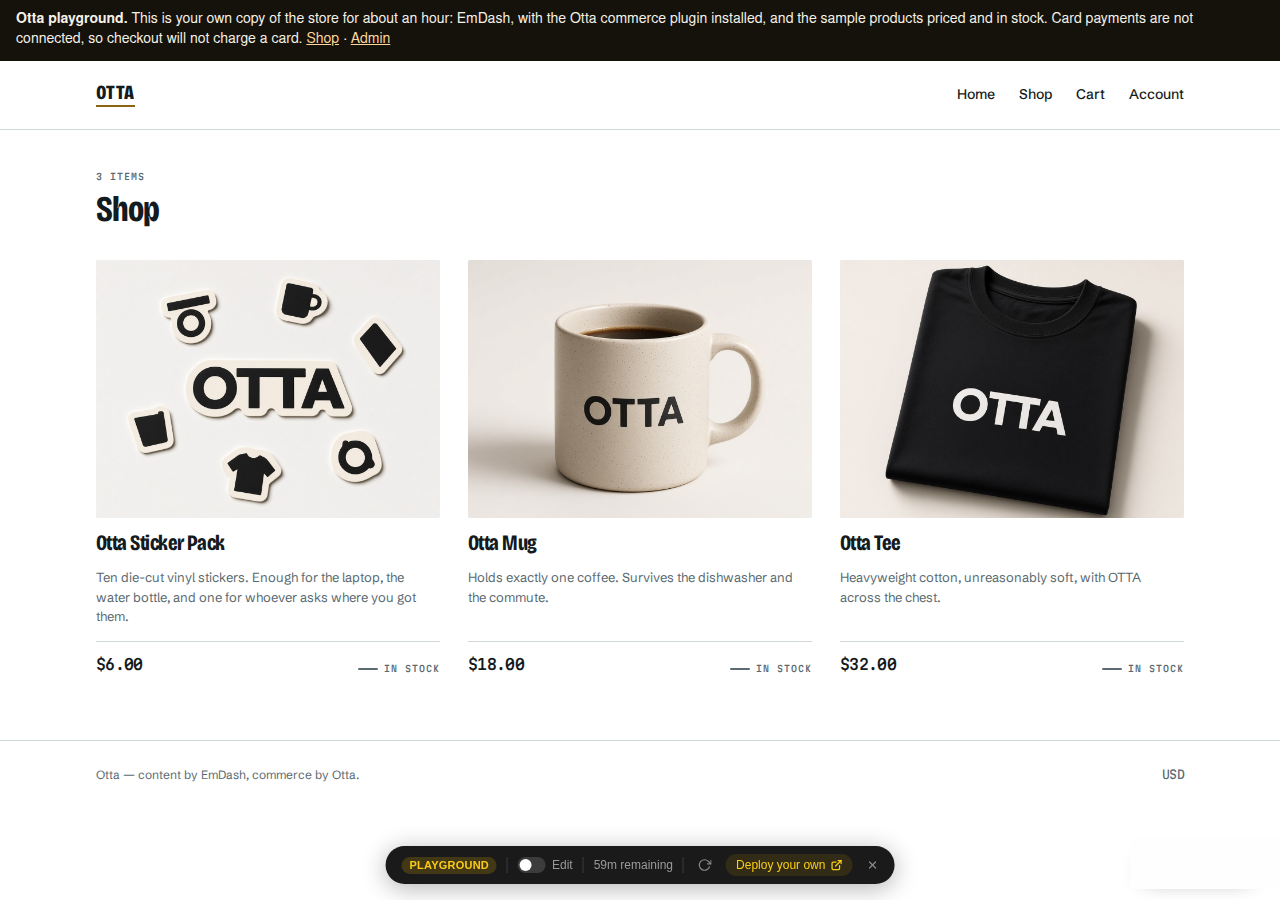
Try it: try the Otta playground (a disposable store that lasts about an hour, with no account and no card payments), deploy your own store with the Deploy to Cloudflare button in the otta-store-template README, or read the source on GitHub.
Snipcart vs Stripe Payment Links vs Shopify Buy Button vs Medusa vs Paddle vs Otta for Astro
Of the six options compared here as of 2026-11-21, Snipcart, Stripe Payment Links, Paddle and the Shopify Buy Button need no server code on your side, because the vendor hosts checkout and stores the orders. Medusa and Otta are open source. Of these six, Otta is the one that runs the commerce backend in the same Worker as the Astro site; other EmDash plugins do too (see Trade-offs).
Paddle is a merchant of record: it sells to your customer and handles global sales tax, so its fee is not like-for-like with Snipcart’s 2% or Stripe’s processing fee. Pricing changes often; check each vendor’s page before you decide.
Table 1. Astro commerce options at a glance. Prices last verified 2026-11-21; sources listed below the table.
| Option | What you run besides Astro | Fees (last verified 2026-11-21) | Server code on your side | Open source |
|---|---|---|---|---|
| Snipcart | Nothing; product URLs must be publicly reachable | 2% per transaction, or $20/month instead when monthly sales are under $1,000; plus payment gateway fees | No | No |
| Stripe Payment Links | Nothing; links are created in the Stripe Dashboard, no code | Stripe processing only: 2.9% + 30¢ per successful US domestic card transaction, no monthly fee | No | No |
| Paddle | Nothing (hosted checkout, merchant of record) | 5% + 50¢ per transaction; no monthly fee | No | No |
| Shopify Buy Button | A Shopify plan | Basic $29/month yearly or $39 monthly; 2% third-party fee on Basic when you don’t use Shopify Payments | No | No |
| Medusa | Medusa server + worker, PostgreSQL, Redis (or Medusa Cloud, from $29/month) | Software free; you pay hosting | Yes (the Medusa backend) | Yes (MIT, with separate Enterprise Edition materials) |
| Otta | Nothing separate: one Worker, D1, R2 and KV on your Cloudflare account | None from Otta; your Cloudflare plan and Stripe fees | Yes, but it is the same server-rendered Astro Worker | Yes (MIT) |
Sources: Snipcart pricing, Stripe pricing ("Stripe does not charge setup fees, monthly fees, or any other hidden fees"), Stripe Payment Links docs ("Accept payments online without writing code"), Paddle pricing, Shopify pricing ("Third-party transaction fees may apply when you use a third-party payment provider (instead of Shopify Payments)"), Medusa LICENSE, Medusa pricing, Medusa deployment, Otta README. All opened 2026-11-21. "Server code on your side" is our reading of each vendor’s architecture: the first four host checkout and store orders on their own servers, so nothing runs on yours. Snipcart’s pricing page does not say which rule applies at exactly $1,000.
Snipcart’s model is worth reading in its own words: its order validation docs say "our servers fetch every item of the cart from your own website," and "the URL has to be publicly reachable."
Table 2. Where the data lives.
| Option | Architecture | Where orders and catalog live |
|---|---|---|
| Snipcart | Hosted cart overlay | Product details read from your pages; orders, inventory and crawled product data in the Snipcart dashboard |
| Stripe Payment Links | Hosted payment page with a fixed set of line items | Products, prices and payments in the Stripe Dashboard |
| Paddle | Hosted checkout (merchant of record) | Paddle dashboard |
| Shopify Buy Button | Embedded widget | Shopify admin |
| Medusa | Headless backend | Your PostgreSQL database |
| Otta | Commerce inside the CMS | Your D1 database, edited in the EmDash admin |
How the options differ
- Stripe Payment Links open a Stripe-hosted page with a fixed set of line items. Shoppers cannot build their own cart from your catalog.
- Stripe Checkout Sessions give you Stripe’s hosted payment page with a cart you build yourself. Sessions are created through Stripe’s Checkout Sessions API with your secret key, so you need server code (checked 2026-11-21).
- Snipcart and Paddle add a cart to a static Astro site with no server code, for a percentage fee. Paddle acts as a merchant of record that handles sales tax.
- Foxy is a hosted cart and checkout with a flat monthly fee: its Starter plan is $30/month billed annually with 100 transactions included, plus gateway fees (Foxy pricing, 2026-11-21).
- The Shopify Buy Button sells from an Astro site through Shopify’s admin, apps and checkout.
- Medusa handles large or B2B catalogs and needs a team that operates PostgreSQL, Redis and a worker.
- We recommend Otta if you want content and commerce in one Astro project on Cloudflare Workers, and you accept EmDash and pre-1.0 software.
- Do not choose Otta for a static-only site, a host other than Cloudflare, multi-warehouse or B2B needs, or if you need a 1.0 stability guarantee.
Five ways Astro sites sell today
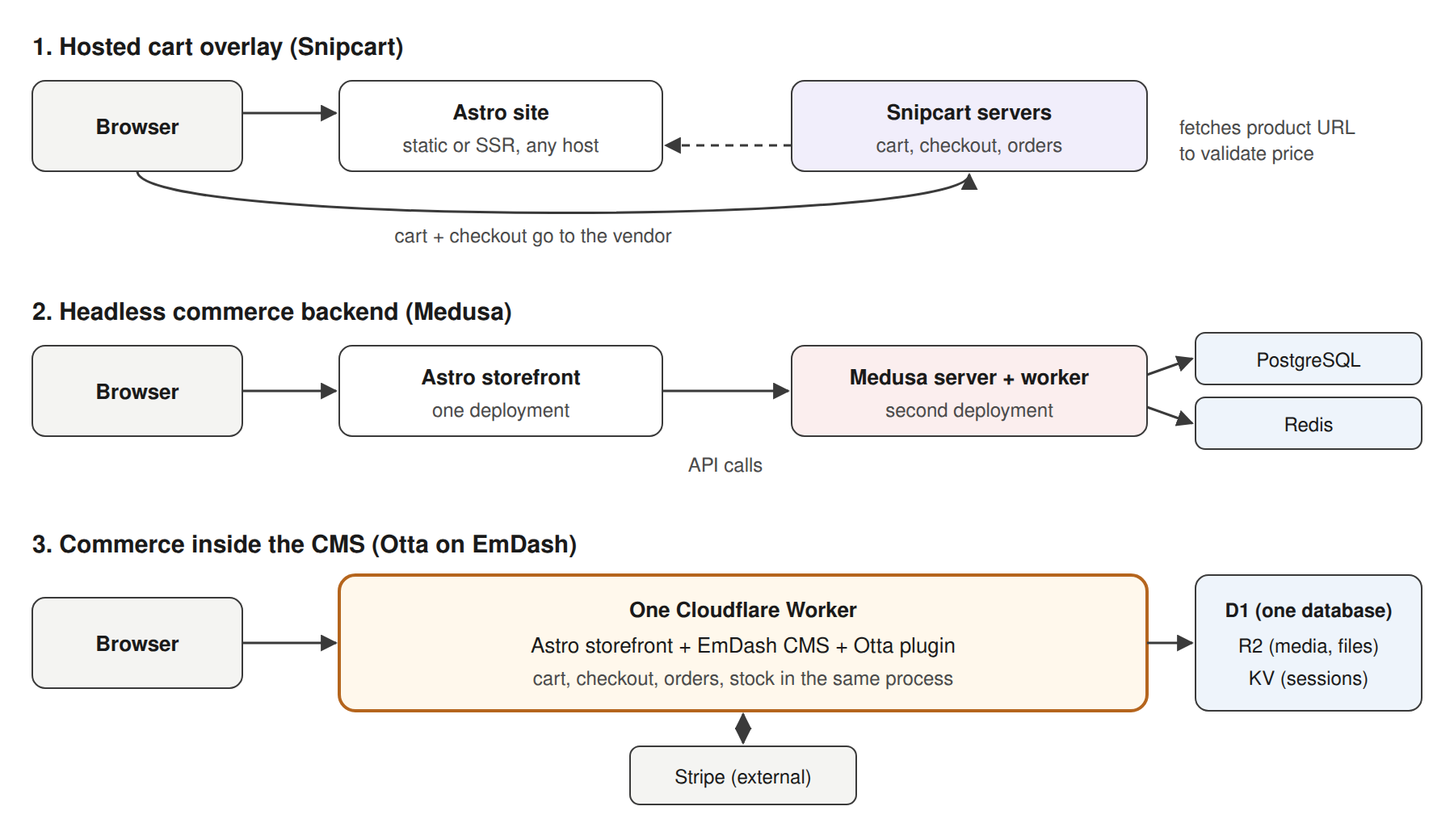
Astro sites sell through hosted cart overlays, hosted payment links, embedded platform widgets, headless commerce backends, or commerce inside the CMS. The five approaches differ mainly in where cart and order data lives and what you have to run.
- Hosted cart overlay (Snipcart, Paddle). A JavaScript cart on your pages; the vendor’s servers handle checkout and store orders. Because Snipcart fetches product data from your public pages to validate prices, it needs no server code on your side, but staging or password-protected product URLs fail validation.
- Hosted payment links (Stripe Payment Links). A Payment Link is a fixed set of line items (up to 20 via the API) on a Stripe-hosted page. Stripe’s create guide says "You can add up to 20 line items for flat rate prices." Shoppers cannot assemble a cart from your catalog.
- Embedded platform widget (Shopify Buy Button). Shopify’s Help Center says "the Buy Button sales channel is included in all Shopify subscription plans," so it needs a paid Shopify plan.
- Headless commerce backend (Medusa). A separate server your storefront calls over an API. Medusa’s deployment guide lists PostgreSQL, Redis, a server and a worker instance, and at least 2 GB of RAM; its installation guide asks for "Node.js v22.22.0+ (LTS versions only)." The core is MIT; its LICENSE separates "Enterprise Edition materials."
- Commerce inside the CMS (Otta on EmDash). Cart, checkout, orders and inventory run in the same Cloudflare Worker that renders your Astro pages, and the data sits in the same D1 database as your content.
What "no separate backend" means in practice
An Otta store is one Cloudflare Worker and one D1 database. The Otta README describes it this way: commerce runs in-process inside the same Worker, "so there is no separate service and no Postgres in the loop."
The product model is split in two:
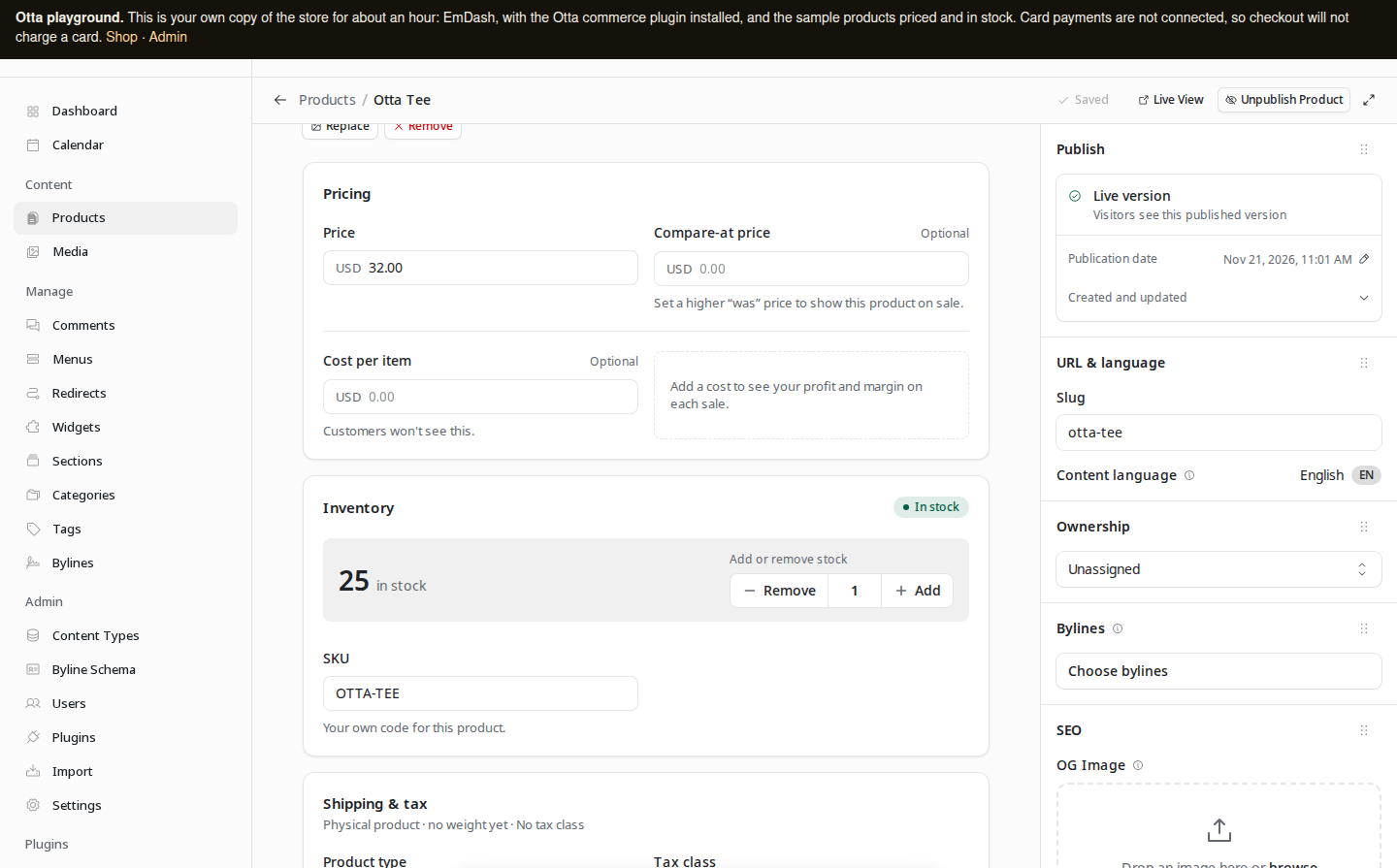
- Content (title, description, images, SEO) lives in EmDash’s
productscollection, edited like any other page. - Commerce fields (price, SKU, stock, tax and shipping settings) live in the plugin’s storage in the same D1 database. The two are joined by content id when a page renders.
Adding to the cart places a time-limited hold on stock. A cron job runs every minute to release expired holds and send queued order email. Media sits in R2. The only outbound calls are to Stripe and, if you set one, an email provider.
What Otta includes:
- Products and variants, inventory, cart, checkout and orders
- Coupons, tax and shipping
- Customer accounts with magic-link sign-in
- Digital downloads from a private R2 bucket
- Stripe card payments and cash on delivery
- An admin console for pricing and stock, orders, coupons, tax, shipping, reports and settings
- One store currency, chosen from many ISO 4217 currencies and stored in integer minor units (no multi-currency selling)
What the Astro code looks like
An Otta product page is an ordinary Astro page that reads the product from EmDash, asks the Otta plugin for price and stock in the same request, and hands the result to a theme component. This is the buy block from the default theme’s product view in the store package, trimmed of comments and styling:
{model.purchase !== null && (
	<>
		<PriceTag formatted={model.purchase.priceFormatted} size="lg" />
		<StockRule availability={model.purchase.availability} />

		{model.purchase.addToCart !== null && (
			<form method="POST" action="/cart/add">
				<AddToCartFields fields={model.purchase.addToCart} />
				<QtyField name="qty" value={1} min={1} />
				<button type="submit">Add to cart</button>
			</form>
		)}
	</>
)}
The add-to-cart button is a plain HTML form, so it works without client JavaScript. AddToCartFields renders the hidden fields /cart/add reads (SKU, product id, an idempotency key from the plugin, and a return path). The page that builds model is longer than this snippet: it handles not-found, store-unavailable and sold-out states. You change how a store looks by editing theme components like this one, not by writing commerce logic.
Quickstart: deploy an Astro store on Cloudflare
You can deploy an Otta store with one button and six steps. The maintainers ran the button end to end on a Workers Free account on 2026-11-10 (deploy, storefront, claim), on the template’s earlier release (EmDash 1.3.1, Otta 0.2.0), according to the README.
- Click Deploy to Cloudflare in the otta-store-template README. It copies the template into your GitHub account and creates the Worker, a D1 database, two R2 buckets (public media, private downloads), a KV namespace for admin sessions, an image binding, two rate limits and an every-minute cron.
- Provide one secret,
EMDASH_ENCRYPTION_KEY. Generate it and keep a copy, because it encrypts the payment keys you save in the admin:
npx emdash secrets generate- Turn off non-production branch builds. In the Cloudflare dashboard, go to your Worker → Settings → Build → Branch control, and turn off builds for non-production branches. Preview versions share your production D1 database and would run forward-only migrations against live data.
- Claim the store. Visit
/_emdash/adminonce, open the setup link from the[otta-setup]line in the Worker logs, choose Sample content, and create your account and passkey. Select Go live in Settings → General when you are ready. - Price your products in each product’s Pricing & stock cards. A sample product shows "Product not found" until you edit it and click Publish changes.
- Take payments. Add a Stripe webhook for
https://<your-site>/webhooks/stripe, subscribed topayment_intent.succeededandpayment_intent.payment_failed, and enter the keys in Store settings. Or turn on cash on delivery, which needs no provider.
Already have an Astro project?
The store ships as one Astro integration, @urumi.ai/otta-store. This is the whole astro.config.mjs, from the package README:
// astro.config.mjs
import cloudflare from "@astrojs/cloudflare";
import otta from "@urumi.ai/otta-store";
import { defineConfig } from "astro/config";

export default defineConfig({
	adapter: cloudflare(),
	integrations: [otta({ template: 1 })],
});
A site also needs wrangler.jsonc, src/worker.ts, src/live.config.ts and pinned dependencies, described in DEPLOYMENT.md §2.6.
Which EmDash version to install: use the exact versions in the template’s package.json. That is emdash and @emdash-cms/cloudflare 1.5.0 with the matching Otta packages, which match the peer dependencies of the published @urumi.ai/otta-store (read with npm view @urumi.ai/otta-store peerDependencies). In practice, the easiest start is the template, not an existing project.
Try it in the playground or locally
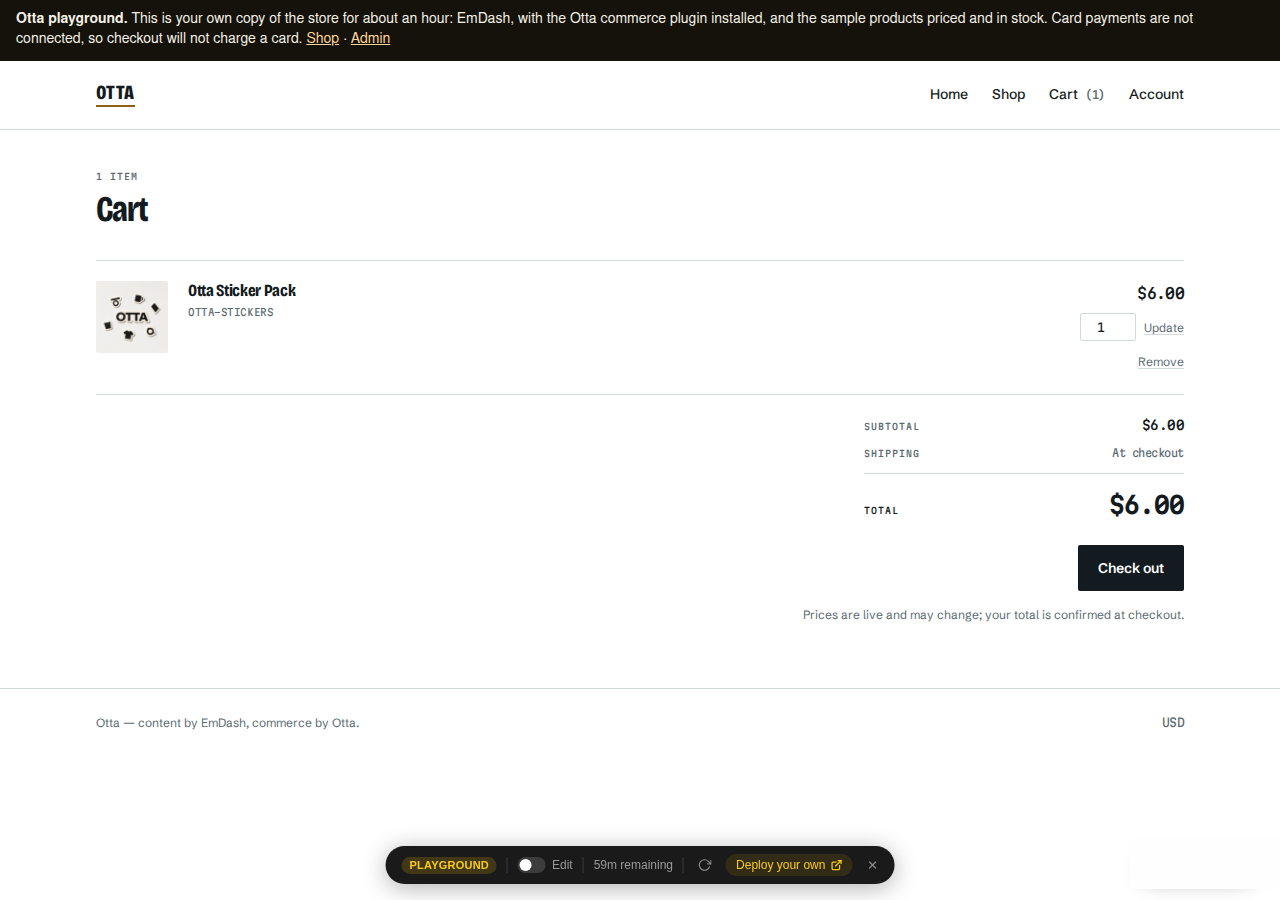
The hosted playground at try.otta.sh/playground gives you a disposable store for about an hour, with sample products priced and in stock. Card payments are not connected there.
To run the repository’s own reference site on your machine, follow the local development steps in the Otta README. That site is the maintainers’ development storefront; for your own store, start from the template.
What it costs to run on Cloudflare
On 50 orders and $2,000 of US card sales a month, fees are $73.00 for Otta on Workers Free or for Stripe Payment Links, $113.00 for Snipcart with Stripe, $125.00 for Paddle and $142.00 for the Shopify Buy Button on Basic with Stripe (vendor pricing pages, checked 2026-11-21).
Otta adds no license or platform fee (MIT), and the README states the template "works on Workers Free (R2 still needs a payment method on the Cloudflare account)." What you pay is Cloudflare usage and payment processing. Cloudflare’s published limits, as of 2026-11-21:
- Workers Free: 100,000 requests per day and 10 ms of CPU time per invocation. Workers Paid: $5/month minimum, with 10 million requests included (Workers pricing).
- D1 Free: 5 million rows read and 100,000 rows written per day, 5 GB storage (same page).
- R2: 10 GB-month of storage free, and no egress charges (R2 pricing).
- Stripe: 2.9% + 30¢ per successful US domestic card transaction (Stripe pricing).
Worked example (illustrative). Assume 50 orders a month at $40 each ($2,000 in sales), all US domestic cards, and traffic inside Workers Free. Using the pricing pages above, as of 2026-11-21:
| Option | Monthly fees on $2,000 / 50 orders | How it’s computed |
|---|---|---|
| Stripe Payment Links | $73.00 | 50 × (2.9% × $40 + $0.30) |
| Otta on Workers Free | $73.00 | Stripe fees only; R2 needs a payment method on the account; $78.00 on Workers Paid ($5 minimum) |
| Snipcart with Stripe | $113.00 | 2% of $2,000 ($40) + Stripe fees ($73) |
| Paddle | $125.00 | 50 × (5% × $40 + $0.50); includes payment processing and sales-tax handling as merchant of record |
| Shopify Buy Button (Basic, Stripe as third-party provider) | $142.00 | $29 Basic plan (billed yearly) + 2% third-party fee ($40) + Stripe fees ($73). Shopify Payments card rates differ and are not computed here |
Otta equals Stripe Payment Links on fees by construction, because it charges nothing on top of Stripe. The $40 a month saved against Snipcart in this example comes at a cost the table does not show: you run EmDash, maintain your own storefront code and accept pre-1.0 software. The example also leaves out hosting for the Astro site in the hosted options, sales tax, refunds, international cards and currency conversion. Card checkout on Workers Free has not been tested against the 10 ms CPU limit, so treat the Free row as unproven for card sales until you check your own Worker’s CPU time.
Trade-offs and limits to know before you switch
Otta is production-ready today and pre-1.0. The two limits that decide most cases come first:
- EmDash and Workers only. It needs server rendering on Cloudflare Workers with EmDash. There is no static mode and no other host.
- Pre-1.0. APIs, storage shapes, settings and admin screens may change between releases. Pin exact versions (
pnpm add -E). - You own the storefront. Snipcart gives you a hosted cart UI. Otta’s storefront is Astro code you theme and maintain yourself.
- Email needs a provider. Without one, order emails wait up to 72 hours and are then skipped, and sign-in links are not sent. The default Cloudflare Email Sending provider needs Workers Paid.
Known issues, open on GitHub as of 2026-11-21:
- Delayed payment methods. SEPA Direct Debit, ACH, Bacs and bank transfer currently end in an expired order and an automatic refund (#606). Turn them off in Stripe.
- Large variant saves on Free. Dropping or re-adding many sized variants with SKUs in one save fails past about 16 to 20 variants on Workers Free (#637).
Otta is not the only commerce option for EmDash, and this list is not exhaustive. As of 2026-11-21: DashCommerce Lite is an MIT-licensed registry plugin for simple products with Stripe hosted Checkout, and its listing says it needs Workers Paid. Vendwick is a commercial plugin ($59/year or $249 lifetime) for digital and physical goods with license keys; its page does not state an open-source license. Katalore offers Catalog Studio, a free MIT plugin for products, variants, galleries and collections, and sells a separate early-access storefront kit with cart and Stripe checkout. Ritely lists an EmDash commerce plugin as coming soon, with a launch-notification waitlist.
Moving from Snipcart: what you redo by hand
Moving from Snipcart to Otta is a manual job: as of 2026-11-21, Otta has no importer for Snipcart data or product CSVs. Snipcart reads product details from your own pages at checkout, so your product names, descriptions and images already live in your markup or CMS. Export order and customer history from the Snipcart dashboard.
- Keep your catalog source. Your product names, descriptions and images live in your HTML or CMS.
- Create products in EmDash. Enter them as
productscontent in the EmDash admin. For many products, have an agent create them through EmDash’s content tools, or write a script against your site’s admin API. The repository’sseed-demo-commerce.tsis a working example: it publishes products and sets SKU, price and stock through the same admin route the editor uses. - Set price and stock in each product’s Pricing & stock cards, or have an agent do it with Otta’s admin MCP tools.
- Replace
snipcart-add-itembuttons. Snipcart puts product data on a button; Otta’s product page renders a plain HTML form that posts to/cart/add. Before and after, simplified:
<!-- Before: Snipcart -->
<button class="snipcart-add-item"
  data-item-id="stickers" data-item-name="Sticker Pack"
  data-item-price="6.00" data-item-url="/products/stickers">
  Add to cart
</button>

<!-- After: Otta (simplified; the theme renders this) -->
<form method="POST" action="/cart/add">
  <input type="hidden" name="sku" value="OTTA-STICKERS">
  <input type="hidden" name="productId" value="…">
  <input type="hidden" name="idempotencyKey" value="…">
  <input type="hidden" name="renderedKey" value="…">
  <input type="hidden" name="returnTo" value="…">
  <input type="number" name="qty" value="1" min="1">
  <button type="submit">Add to cart</button>
</form>
The hidden fields come from the theme’s AddToCartFields component; the quantity field and button are the theme’s own markup. Don’t hand-write the hidden fields: the idempotencyKey comes from the plugin, so a double-click doesn’t add twice, and the route rejects a request without one. Note that the price is not in the markup; Otta reads it from its own storage.
- Connect payments. Add the Stripe webhook and keys (quickstart step 6), or turn on cash on delivery.
- Remove the Snipcart script and its
data-item-*attributes.
FAQ
Can I use Astro for ecommerce without Shopify?
Yes. Astro’s e-commerce guide lists Lemon Squeezy, Paddle and Snipcart, and Stripe Payment Links work from any page. You can also run a headless open-source backend such as Medusa, or run commerce inside the CMS with Otta on EmDash. Lemon Squeezy says it will shut down on March 31, 2027.
What is an open-source Snipcart alternative for Astro?
We recommend Otta (MIT), which we build; Medusa (MIT, with Enterprise Edition materials) is also open source. Otta runs inside an EmDash site on Cloudflare Workers with no separate server. Medusa runs as its own server with PostgreSQL and Redis. Neither is a drop-in replacement for Snipcart on a static site.
Can I sell from a static Astro site with only Stripe Payment Links?
Yes, for a small catalog. A Payment Link is a fixed set of line items (up to 20 via the API) on a Stripe-hosted checkout page, and Stripe charges its standard processing fee (2.9% + 30¢ per US domestic card, as of 2026-11-21). Shoppers cannot build their own cart from your catalog.
Does Otta work with a static Astro site?
No. Otta needs server rendering on Cloudflare Workers, with EmDash as the CMS, so it does not support a static Astro build.
Does Otta need a database server or Redis?
No. Otta stores commerce data in the site’s D1 database through EmDash plugin storage, in the same Worker that renders the site. Media and downloads go to R2, and admin sessions to KV.
Can Otta run on the Cloudflare Workers Free plan?
Yes. The README says the template works on Workers Free, and the maintainers tested the Deploy button end to end on a Workers Free account on 2026-11-10, on EmDash 1.3.1; card checkout on Free is not yet tested. R2 still needs a payment method on the account. Order email through Cloudflare Email Sending needs Workers Paid. Saving more than about 16 to 20 sized variants at once fails on Free (issue #637).
Next steps
- Deploy a store: use the Deploy to Cloudflare button in the otta-store-template README.
- Try it first: try the Otta playground.
- Read the source: github.com/UrumiAI/otta.sh. A star helps others find it.
Otta runs the whole store inside EmDash, in one Cloudflare Worker. It is production-ready today and pre-1.0, so pin exact versions and review each update.
About the author: Vedanshu Jain is a former WooCommerce core engineer and tech lead, and builds Otta at Urumi. GitHub · WordPress.org
Sources (all opened 2026-11-21)
- Astro Docs, E-commerce guide and EmDash & Astro
- Cloudflare, EmDash 1.0: the stable CMS with a secure plugin registry (2026-09-28)
- Snipcart, Pricing and Order validation
- Stripe, Pricing, Payment Links, Create a payment link and Checkout
- Paddle, Pricing
- Foxy, Pricing
- Lemon Squeezy, Pricing
- Shopify, Pricing and Buy Button help
- Medusa, LICENSE, Installation, Deployment, Pricing
- Cloudflare, Workers pricing and R2 pricing
- GitHub, Adammatthiesen/astro-snipcart (archived 2024-07-18) and lloydjatkinson/astro-snipcart (not archived)
- EmDash commerce plugins: DashCommerce Lite, Vendwick, Katalore / Catalog Studio, Ritely eCommerce
- Otta, README, store package README, DEPLOYMENT.md, otta-store-template, issue #606, issue #637, npm @urumi.ai/otta-store
Last updated Nov 23, 2026