 Urumi.AI
EmDash Cloudflare lock-in: a store portability audit
EmDash runs on Node, but an Otta store's template has 3 Cloudflare bindings with no replacement wired and 1 untested. Audit and export commands.
Updated 2026-11-21 · Versions we tested: EmDash 1.3.1 with Otta 0.2.0, on the published template of that date. The template now pins EmDash 1.5.0, and we have not re-run the export on it.
Is EmDash Cloudflare lock-in real?
No, not at the code level. EmDash is MIT-licensed and runs on Node.js with SQLite, PostgreSQL or libSQL. An Otta store is more tied: its one-click template relies on Cloudflare for rate limiting (which cash on delivery requires), private downloads and scheduled jobs. Store data exports as SQL. We tested that on a local copy with sample products and no orders yet; a live store’s orders sit in the same table.
We tried to export our own EmDash store template. The obvious command failed.
Otta is an open-source (MIT) commerce plugin for EmDash that keeps products, cart, checkout, orders and inventory inside the CMS on Cloudflare Workers, with no separate backend, database server or Redis.
We built Otta on Workers, so we audited our own lock-in and tried to break the export. This post includes the parts that make our store harder to move. To see the store being audited, try the Otta playground.
Key findings
- The plain
wrangler d1 exportfailed on our store template because product search creates an FTS5 virtual table. Exporting the 72 regular tables (of 79) by name worked. - EmDash’s built-in backup leaves out plugin data, which is where Otta keeps orders, stock and customers.
- Cash on delivery is offered only where the write rate-limit binding exists. Leave Cloudflare without it and the store stops offering cash on delivery. No drop-in replacement exists today.
- An Otta store’s template uses 8 Cloudflare resources: 7 bindings plus a cron trigger. EmDash documents an off-Cloudflare replacement for 4 of them (the D1 database, the media bucket, sessions and the cron). 3 bindings have no replacement wired in Otta (the private downloads bucket and both rate limiters). 1, the Images binding, is untested. Counted on 2026-11-21 from the public template’s
wrangler.jsonc. - The named-table export is a data copy, not a clone: it had 0 indexes, where a full export of the same database had 204.
What we measured
- 72 of 79 tables exported by name; the other 7 are search-index tables and one Cloudflare metadata table.
- 0 indexes in the named-table export, against 204 in a full export of the same database.
- Row counts matched for every table we counted after importing the export into a fresh SQLite file.
The export in three commands
TABLES=$(npx wrangler d1 execute <db> --remote --json --command "SELECT name FROM sqlite_master WHERE type='table' AND name NOT LIKE '\_emdash\_fts\_%' ESCAPE '\' AND name NOT LIKE '\_cf\_%' ESCAPE '\' AND name NOT LIKE 'sqlite\_%' ESCAPE '\'" | jq -r '.[0].results[].name | "--table=" + .')
npx wrangler d1 export <db> --remote $TABLES --output=./store.sql
sqlite3 fresh.sqlite < store.sql
The full procedure explains each step and its caveats.
How we tested
- Versions we tested: EmDash 1.3.1 with Otta 0.2.0 (the published one-click template on that date), wrangler 4.159.0. We also read the EmDash 1.5.0 docs and package code. The template now pins EmDash 1.5.0, and we have not re-run the export on it.
- Date: all runs, page reads and screenshots on 2026-11-21.
- Local only: we ran the template and the export with
--localagainst a local D1 copy holding the three seeded sample products, before any orders. We did not run against a live database or re-run the export on EmDash 1.5.0.
Is EmDash vendor lock-in about the license, the runtime or the data?
EmDash vendor lock-in is about the data and operations, not the license: EmDash and Otta are both MIT-licensed (no license lock-in), EmDash has a documented Node.js path with some features left on Cloudflare (partial runtime lock-in), and the real cost is switching cost, which is what this audit measures.
How do I self-host EmDash off Cloudflare?
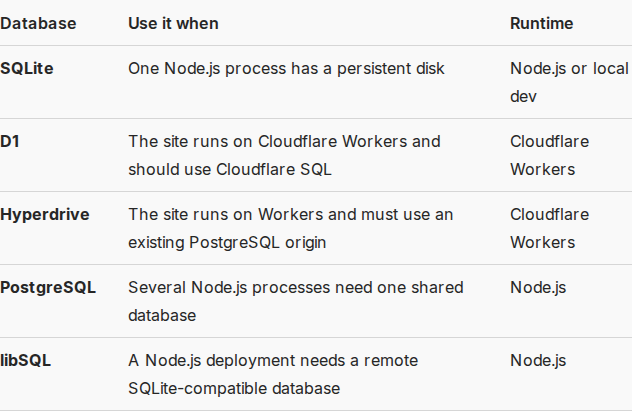
You can self-host EmDash off Cloudflare in three steps, according to EmDash’s own docs:
- Swap the runtime and database. Build with the
@astrojs/nodeadapter and pick one database adapter: SQLite for one process with a persistent disk, PostgreSQL for several processes, or libSQL for remote SQLite. EmDash’s database page says: "Choose one database adapter for each deployment." - Swap storage and sessions. EmDash’s Node docs say "S3-compatible storage works with Cloudflare R2 (via S3 API), MinIO, and other S3-compatible services". Sessions move from KV to Redis or a file, per the EmDash README.
- Move the data. Export the D1 database as SQL using the export procedure in this post, and copy media out over the S3 API.
Self-hosting EmDash leaves behind the Cloudflare-hosted extras that came with 1.0, and an Otta store also leaves behind the Cloudflare resources listed in the Otta section of this audit. The Node docs also note that "The built-in scheduler runs only while a Node.js process is running", so a server that sleeps pauses scheduled work.
What the lock-in debate says, and what changed at 1.0
The EmDash lock-in debate started at launch. Cloudflare, which makes EmDash, framed lock-in as a marketplace and license problem. Its launch post (Matt Taylor and Matt Kane, 2026-04-01) says "Solving plugin security means solving marketplace lock-in" and "Plugins can have any license: they run independently of EmDash and share no code", and adds "You can run EmDash anywhere, on any Node.js server" (Cloudflare blog).
The critics answered the next day. Matt Mullenweg, co-founder of WordPress, the CMS EmDash is positioned to replace, wrote on 2026-04-02 "The plugin security only works on Cloudflare" [emphasis in original] and "I think EmDash was created to sell more Cloudflare services" (ma.tt). His line "You can run it anywhere; there’s no lock-in" in the same post describes WordPress, not EmDash; we checked the page so as not to quote it out of context. Dan Maby of Blue 37, a digital agency that builds with WordPress among other tools, wrote on 2026-04-02 that the Cloudflare tie-in "is a softer form of lock-in, but it is lock-in nonetheless" (Blue 37).
After 1.0, Roger Montti at Search Engine Journal (2026-09-29) listed the Cloudflare-tied features, including EmDash Build, Sandbox containers, Artifacts and the plugin registry, while noting "It’s possible to host an EmDash website without Cloudflare by using a server environment that supports Node.js" (SEJ).
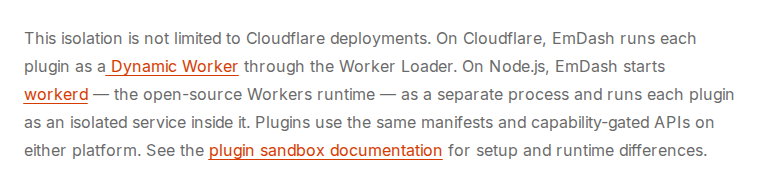
Cloudflare’s 1.0 post (2026-09-28) disputes the plugin-security point directly: "This isolation is not limited to Cloudflare deployments. On Cloudflare, EmDash runs each plugin as a Dynamic Worker through the Worker Loader. On Node.js, EmDash starts workerd — the open-source Workers runtime — as a separate process" (Cloudflare blog). None of these pieces shows what you run to get orders out, or which Cloudflare resources a real store depends on. That is what this audit adds.
EmDash layer by layer: what runs off Cloudflare
This table covers EmDash itself, before any commerce plugin. Sources are EmDash’s docs and README and Cloudflare’s 1.0 post, all re-read on 2026-11-21.
| Layer | On Cloudflare | Off Cloudflare (Node.js) | Verdict |
|---|---|---|---|
| License | MIT | MIT | Portable |
| Database | D1, or Hyperdrive to PostgreSQL | SQLite, PostgreSQL, libSQL | Portable |
| Media | R2 (no egress fees, per R2 pricing) | S3-compatible storage or local disk | Portable |
| Sessions | KV | Redis or file | Portable |
| Plugin isolation | Each plugin as a Dynamic Worker | workerd child process. EmDash’s docs disagree on sandboxing plugins on Node with PostgreSQL (checked 2026-11-21); Otta’s template runs the plugin trusted | With work |
| Scheduled tasks | Cron Trigger | Built-in scheduler, "only while a Node.js process is running" | With work (needs an always-on process) |
| Full-text search | FTS5 on D1 | FTS5 on SQLite or libSQL; "unavailable with PostgreSQL" | Partly portable |
| EmDash Build, Artifacts, Sandbox containers, default registry | Build is an open-sourced alpha that runs on Cloudflare: "each project gets its own Cloudflare Sandbox container"; the default registry is hosted by EmDash (Cloudflare 1.0 post, 2026-09-28; listed as Cloudflare-tied by SEJ, 2026-09-29; checked 2026-11-21) | No documented equivalent; we did not test running them elsewhere | Cloudflare-tied today |
| Built-in backup | Available, no plugin data | Same | Portable, incomplete for stores |
EmDash’s docs disagree on sandboxing plugins on Node with PostgreSQL (checked 2026-11-21); we run plugins trusted. For why sandboxing matters for a store at all, see Sandboxed Plugins: Why a Store Plugin Shouldn’t Have Full Database Access.
Where an Otta store depends on Cloudflare (and where it doesn’t)
The plugin itself. @urumi.ai/otta-plugin imports nothing Cloudflare-specific. We checked by grepping the imports of the plugin, storage adapter, domain and payment packages on 2026-11-21; Cloudflare packages appear only in comments. The plugin is written to EmDash’s sandboxed-plugin rules (it registers as format: "standard"), and its README describes the constraint as "no DB driver, no node: builtin, no host import". That means it does not need Cloudflare internals. It does not mean it runs on Node: the one-click template registers it trusted, in-process, and we have not run the Otta store on Node. Otta’s sandbox tests use its own workerd harness rather than EmDash’s sandbox runner.
Where the data lives. Otta keeps commerce state in EmDash’s per-plugin document store, which is one SQL table, _plugin_storage, keyed by (plugin_id, collection, id) with a JSON data column. Otta’s collections include inventory, carts, orders, order notes, product commerce, coupons, rules, customer identity, entitlements and payment events. Product titles, descriptions and images are ordinary EmDash content in their own table. Settings and encrypted payment keys sit in EmDash’s options table under plugin:otta:. The storage adapters are tested against SQLite in every run, against PostgreSQL in CI, and against D1 in a local workerd simulator.
The one-click store. @urumi.ai/otta-store is Cloudflare-specific by design. It requires @astrojs/cloudflare and @emdash-cms/cloudflare. The template declares 7 bindings and 1 cron trigger:
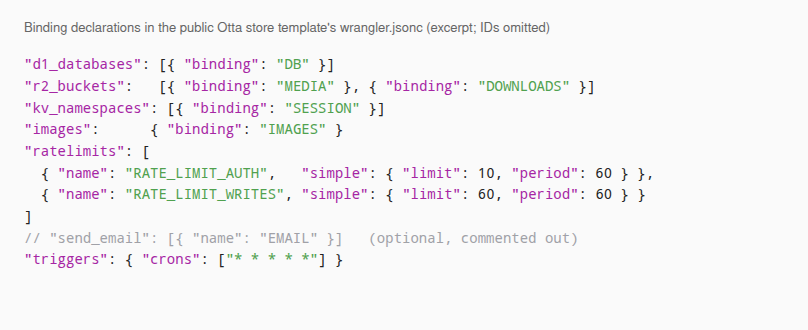
wrangler.jsonc (excerpt, IDs omitted).| Piece | What the template uses | Off Cloudflare | What happens without it (from source) |
|---|---|---|---|
| Commerce data | D1 binding, _plugin_storage | Any EmDash database | n/a |
| Product media | R2 binding MEDIA | S3-compatible storage | n/a |
| Paid downloads | R2 binding DOWNLOADS (private) | No replacement wired in Otta | "downloads are then off" |
| Admin sessions | KV binding SESSION | Redis or file, via EmDash | n/a |
| Rate limits | 2 Rate Limiting bindings: sign-in 10 per 60 s, cart and checkout writes 60 per 60 s | No replacement wired in Otta | The limiter "lets everything through"; cash on delivery is not offered |
| Images | IMAGES binding, added by the @astrojs/cloudflare adapter’s default image service, not by Otta code | Untested as of 2026-11-21 | Otta’s playground build sets imageService: "passthrough" and runs with no binding; images are served unresized |
| Scheduled jobs | Cron Trigger (not a binding), every minute | EmDash’s Node scheduler (needs an always-on process) | These jobs don’t run; we have not tested the effect over time |
| Optional Cloudflare Email Sending | Otta sends through EmDash’s host email API (design note); a non-Cloudflare provider is untested as of 2026-11-21 | No sender until one is configured | |
| Payment keys | Encrypted under EMDASH_ENCRYPTION_KEY | Same environment variable | Without the key, re-enter them |
Rate limits and cash on delivery. In an Otta store, cash on delivery is offered only where the write rate-limit binding exists. The limiter itself fails open by design, so checkout stays up without it; only cash on delivery refuses. A design note makes cash on delivery conditional on that binding, because the limit bounds how fast one client can create unpaid orders that hold stock, and the store’s source says the check "does NOT fail open". The site code reads the Cloudflare binding by name and expects its limit() method, so another limiter could only stand in if you change the site code. There is no drop-in replacement today.
The cron. The template’s every-minute Cron Trigger handles, in the template’s words, "scheduled publishing, expiring stock holds and the order email queue."
What we did not test (and how to correct us)
We have not run:
- Otta on EmDash-on-Node, end to end. There is no
@astrojs/nodebuild of the store in the repo. - The export on EmDash 1.5.0. Our export run used EmDash 1.3.1.
- The Images binding replaced by another image service, or email sent through a non-Cloudflare provider.
- A migration of an Otta store’s data to PostgreSQL.
- The Otta store under EmDash’s real sandbox runner on Node. (Otta’s own test harness does run the plugin in
workerd.) emdash site exportagainst a live site (it needs a running instance and a token). What we say about it comes from reading the package code, and we did not verify whether it carries settings.
If you have done any of these, open an issue on GitHub with what happened, and we will correct this post. The export method below applies to any EmDash plugin that keeps its data in EmDash plugin storage. If you maintain another EmDash commerce plugin, check its docs for where it keeps data, and send us your export notes.
How to export your EmDash store data, including orders
To export an Otta store from D1, export every table except the FTS5 search tables with repeated --table flags.
EmDash’s own export tools were built for content, and none of them carries plugin data. We read the code of both EmDash 1.5.0 and 1.3.1, and the scope is the same in each:
| Tool | Content | Users | Settings | Plugin data (orders, stock, customers) |
|---|---|---|---|---|
| EmDash backup / snapshot | Yes | No (excluded) | Only site: options plus site title, tagline and locale | No: every _plugin_ table is excluded |
emdash site export (.emdash package) | Yes | Yes | Not verified | No plugin-storage code path (our reading of the package) |
emdash export-seed --with-content=all | Yes (we ran it: 3 products) | No | Site title and tagline | No (we ran it) |
wrangler d1 export, all tables | Yes | Yes | Yes | Yes (we ran it) |
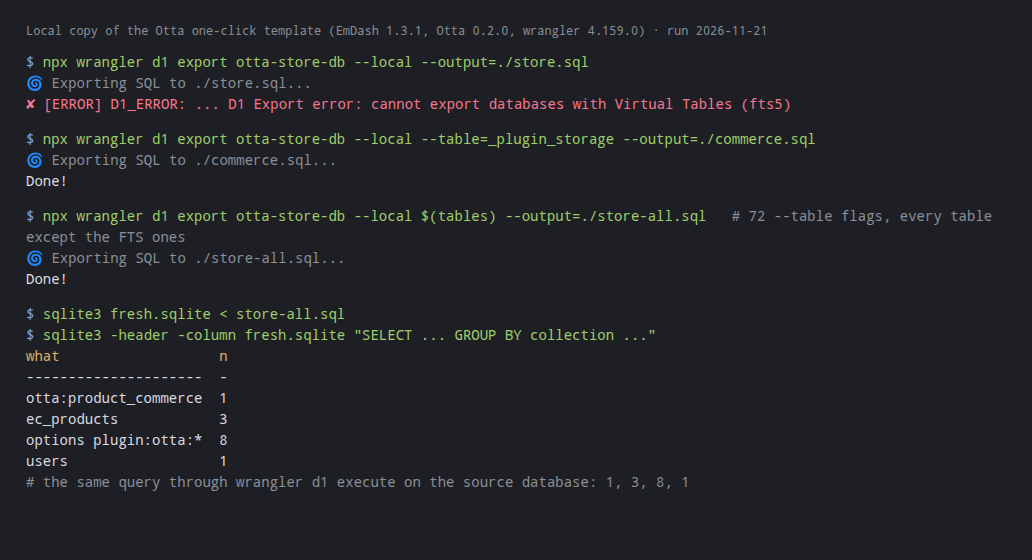
What we ran. On 2026-11-21 we ran the public one-click template locally (EmDash 1.3.1, Otta 0.2.0, wrangler 4.159.0) with its three seeded sample products, before any orders, and exported the local D1 database:
- The plain full export failed. It returned "D1 Export error: cannot export databases with Virtual Tables (fts5)". The products collection has search turned on, so EmDash creates an FTS5 table for it. Cloudflare documents this: "Export is not supported for virtual tables, including databases with virtual tables" (D1 docs).
- Exporting named tables worked, including all 72 regular tables at once (of 79; the other 7 are the search index and one Cloudflare metadata table).
- The data loaded into a fresh SQLite file with the
sqlite3command-line tool, and the row counts matched the source:
| What we counted | Source (D1, local) | Fresh SQLite after import |
|---|---|---|
| Otta product-commerce records | 1 | 1 |
Products (EmDash content, ec_products) | 3 | 3 |
Otta settings and state rows (options, plugin:otta:*) | 8 | 8 |
| Users | 1 | 1 |
A live store adds orders, carts and coupons to the same _plugin_storage table; the method is the same.
The procedure
These are the commands we ran. We ran them with --local only; --remote is the same command pointed at your live database. Replace <db> with your D1 database name, which the template calls otta-store-db. Run them at a quiet hour, because, per Cloudflare’s D1 docs, "A running export will block other database requests."
- List every table except the search tables, as
--tableflags (needsjq):
TABLES=$(npx wrangler d1 execute <db> --remote --json --command "SELECT name FROM sqlite_master WHERE type='table' AND name NOT LIKE '\_emdash\_fts\_%' ESCAPE '\' AND name NOT LIKE '\_cf\_%' ESCAPE '\' AND name NOT LIKE 'sqlite\_%' ESCAPE '\'" | jq -r '.[0].results[].name | "--table=" + .')- Export them in one file:
npx wrangler d1 export <db> --remote $TABLES --output=./store.sqlCloudflare’s docs show --table once. Repeating it worked for us in wrangler 4.159.0.
- For a quick copy of orders, stock, coupons and customers only, export the plugin table:
npx wrangler d1 export <db> --remote --table=_plugin_storage --output=./commerce.sqlThis file is not the whole store. The product catalog (titles, descriptions, images) is in ec_products, and Otta’s settings and encrypted payment keys are in options. Add --table=ec_products --table=options, or use step 2.
- Copy media. R2 speaks the S3 API, and Cloudflare says "There are no charges for egress bandwidth for any storage class" (R2 pricing). Any S3 tool works; Cloudflare documents rclone with R2. Copy both buckets:
MEDIA(public images) andDOWNLOADS(paid files). - Keep
EMDASH_ENCRYPTION_KEYseparately. The Stripe secret key, the webhook signing secret and the webhook edge token are stored AES-GCM-encrypted under it (design note). Theoptionsrows in your export hold only the encrypted envelopes. Without the key, you re-enter those three secrets on the new host.
Caveats
- Repeating
--tableis undocumented. It worked in wrangler 4.159.0 but may change between wrangler versions. Check that the exported file contains every table you expected, for example by comparing row counts in the source and in a SQLite import, as we did. - The named-table export is a data copy, not a clone. It carries table definitions and rows, but no indexes or triggers. Our all-tables file had 0 indexes. A full export of the same database (taken after dropping search on a throwaway copy) had 204.
- Cloudflare’s workaround is to drop the virtual tables, export, then recreate them. We tried it on a copy. The export then succeeded, but EmDash’s three search triggers on the products table were left pointing at a table that no longer existed. We would not do that on a live store.
- Time Travel is not an export. It restores the same database in place, back up to 30 days on Workers Paid or 7 days on Free, and cannot yet clone to a new database (Time Travel docs). Otta’s own DEPLOYMENT.md suggests a Time Travel bookmark or a full export before upgrades. On a store with search turned on, use the all-tables export instead of the full export.
- The export is personal data.
commerce.sqlandstore.sqlhold customer emails, delivery addresses, phone numbers and order history. Store them encrypted, limit who can read them, delete old copies, and never commit them to a repository. The export also contains the encrypted payment-key envelopes, so the encryption key must travel by a different route.
Moving the data to SQLite or PostgreSQL
A D1 export is SQLite-dialect SQL: in our test, row counts matched after importing the all-tables export into a fresh SQLite file with sqlite3 fresh.sqlite < store.sql, though the file has no indexes and we have not booted EmDash on it. Third-party tools convert D1 exports to PostgreSQL, and Otta’s commerce rows are JSON text in one data column under a three-part primary key, but we have not tested an Otta migration to PostgreSQL, where EmDash’s built-in full-text search is unavailable.
So is it lock-in? A verdict by role
License lock-in: none. Runtime lock-in: partial. Switching cost: real, and measurable.
| You are | Switching cost (our judgment) | Where it sits |
|---|---|---|
| A blogger or content site on EmDash | Low | The Node path is documented; EmDash’s backup and site export cover content |
| A store on Otta today | Medium | Data leaves as SQL (all-tables export, not the plain one). The deployment is Cloudflare-shaped: the template, 3 bindings with no Otta replacement (downloads and both rate limiters), the untested Images binding, and the cron. We expect leaving to mean rebuilding the site on @astrojs/node, not rewriting commerce, but we have not run Otta on Node. Cash on delivery needs a write limiter, which you would have to replace in site code |
| An agency standardizing on EmDash | Grows with use | EmDash Build, Artifacts, Sandbox containers and the default registry are Cloudflare-tied today |
Our own conflict. We chose a Cloudflare-only store template, and we have not committed to a Node.js target for it. If you need one, open an issue; demand there is what would move it.
Running on Workers is why Otta can run the whole store inside EmDash, in one Cloudflare Worker, and that is what you give up when you leave; The Cheapest Way to Run an Online Store in 2026 covers what that costs. If you are staying, EmDash Store Template: Deploy to Cloudflare in One Click walks through the setup.
What would change this verdict (as of 2026-11-21)
- A Node.js (
@astrojs/node) target for the Otta store template. - A rate-limit adapter in Otta that does not depend on the Cloudflare binding, so cash on delivery works off Cloudflare.
- EmDash’s backup including plugin tables, or
wrangler d1 exportsupporting virtual tables. - EmDash’s docs agreeing on whether sandboxed plugins run on Node with PostgreSQL.
EmDash Cloudflare lock-in FAQ
Is EmDash locked to Cloudflare?
No. EmDash is MIT-licensed and documents a Node.js deployment with SQLite, PostgreSQL or libSQL and S3-compatible storage. What stays on Cloudflare are hosted extras such as EmDash Build’s Sandbox containers. An Otta store is more tied: its template needs Cloudflare for rate limiting, private downloads and its cron.
Can I self-host EmDash without Cloudflare?
Yes. Self-hosting EmDash needs Node.js 22 with the @astrojs/node adapter; the docs name v22.23.4 or higher on current Astro, or v22.16.0 on Astro 7.3 or earlier (checked 2026-11-21). Use SQLite, PostgreSQL or libSQL and S3-compatible or local storage. Scheduled tasks need an always-on process.
Do EmDash plugins stay sandboxed on Node?
Cloudflare’s 1.0 post (2026-09-28) and EmDash’s Node docs say yes, through a workerd child process, but EmDash’s database page says "Sandboxed plugins are D1-only", so on PostgreSQL plan to run plugins trusted until the docs agree.
Does EmDash’s backup include my orders?
No. In EmDash 1.3.1 and 1.5.0 the snapshot behind the built-in backup excludes every _plugin_ table, which is where plugins like Otta keep orders, stock and customers. It also leaves out users and plugin settings. Use a wrangler d1 export of all tables except the search tables instead.
How do I export my store’s data from D1?
Export every table except the FTS5 search tables with repeated --table flags on wrangler d1 export, as in the export procedure in this post. A plain wrangler d1 export fails on a store with search turned on. --table=_plugin_storage alone gives orders, stock, coupons and customers, but not the catalog or settings.
What do I lose leaving Cloudflare with an Otta store?
You lose the one-click deploy and, until you replace them, the rate limiters, cash on delivery, private downloads and the Images binding. The limiter fails open, so checkout keeps working, but cash on delivery is not offered. The every-minute cron’s jobs need an always-on process instead.
Audit it yourself
Everything in this audit can be checked in the source. If we got something wrong, tell us.
- Open an issue to correct this post, to ask for a Node.js target, or to report running one of the things we haven’t.
- Star the repo on GitHub and read the source.
- Try the Otta playground: a disposable store that lasts about an hour, with no account and no card payments.
- Deploy to Cloudflare: deploy the one-click store and read its bindings yourself.
For the wider picture, read how to add a store to EmDash and our survey of EmDash plugins.
About the author: Vedanshu Jain is a former WooCommerce core engineer and tech lead, and builds Otta at Urumi. GitHub · WordPress.org
Last updated Nov 23, 2026