 Urumi.AI
Sandboxed Plugins: Why a Store Plugin Shouldn't Have Full Database Access
A WordPress plugin can read your whole database. A sandboxed EmDash plugin gets only what it declares. What that means for an online store in 2026.
A sandboxed plugin can only touch what it declared and an admin approved: its own storage, named capabilities and allowed hosts. A WordPress plugin runs inside the site’s PHP process and can read the whole database. Sandboxing limits the blast radius of a compromised plugin; it does not stop the compromise.
Updated 2026-11-21 · EmDash docs as fetched 2026-11-21; Otta’s store template pins EmDash 1.5.0
This post maps two 2026 WordPress supply-chain attacks, ShapedPlugin and BdThemes, onto what a sandboxed plugin could and couldn’t reach, and ends with a ten-step checklist. Already hit by a plugin breach? Jump to the checklist.
Of seven store assets we mapped, a sandboxed plugin cannot reach four: database credentials, other plugins’ data, admin account creation and installing more code.
Try the Otta playground (a disposable store that lasts about an hour, with no account and no card payments) · Deploy to Cloudflare · Star Otta on GitHub to follow releases on the way to 1.0.
What is a sandboxed plugin, and why does it matter for a store?
A sandboxed plugin runs in its own isolated runtime and can use only what it declared and an administrator approved, per Cloudflare’s EmDash 1.0 announcement (2026-09-28): its own storage, named capabilities and allowed hosts. A WordPress plugin runs inside the site’s PHP process, so one compromised update can read the whole database.
Note on our own product. Otta’s one-click template registers it in-process today; the trade-off is explained in the section on how the template runs Otta.
If you run WooCommerce and are weighing EmDash plus Otta as an open-source Shopify alternative on Cloudflare, this post covers what actually changes about plugin risk, and what doesn’t.
Key takeaways
- A WordPress plugin can read the whole site database; a sandboxed EmDash plugin gets its own storage plus only the capabilities and hosts it declared.
- Sandboxing limits the blast radius of a compromised plugin. It does not stop the compromise, and it does not protect the data the plugin itself stores.
- Only plugins loaded through a sandbox runner are isolated.
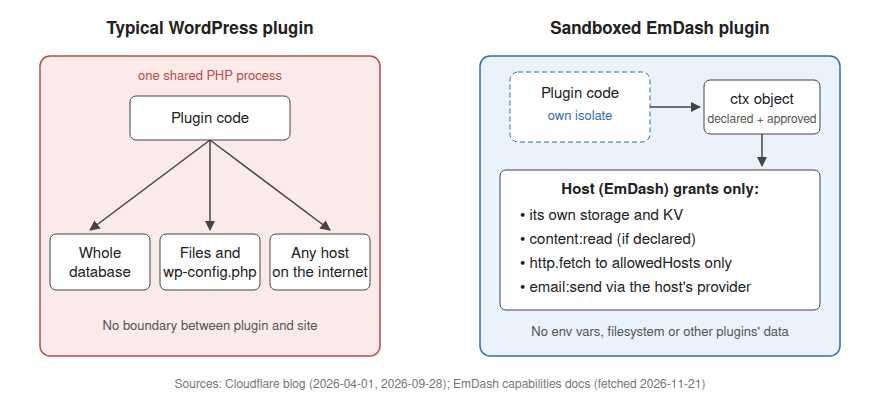
For an online store, that database holds customer records, addresses, order history and payment-gateway settings. In WordPress, a plugin reading wp-config.php is an ordinary PHP file read. A sandboxed EmDash plugin has no file to read: per the EmDash capabilities docs, sandboxed plugins "don’t see environment variables, the filesystem, or any platform bindings."
Most disclosed WordPress vulnerabilities are in plugins. In its 2026 report (covering 2025), Patchstack counted 11,334 new vulnerabilities in the WordPress ecosystem, 91% of them in plugins (Patchstack, State of WordPress Security in 2026, dated 2026-02-25). The widely quoted 96% plugin share comes from Patchstack’s earlier report, which covered 2024 (State of WordPress Security in 2025).
Otta is an open-source commerce plugin for EmDash that runs products, cart, checkout, orders and inventory inside the CMS on Cloudflare Workers, with no separate backend, database server or Redis. Cloudflare’s 1.0 announcement lists Urumi, which builds Otta, among the companies building on EmDash and says: "Urumi is using their WooCommerce expertise to release EmDash’s first eCommerce plugin." We build it, so this post uses Otta as the worked example. (New to it? Start with our EmDash ecommerce guide.)
What can a WordPress plugin reach in a WooCommerce store?
A WordPress plugin can reach everything the site can, because it runs in the same PHP process with the same database connection. Cloudflare put it plainly when it introduced EmDash: "There is no isolation: a WordPress plugin has direct access to the WordPress site’s database and filesystem" (Cloudflare, 2026-04-01). In a WooCommerce store, that database is also the order book: customers, addresses, orders and the gateway settings saved in the options table.
The vulnerability numbers from Patchstack’s 2026 report, covering 2025 (page dated 2026-02-25):
- 11,334 new WordPress-ecosystem vulnerabilities in 2025, up 42% on 2024.
- 91% were in plugins and 9% in themes. WordPress core had 6. (Patchstack’s earlier report put the plugin share for 2024 at 96%.)
- 46% had no fix from the developer at public disclosure.
A note on sources: Patchstack and Wordfence both sell WordPress security products, and the plugin share partly reflects how many plugins exist. Cloudflare builds EmDash, and we build an EmDash plugin. Weigh each source with that in mind. WordPress hardening, such as a least-privilege database user, a deliberate auto-update policy and a web application firewall, reduces this exposure, but it doesn’t change the fact that plugin code runs with the site’s own access.
Supply-chain compromises skip the vulnerability entirely
Two 2026 incidents show why patching discipline alone doesn’t protect a store.
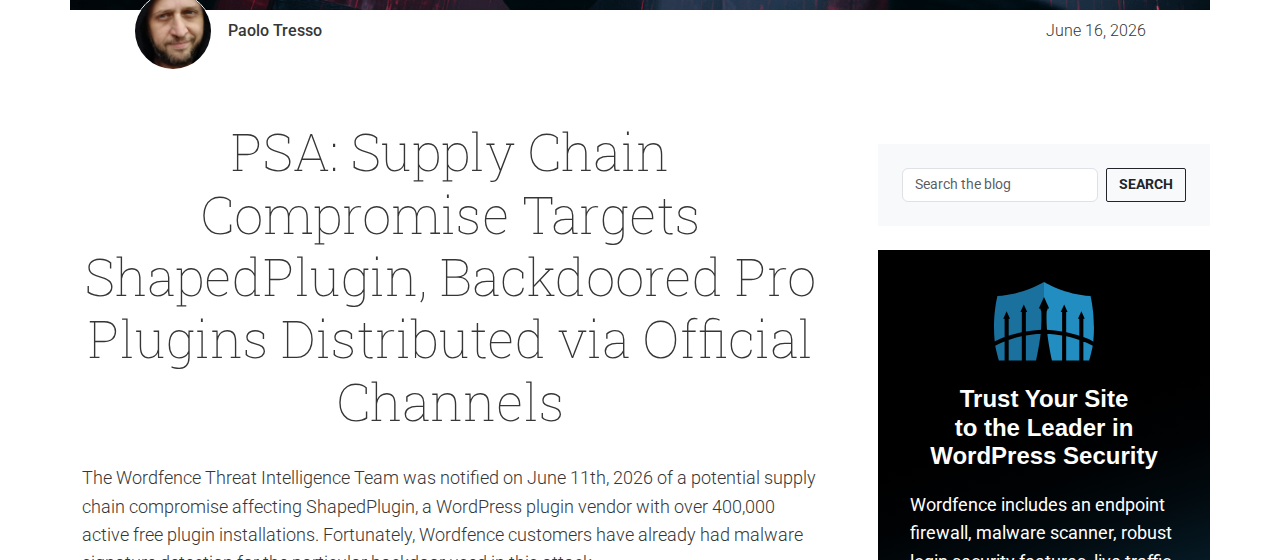
- ShapedPlugin, June 2026. Attackers compromised the vendor’s build and distribution pipeline and backdoored Pro releases shipped through official licensed updates. The free WordPress.org versions were not affected (Wordfence PSA, 2026-06-16; CVE-2026-10735, CVSS 9.8). The payload bundled the Adminer database tool, stole credentials and TOTP two-factor seeds, and displayed the full
wp-config.phpand "WooCommerce order data from the last 3 months". Wordfence wrote that "this attack is particularly insidious because affected site owners followed security best practices: they purchased legitimate licenses and installed updates directly from the vendor’s official update system." It advises anyone who installed a ShapedPlugin Pro plugin between April and June 2026 to treat the site as potentially compromised. - BdThemes, August 2026. Wordfence wrote that "zero source code files were modified within the official WordPress.org repository" (PSA, 2026-08-08). Instead, a poisoned remote JSON feed triggered a cross-site scripting flaw that "fires inside every logged-in admin’s browser", and from there created rogue administrator accounts and uploaded a webshell plugin.
In both cases the update or the feed was the attack. What limits the damage is what the plugin’s code is allowed to reach.
Is a sandboxed CMS a WordPress plugin security alternative?
Yes, for limiting damage. A sandboxed CMS removes a plugin’s access to your database credentials, other plugins’ data, the filesystem and arbitrary outbound hosts, so a compromised plugin reaches far less. It does not decide whether a plugin gets compromised, and it does not protect the data that plugin stores itself.
How does EmDash isolate a plugin?
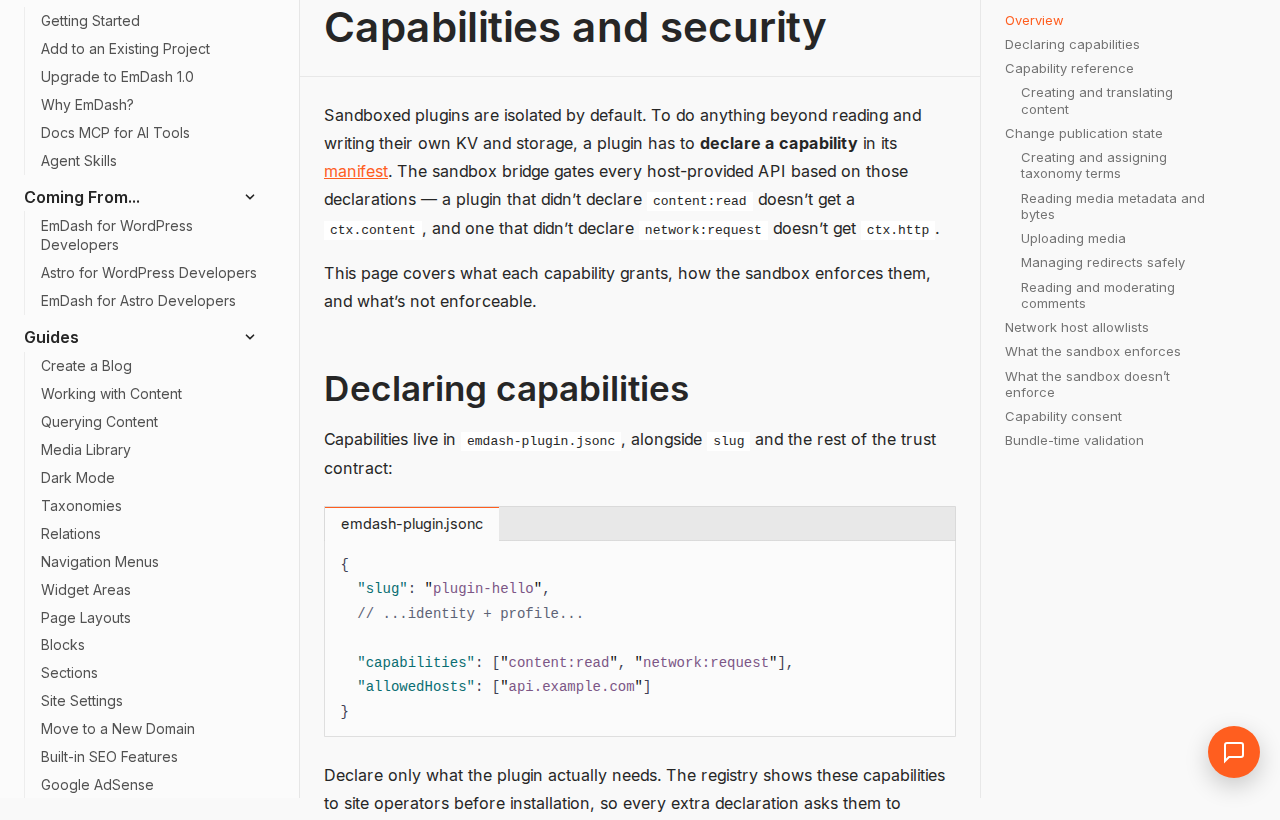
In EmDash, each sandboxed plugin runs in its own isolate. On Cloudflare that isolate is a Dynamic Worker created through the Worker Loader (Cloudflare, 2026-09-28). Self-hosting on Node.js does not switch the sandbox off: EmDash’s plugin sandbox docs say "On Node.js, the server starts workerd, the open-source Workers runtime, as a child process and runs each plugin as a service inside it." The plugin receives a ctx object, and each part of ctx exists only if the plugin declared the matching capability. Cloudflare’s 1.0 post says a sandboxed plugin "gains additional abilities only when they are declared by the plugin and approved by the site administrator."
What every sandboxed plugin gets
Every sandboxed EmDash plugin can read and write its own storage and key-value (KV) data without declaring anything. The EmDash docs state the limit: "Every storage and KV operation is scoped to the runtime plugin ID. A plugin can’t read another plugin’s KV or storage collections, and it can access only collections declared in its manifest" (capabilities docs). Site content, users and media are not included.
What needs a capability
Anything outside a plugin’s own storage needs a declared capability, shown to the administrator before install. The ones a store plugin is most likely to ask for:
Table A: EmDash capabilities a store plugin might request, and what Otta declares (at commit b2c6d73)
| Capability | What it opens (EmDash docs) | Otta declares it? |
|---|---|---|
none needed: ctx.storage / ctx.kv | The plugin’s own declared collections and KV | Uses it for all commerce data |
content:read | ctx.content.get(), list(), getTranslations(), getPublicUrl() | Yes |
content:write / content:publish | Create, update, delete, publish content | No |
users:read | ctx.users.get(), getByEmail(), list() | No |
network:request | ctx.http.fetch(), restricted to allowedHosts | Yes: api.stripe.com plus hosts the operator adds |
network:request:unrestricted | ctx.http.fetch() to any host | No |
email:send | ctx.email.send(), if an email provider is configured | Yes |
Network access is an allowlist
A sandboxed EmDash plugin can reach the network only through ctx.http.fetch(), and only to hosts it listed. The docs say "Direct fetch() and other network primitives are blocked by the runner", and a leading *. in allowedHosts "matches both the named domain and its subdomains." Otta’s real declaration is shown in the section on its three capabilities.
What the sandbox does not solve
The EmDash sandbox doesn’t make a malicious plugin harmless. It caps what that plugin can do. Three limits matter:
- Approval is only as careful as the person approving. "The runtime enforces whatever the administrator approved, including approvals granted without a glance" (Help Net Security, Mirko Zorz, 2026-09-29).
- Signatures prove who published, not that the account was safe. As the same article puts it: "A hijacked publisher account would produce valid signatures too."
- Not every EmDash plugin runs in a sandbox. Native plugins and in-process registration have no isolation boundary, which the next section covers.
Sandboxed vs native vs in-process: where is the boundary in EmDash?
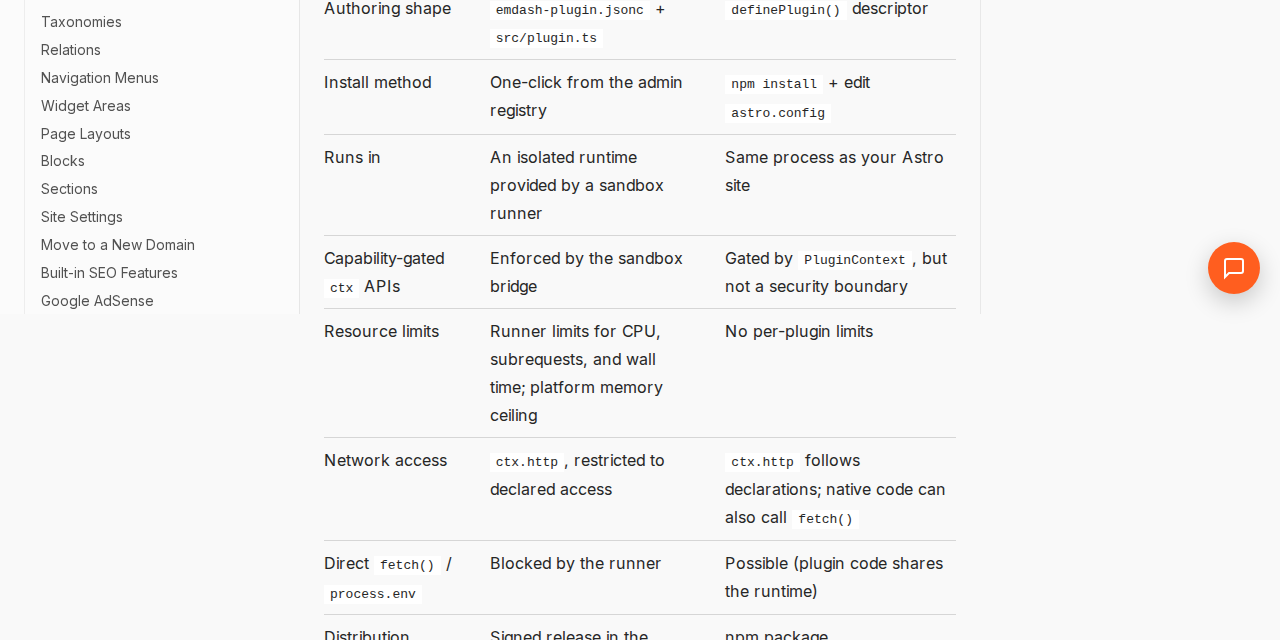
In EmDash, only a sandboxed plugin loaded through a sandbox runner sits behind an isolation boundary; native plugins and in-process registrations do not. EmDash has two plugin formats, sandboxed and native, and a sandboxed-format plugin can also be registered in-process. The EmDash docs describe the in-process fallback directly: when no runner is available, sandboxed plugins "are skipped at startup. You can move them into plugins: [] to run them in-process — but then there’s no V8 isolate, no resource limits, and the plugin can call fetch() directly or read environment variables. Treat that as native-level trust" (capabilities docs).
Table B: Where the security boundary is in EmDash
| Sandboxed plugin in a runner | Sandboxed-format plugin registered in-process | Native plugin | |
|---|---|---|---|
| Isolation | Own isolate (Dynamic Worker on Cloudflare, workerd on Node.js) | None: shares the site’s runtime | None: shares the site’s runtime |
Capability-gated ctx | "Enforced by the sandbox bridge" | ctx is gated, but code can go around it | "Gated by PluginContext, but not a security boundary" |
Direct fetch() / environment variables | "Blocked by the runner" (choosing-a-format docs) | Possible | Possible |
| Resource limits | "Runner limits for CPU, subrequests, and wall time; platform memory ceiling" | None per plugin (EmDash docs) | "No per-plugin limits" |
| In Otta | Written and tested to this contract | Default template (see below) | Otta’s React admin screens |
Quoted cells come from EmDash’s Choosing a plugin format page unless marked.
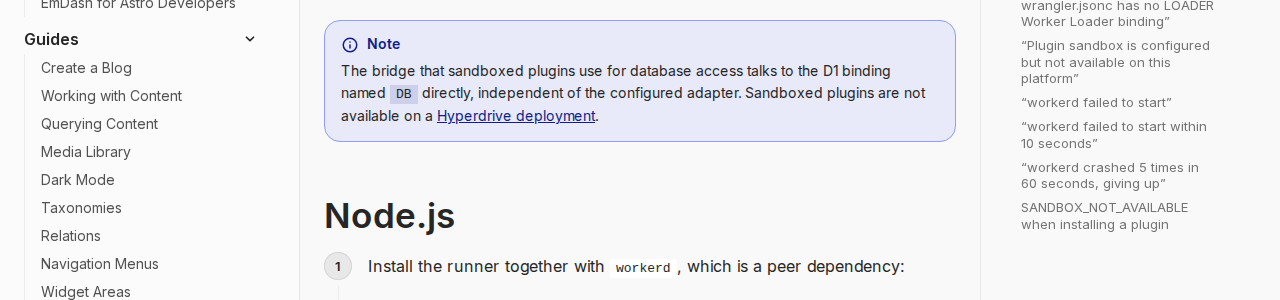
The sandbox runner has deployment requirements. On Cloudflare, EmDash’s plugin sandbox docs list the Workers Paid plan, a Worker Loader binding named LOADER and a PluginBridge export. Its built-in limits are 50 ms of CPU and 30 subrequests per invocation (enforced on Cloudflare) and 30 s of wall time. The same page notes that "Sandboxed plugins are not available on a Hyperdrive deployment", because the bridge talks to the D1 binding directly.
A practical rule: install third-party plugins sandboxed, and run code in-process or natively only if you would also merge it into your own repository. That rule covers Otta too. Its one-click template runs in-process, so review the version you pin as you would your own code.
How does Otta fit EmDash’s sandbox model?
At the commit we checked, Otta’s declared surface is small and fixed: three declared capabilities, one default outbound host, no content:write and no users:read, with a test that fails if the list changes. You can read the declared list in a minute. It shows what Otta’s code is written to use. In-process, EmDash still gates the ctx API to that list, but code can go around ctx, so it is not a security boundary and you are trusting Otta’s code as you would any native plugin.
Otta is written and tested to EmDash’s sandbox contract, but its default deployment does not run it in a sandbox.
How the one-click template actually runs Otta
The one-click Deploy to Cloudflare template registers Otta in-process ("trusted"), not in a Worker Loader sandbox, so the store fits the Workers free plan. EmDash’s sandbox runner on Cloudflare requires Workers Paid. Order email through the default Cloudflare email provider also needs Workers Paid; other providers are configured separately. In this mode, the capability list and allowedHosts are still applied to the ctx object Otta receives, but per EmDash’s docs in-process code is not behind an isolation boundary. Otta’s React admin screens ship as a separate native plugin, which is in-process by definition.
This is a deliberate, documented trade-off. Otta’s ADR-0006, Trusted in-process deployment, records three consequences:
- Sandboxed routes are cookie-blind: in sandboxed mode,
cookieandset-cookieare stripped from every header set handed to the plugin. - In-process routes see the raw request headers, the browser’s
Cookieheader included. The ADR accepts that only because the code reading them is Otta’s own, reviewed in its repository. - Third-party plugins must never be registered in-process on these deployments; they belong in the sandbox, with a runner and Workers Paid.
That last point is the same practical rule as above. The ADR treats Otta as first-party on the project’s own deployments. On your store, Otta is third-party code too, so review the version you pin before you run it in-process.
What we’re doing about it
A sandboxed Otta deployment is not a supported path yet. EmDash’s own requirements (Workers Paid, the LOADER binding, a PluginBridge export, D1 rather than Hyperdrive) are a starting point, not a tested Otta recipe. If you want it, open an issue and tell us your plan; that is how we will prioritize it.
Three capabilities, and none of them write content
At the commit linked here, Otta declares exactly three capabilities: content:read, network:request and email:send (see the declaration on GitHub). content:read is there because EmDash requires it for the content-save and content-delete hooks Otta registers, and Otta uses it to check that a product’s CMS entry still exists. At that commit it does not declare content:write, users:read or any media capability, and a test in the plugin’s test suite fails if the list changes.
Other EmDash commerce plugins exist, including Vendwick, DashCommerce, Catalog Studio and Ritely. The same capability-list check applies to each of them; we have not audited them.

You can check this in under a minute:
git clone https://github.com/UrumiAI/otta.sh.git
cd otta.sh
grep -n "OTTA_PLUGIN_CAPABILITIES =\|STRIPE_API_HOST =" packages/plugin/src/manifest.ts
Expected output on 2026-11-21:
38:export const OTTA_PLUGIN_CAPABILITIES = ["content:read", "network:request", "email:send"] as const;
53:export const STRIPE_API_HOST = "api.stripe.com";
Store data lives in its own declared collections
Otta keeps carts, orders, inventory, coupons, customers, payment events and products’ commercial fields in its own ctx.storage collections, declared in its plugin descriptor. That is why the store needs no separate backend (Ecommerce on Cloudflare Workers: Run a Store Step by Step (2026) covers the architecture). The CMS owns content; at the commit we checked, Otta’s plugin reads it but does not write it. When an agent you authorize creates or edits a product, EmDash’s own content tools write the product’s content under that agent’s token, and Otta’s admin tools set its commercial fields.
One outbound host by default
Otta’s only default server-side outbound host is api.stripe.com (see it on GitHub). Operators can add hostnames at build time with OTTA_EXTRA_ALLOWED_HOSTS. The build fails on invalid or internal names such as localhost, .local, .internal and wildcard-IP DNS services like nip.io, and on Stripe hosts other than the API. Stripe.js runs in the shopper’s browser, so it is not plugin egress, and a test forbids the Stripe.js host anywhere in the plugin’s source.
Credentials and email
Otta holds no email credentials and registers no email transport: it asks the host to send mail through ctx.email. That keeps mail credentials out of the plugin, but it is not an exfiltration-proof channel. The EmDash docs don’t say recipients are restricted, so a compromised plugin with email:send could mail data out through the host’s provider.
The Stripe secret key, the webhook signing secret and the webhook edge token are stored as encrypted EmDash secret settings (EmDash 1.0.1+). Other plugin settings are not covered. Encryption at rest protects the stored row, not against the plugin itself: EmDash decrypts the setting when the plugin reads it.
Tested in workerd against Otta’s own sandbox harness
As of 2026-11-21, Otta’s repository has 27 sandbox test files that boot the real workerd binary and drive the plugin’s hooks and routes through a sandbox harness with the same allowlist check. They run in CI with the rest of the unit suite. This harness is Otta’s own mirror of EmDash’s contract, not EmDash’s sandbox bridge. It proves Otta doesn’t depend on anything the sandbox would forbid. It doesn’t prove Otta has run under EmDash’s bridge in production.
What could a compromised store plugin reach?
A compromised store plugin on WordPress can reach the whole site. A compromised sandboxed EmDash plugin can reach its own data and whatever its capabilities open. The rows below follow the ShapedPlugin payload described by Wordfence (2026-06-16).
A sandboxed plugin cannot reach admin accounts, other plugins’ data or platform credentials, but it can still read its own store data.
Table C: What a compromised plugin could reach
| Asset | WordPress plugin | Sandboxed EmDash plugin (Otta’s capabilities) | In-process (Otta’s default template) |
|---|---|---|---|
Database credentials (the wp-config.php equivalent) | Yes: ShapedPlugin displayed the full wp-config.php | No: no environment variables, filesystem or bindings (EmDash docs) | Treat as yes: can read environment variables (EmDash docs) |
| Customer and order data | Yes: the whole database; ShapedPlugin showed 3 months of WooCommerce orders | Only its own collections. For a commerce plugin that is the store’s orders and customers. | Yes |
| CMS content | Yes | Readable via content:read (entries and their identity fields; the docs don’t say whether drafts are excluded) | Yes |
| Other plugins’ data, including 2FA secrets | Yes: ShapedPlugin stole TOTP seeds | No: storage and KV are scoped to the plugin ID | Treat as yes (native-level trust) |
| Create admin accounts | Yes: BdThemes created rogue administrators | No: the EmDash capabilities page, as fetched 2026-11-21, lists no user-write capability (users:read only reads) | Treat as yes (native-level trust) |
| Install more code | Yes: ShapedPlugin dropped a fake plugin | No filesystem access | Treat as yes (native-level trust) |
| Send data out | Yes: to an attacker-controlled domain | Only to allowedHosts (api.stripe.com plus hosts the operator adds). Email through ctx.email is a second outbound path when a mail provider is configured. | Yes: fetch() is callable directly |
The middle column assumes the capabilities Otta declares: content:read, network:request (api.stripe.com) and email:send. Running first-party code in-process, as in the right-hand column, is the trade-off Otta’s ADR-0006 documents.
What a compromised Otta could still do, even in a sandbox:
- Read and alter its own orders, customers, coupons and inventory.
- Read its own Stripe secret key, which EmDash decrypts for the plugin on read, and call the Stripe API with it, for example to issue refunds.
- Read site content through
content:read. - Send mail through the host’s email provider via
email:send.
Leaving WordPress after a plugin breach: a checklist
Leaving WordPress is one option after a plugin breach. Hardening and staying on WordPress with a security vendor’s tooling is a legitimate choice too, and steps 1 to 7 apply either way. Clean up first, migrate second, and never carry the compromise across.
- Contain the store. Put the site in maintenance mode and disable payment methods so no transactions go through while you investigate (Patchstack WooCommerce recovery guide). Serve a 503 status while you do: Google’s crawlers slow down on 5xx errors and keep already-indexed URLs for a time, though not indefinitely (Google Search Central, last updated 2026-02-04).
- Back up the compromised site for forensics only. Store it somewhere not connected to your hosting, label it, and don’t overwrite clean backups (Patchstack). Never restore from it or migrate from it.
- Rotate everything the plugin could have read: WordPress admin passwords, database credentials and every API key in
wp-config.php(Wordfence ShapedPlugin recommendations), plus mail-plugin SMTP credentials, which that payload also displayed. - Revoke and regenerate two-factor secrets for all users. Stolen TOTP seeds survive a password change (Wordfence).
- Roll your payment-gateway keys (for Stripe, the secret key and webhook signing secret) and check the gateway dashboard for webhook endpoints you didn’t add. Our recommendation, based on a payload that exposed
wp-config.phpand order data. - Audit administrator accounts and remove any you didn’t create (Wordfence, both PSAs).
- Assess customer-data exposure. Order data with names and addresses may trigger breach-notification duties where you operate. Ask your counsel; this post is not legal advice.
- Export data, never code. Move products, customers and order history as CSV or JSON, not plugins, themes or full database dumps that can carry the payload’s options and users. Our recommendation. Otta has no automatic WooCommerce importer today; Migrate WooCommerce to EmDash: What Moves, What Doesn’t walks through what transfers.
- On the new stack, review permissions before installing anything. In EmDash, read each plugin’s capability list and allowed hosts, prefer sandboxed plugins, and treat native or in-process plugins as your own code.
- Re-verify checkout end to end: a test payment, a webhook delivery and order emails. Our recommendation.
Methodology and limits
- Every external source in this post was opened in a headless Chromium browser on 2026-11-21, and every quotation was checked against the page text.
- Otta claims were checked against the public repository on 2026-11-21. The store template (
@urumi.ai/otta-store) pins EmDash 1.5.0. GitHub links are pinned to commitb2c6d73so line anchors don’t drift. - Otta’s sandbox tests run in real workerd through Otta’s own harness, not through EmDash’s host sandbox bridge.
- The "4 of 7" figure counts the Table C rows whose sandboxed-column answer is a plain "No": database credentials, other plugins’ data, creating admin accounts and installing more code.
- Corrections: found an error? Open an issue on GitHub and we will update the post and its Updated date.
FAQ
Is EmDash a WordPress plugin security alternative?
For limiting damage, yes. A sandboxed EmDash plugin cannot reach database credentials, other plugins’ data, the filesystem or hosts it didn’t declare; a WordPress plugin can. Native and in-process EmDash plugins have no such boundary, so it depends on how a plugin is installed.
Does Otta run in EmDash’s sandbox?
Not by default. The one-click Cloudflare template registers Otta in-process to stay on the Workers free plan, and in-process is not an isolation boundary. At the commit we checked, Otta declares three capabilities, and it is tested in real workerd against its own harness that mirrors EmDash’s sandbox contract.
Can a sandboxed EmDash plugin read my whole database?
Not through the plugin API. It can read its own declared storage plus only the site data its approved capabilities open, for example site content entries with content:read (the docs don’t say whether drafts are excluded). For a store plugin, its own storage is the order and customer data.
Does sandboxing stop supply-chain attacks?
No, not on its own. A malicious update still runs, but only with the permissions already granted. Signed registry releases show who published, not that the publisher’s account wasn’t hijacked.
What should I do first if a WordPress plugin on my store was backdoored?
Put the store in maintenance mode, take a forensic backup kept away from your hosting, then rotate database, admin, API, SMTP and payment keys and reset two-factor secrets. Clean up before you migrate anything.
Do sandboxed EmDash plugins only work on Cloudflare’s paid plan?
On Cloudflare, they need the Workers Paid plan and a Worker Loader binding. Self-hosted Node.js sites keep the sandbox: EmDash’s plugin sandbox docs (docs.emdashcms.com/deployment/plugin-sandbox/) say "On Node.js, the server starts workerd, the open-source Workers runtime, as a child process and runs each plugin as a service inside it." Sandboxed plugins are not available on a Hyperdrive deployment.
Next steps
- Check the capability list. Otta’s manifest on GitHub declares the three capabilities and the one default host described above.
- Deploy to Cloudflare. The one-click template runs Otta in-process on the Workers free plan, not in EmDash’s sandbox.
- Try the Otta playground: a disposable store that lasts about an hour, with no account and no card payments.
- Star Otta on GitHub to follow releases on the way to 1.0.
Comparing platforms after a breach? See Otta vs WooCommerce for what changes when your store has no server, and Best EmDash Plugins (2026): 332 Listings Audited for a survey of the EmDash plugin registry.
About the author: Vedanshu Jain is a former WooCommerce core engineer and tech lead, and builds Otta at Urumi. GitHub · WordPress.org
Last updated Nov 23, 2026