 Urumi.AI
Otta vs WooCommerce: what changes when your store has no server
A WooCommerce alternative without WordPress: Otta vs WooCommerce on hosting, cost, features and security, plus 7 other options. Verified 2026-11-21.
A WooCommerce alternative without WordPress, with a source for every claim.
Updated 2026-11-21
Disclosure: Urumi builds Otta. Every WooCommerce and competitor fact below is linked to its source and dated.
Move a store from WooCommerce to Otta and you stop running a PHP host, a MySQL server, an object cache and operating system patches. In exchange you depend on Cloudflare and get a much smaller feature set than WooCommerce offers. This post sets out both sides, including what Otta cannot do.
TL;DR. We recommend Otta, which we build, if you sell simple physical or digital products, Stripe or cash on delivery covers you, and you want open source with no server of your own on Cloudflare. Otta does not offer subscriptions, bookings, PayPal or WooCommerce’s extensions.
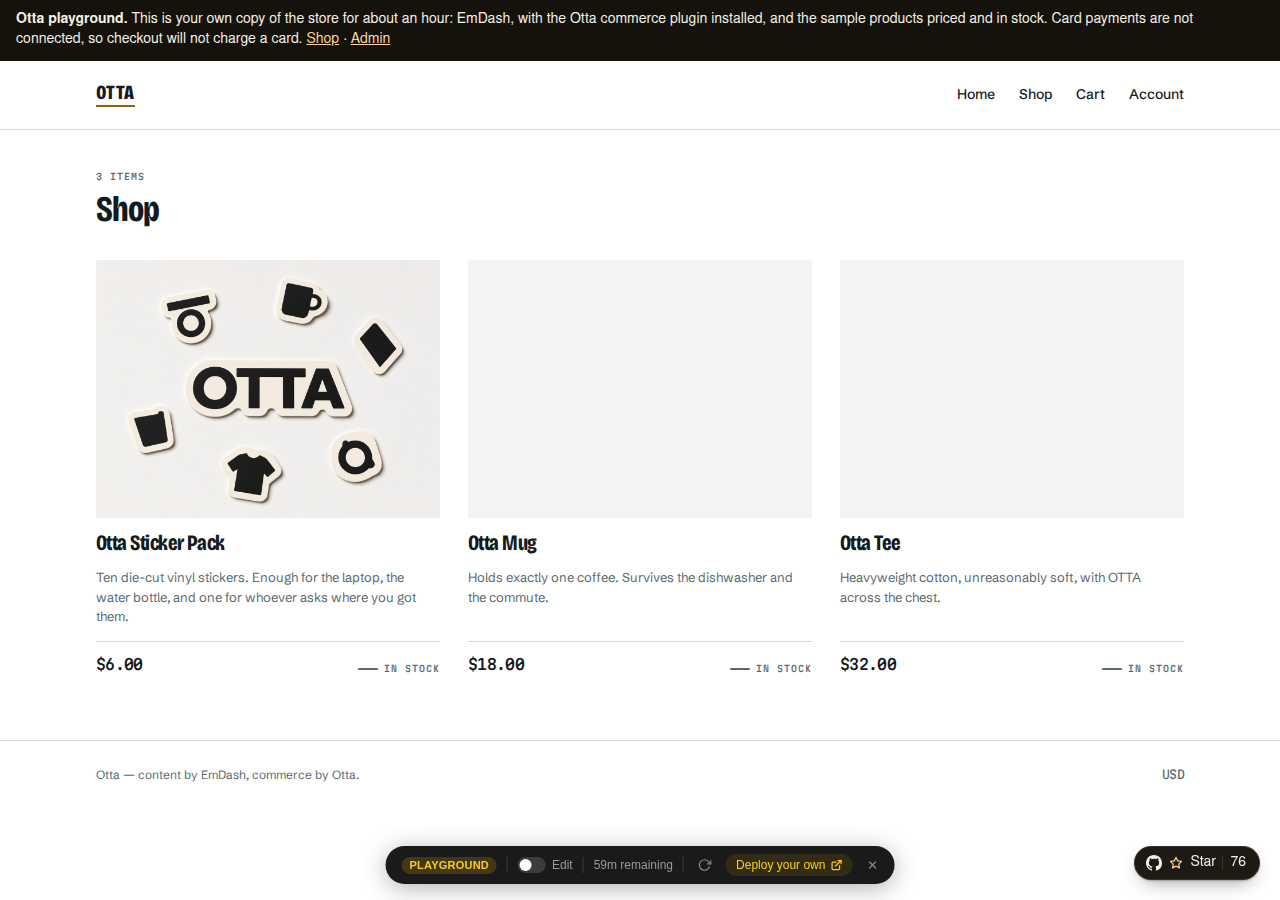
Try it: the Otta playground (a disposable store that lasts about an hour, with no account and no card payments), deploy to Cloudflare or read the code on GitHub.
What is the best WooCommerce alternative without WordPress?
We recommend Otta, which we build, if you want open source with no server of your own on Cloudflare. Other alternatives exist: Shopify and BigCommerce are hosted, and Medusa, Saleor, Vendure and PrestaShop are open source you host yourself. WooCommerce is far more mature than Otta.
Otta is an open-source commerce plugin for EmDash that runs products, cart, checkout, orders and inventory inside the CMS on Cloudflare Workers, with no separate backend, database server or Redis.
"No server of your own" does not mean no servers. Workers, the D1 database and R2 storage are managed Cloudflare services, so an Otta store depends on Cloudflare. Our introduction to Otta explains what the plugin is.
What Otta cannot do today (checked 2026-11-21)
- No subscriptions, bookings or product bundles.
- Stripe and cash on delivery are the only payment options.
- No WooCommerce importer for products, orders or customers.
- Pre-1.0: APIs, storage shapes and admin screens may change between releases.
If your store depends on any of these, Otta cannot replace it today.
Otta vs WooCommerce at a glance
WooCommerce is the open-source commerce plugin for WordPress, built by Automattic and run on a PHP host. Otta is a commerce plugin for EmDash, the open-source CMS from Cloudflare, and runs on Cloudflare Workers. Urumi builds Otta.
WooCommerce vs Otta comparison, verified 2026-11-21
| WooCommerce | Otta | |
|---|---|---|
| License | GPLv3 (readme) | MIT (GitHub) |
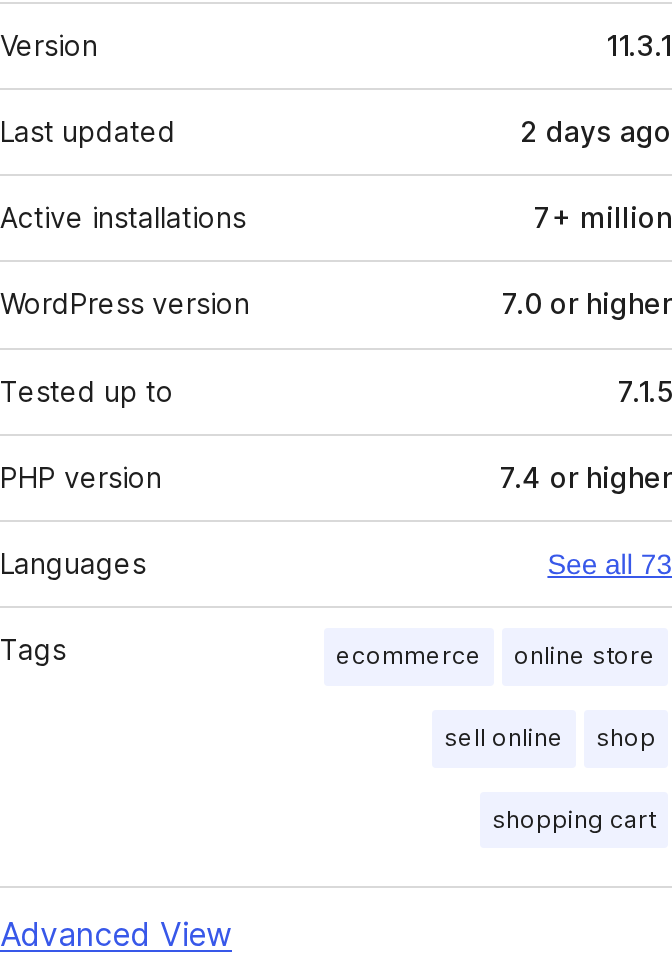
| Install base and maturity | 7+ million active installations, version 11.3.1 (wordpress.org, accessed 2026-11-21) | Production-ready and pre-1.0; published on npm |
| Extensions ecosystem | Large paid marketplace plus free WordPress plugins | Core features only; no extension marketplace |
| Payments built in | WooPayments, plus many gateways via extensions | Stripe and cash on delivery only |
| Subscriptions and bookings | Paid extensions | Not available |
| Hosting choice | Any PHP host | Cloudflare only |
| Server of your own to run | Yes (or a managed WordPress host) | No; one Cloudflare Worker that Cloudflare runs |
| Database | MySQL or MariaDB, typically | Cloudflare D1, shared with CMS content |
| Language and stack | PHP, WordPress hooks (actions and filters) | TypeScript, Astro, npm packages @urumi.ai/otta-* |
| Plugin isolation | Plugins run in the same PHP process as WordPress | Not isolated on the one-click store: Otta runs trusted, in-process, on Workers Free. Its declared capabilities gate the ctx API, but that is not a security boundary |
| Updates | wp-admin updates, per plugin | Dependabot pull requests to your store’s repository |
| Migration in | Many importers | No WooCommerce importer |
What "no server of your own" means for an Otta store compared with WooCommerce
A WooCommerce store needs a PHP host and a database; an Otta store made with the one-click template is one Cloudflare Worker plus managed Cloudflare storage. According to wordpress.org (accessed 2026-11-21), WooCommerce 11.3.1 requires WordPress 7.0 or higher and PHP 7.4 or higher (PHP 8.0 or higher recommended), and is tested up to WordPress 7.1.5. You or your host keep the PHP runtime, web server, database and any cache patched.
According to the Otta README, the Deploy button creates a D1 database, two R2 buckets (public media and private downloads), a KV namespace for admin sessions, an Images binding, two rate limits and an every-minute cron job. Commerce data lives in EmDash’s per-plugin document store, in the same D1 database as your content.
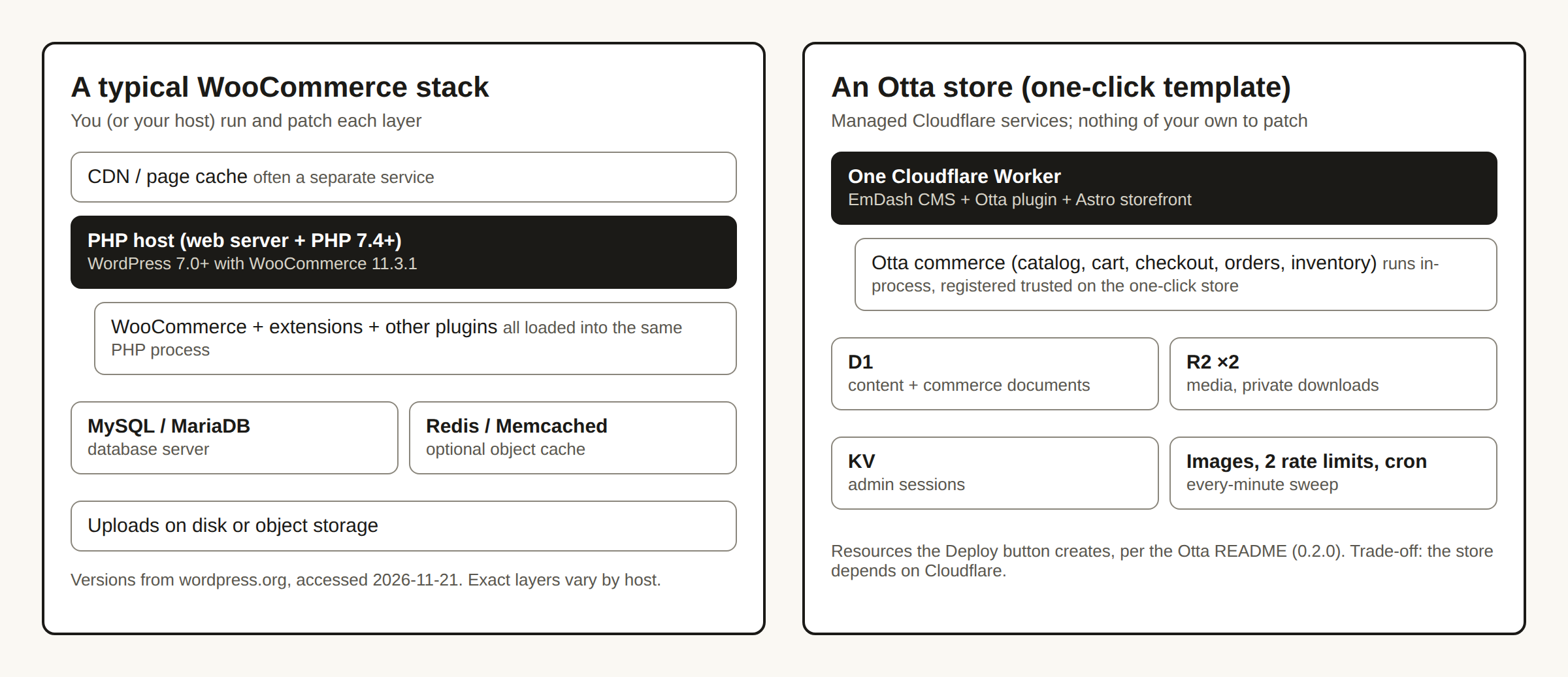
What a WooCommerce owner no longer manages on Otta
Moving a store from WooCommerce to Otta removes these layers from your own list of things to run:
- PHP versions and web server configuration.
- A MySQL server, its backups and its upgrades.
- An object cache, if you run one.
- Operating system patching.
What a WooCommerce owner takes on with Otta instead
Moving a store from WooCommerce to Otta adds these responsibilities:
- A Cloudflare dependency. An Otta store runs only on Cloudflare. Moving off it means moving off Workers, D1 and R2.
- Platform limits. Workers Free allows 100,000 requests a day and 10 ms of CPU time per invocation (Workers pricing, Workers limits). D1 Free allows 5 million rows read and 100,000 rows written a day, with 5 GB of storage (all accessed 2026-11-21).
- Known Workers-specific limits. Saving many sized variants with SKUs at once fails past about 16 to 20 variants on Workers Free (#637).
- A different update model. Updates arrive as Dependabot pull requests to your store’s repository, and merging one deploys it, per the Otta README. The current Otta release declares a peer dependency of EmDash ^1.5.0, and the one-click store template pins an exact EmDash version (1.5.0); a release that moves EmDash, Astro or React needs a manual step.
Where does Otta fit, and where does it not?
WooCommerce has far more breadth. We recommend Otta for new or small stores that want open source on Cloudflare with no server of their own to patch.
| Otta does not fit if… | We recommend Otta if… |
|---|---|
| You sell subscriptions, bookings or bundles | You sell physical or digital products with simple variants |
| You need PayPal or another gateway besides Stripe | Stripe or cash on delivery covers your customers |
| You rely on a paid extension or a specific theme | You are happy to start from one Astro template and edit it |
| You need years of order history in the same system | You are starting a new store, or can keep old orders archived |
| You want to hire from a large agency and hosting market | You want to set up and run the store with an AI agent on your own Cloudflare account |
| You want open-source code and no server of your own to patch |
How much does WooCommerce cost to run compared with Otta?
WooCommerce core and Otta are both free to use; running costs differ. WooCommerce’s own pricing guide puts hosting at "$25 – $350/month for most stores" (accessed 2026-11-21). Otta runs on Cloudflare Workers Free at $0, and Workers Paid starts at $5/month (Workers pricing, accessed 2026-11-21).
Illustrative example, line items only. A small WooCommerce store at the low end of WooCommerce’s quoted hosting range, with no paid extensions, pays $25 × 12 = $300 a year for hosting. An Otta store on Workers Paid, so that Cloudflare email sending works, pays $5 × 12 = $60 a year in platform fees. Both figures exclude payment processing, domain and the time to run the store, and a busy store pays more on either platform. If the store needs WooCommerce Subscriptions ($279/year, accessed 2026-11-21), Otta is not an option at any price, because it has no subscriptions.
| Line item | WooCommerce | Otta | Source, accessed |
|---|---|---|---|
| Hosting | "$25 – $350/month for most stores", per WooCommerce. Small stores on basic shared hosting may pay less. | Workers Free: $0, 100,000 requests/day, 10 ms CPU. Enough to try a store, not to carry real traffic. Workers Paid: $5/month minimum, 10 million requests included. | WooCommerce pricing; Workers pricing, 2026-11-21 |
| Media storage | Usually part of hosting | R2 free tier: 10 GB-month per month, no egress charges. R2 needs a payment method on the account. | R2 pricing, 2026-11-21 |
| Extensions | "$29 – $299/year per extension", per WooCommerce. Example: Subscriptions $279/year | None to buy, and none available | WooCommerce pricing and product page, 2026-11-21 |
| Payment processing | WooPayments "~2.50-2.90% + 30¢ per transaction", per WooCommerce, or Stripe | Stripe: "2.9% + 30¢ per successful transaction for domestic cards" (US), plus 1.5% for international cards and 1% if currency conversion is required. Same fee whichever platform you use. Cash on delivery: no provider. | WooCommerce pricing; Stripe pricing, 2026-11-21 |
| Your host or an SMTP plugin | Cloudflare Email Sending is the default provider and needs Workers Paid. With no provider, order emails are skipped after 72 hours and sign-in links are not sent. | Otta README, 2026-11-21 |
Running the store is the cost this table leaves out. Otta is built to be set up and run with an AI agent. It is production-ready today and pre-1.0, with a small community, so expect updates to review and fewer agencies to hire than WordPress has. What it costs to run a store at zero revenue has more worked examples.
Plugins and extensions: where WooCommerce wins clearly over Otta
Stripe and cash on delivery are the only payment options in Otta today, while WooCommerce has a marketplace of paid extensions, free WordPress plugins and themes, and a mature agency and hosting market. For many WooCommerce stores that alone settles the question.
What Otta covers, per its README: catalog and variants, inventory, cart, checkout, orders, refunds, customer accounts with magic-link sign-in, Stripe, cash on delivery, tax, shipping zones and rates, coupons, paid digital downloads, reporting and settings. The storefront is an Astro integration (otta({ template: 1 })); EmDash owns titles, descriptions and images, and commerce fields are edited in the admin’s Pricing & stock cards. Custom code is TypeScript, not PHP hooks, and money is stored as integer minor units.
For AI agents, EmDash’s own content tools create and edit product content, and the opt-in @urumi.ai/otta-mcp package adds admin tools for price, stock, orders, coupons, shipping, tax, reports and settings, all over EmDash’s MCP endpoint. Otta’s package is off by default, admin-only, and logs every call to its tools. You still bring the Cloudflare account, claim the admin with your own passkey, connect Stripe and approve what ships.
We found no support for the following in Otta’s source code on 2026-11-21:
- Subscriptions, bookings and product bundles
- PayPal or any gateway other than Stripe (the payment interface is designed for more, but none ship)
- Multi-currency selling (each store has one store currency, and a cart in another currency cannot be checked out)
- Gift cards and wishlists
- Product reviews and ratings
- Live carrier shipping rates (you set zones and rates yourself)
- B2B or wholesale pricing
- A theme marketplace (the store ships as one Astro template)
If you depend on Subscriptions, Bookings or a niche extension, Otta does not cover it today. Missing something you need? Open an issue so it is on the record.
Where Otta and WooCommerce give different totals, and other behavior changes
Otta differs from WooCommerce in three behaviors that matter to anyone moving a store across: coupon rounding, tax and customer sign-in.
Coupon cents are split differently, on purpose. WooCommerce splits a fixed cart coupon equally per unit. Otta splits it across lines pro rata. In the example in Otta’s design note (a fixed 1000-cent coupon on a 2000 + 2×1000 cart, 8.25% tax), the order total is 3248 cents in Otta and 3247 cents in WooCommerce. Expect one-cent differences if you compare old and new orders.
Tax options follow WooCommerce core. Otta copies WooCommerce’s tax options, including prices entered with tax included and rounding at subtotal. Its results are checked against an independent WooCommerce 11.1.2 answer key (same design note). WooCommerce is now on 11.3.1, so treat this as "checked against 11.1.2", not "identical to current WooCommerce".
Customers sign in with magic links. Otta’s customer accounts use a passwordless email link (design note). WooCommerce password hashes do not migrate, and you do not need them. Sign-in emails need an email provider to be set up.
Maturity: WooCommerce is far more mature than Otta
WooCommerce has years of production use, an 11.x version line and 7+ million active installations. Both Otta and EmDash are young. EmDash reached 1.0 on 2026-09-28. Otta is production-ready today and still pre-1.0. The EmDash ecosystem is young too: fewer plugins, fewer developers and less public documentation than WordPress.
Cloudflare’s EmDash 1.0 post (2026-09-28) says: "Urumi is using their WooCommerce expertise to release EmDash’s first eCommerce plugin." That is a line from the platform vendor’s own announcement about Urumi, not an independent review. Otta is not the only option: Vendwick, DashCommerce, Catalog Studio and Ritely also add commerce to EmDash, and our EmDash plugin roundup covers them fairly.
Known open issues in Otta (checked 2026-11-21):
- Payment methods that confirm days later (SEPA Direct Debit, ACH, Bacs, bank transfer) end in an expired order and an automatic refund (#606). Avoid enabling delayed-notification payment methods in your Stripe Dashboard until it is fixed.
- Large bulk variant saves fail on Workers Free (#637).
Pin exact package versions if you build on Otta, review each update, and expect breaking changes before 1.0. For what leaving Cloudflare would involve, see our EmDash Cloudflare lock-in audit.
Security: what isolation an Otta store actually uses
On the one-click Otta store, Otta is not isolated from the rest of the site: it runs trusted, in the same Worker as EmDash, much as WooCommerce runs in the same PHP process as WordPress and every other plugin. EmDash can isolate plugins, and Cloudflare, which builds EmDash, describes that design in its EmDash 1.0 post: "Each plugin runs in an isolated runtime with access to its own private storage, but not to the site’s content, media, users, secrets, environment, filesystem, or network."
That isolated plugin runtime needs Workers Paid, so the one-click store registers Otta as trusted to fit Workers Free. On that store, Otta’s declared capabilities and hosts gate the ctx API it is given, and its code makes outbound calls only through ctx.http. Because it runs in-process, that is how the code is written, not an isolation boundary (design note). Otta’s CI also tests the plugin in workerd through its own harness.
Other controls in Otta: payment secrets are encrypted at rest, the first admin claim is gated by a setup token, admins sign in with passkeys, and per-IP rate limits apply to sign-in and write requests.
Patchstack’s State of WordPress Security in 2026 (updated 2026-02-25) counted 11,334 new vulnerabilities in the WordPress ecosystem in 2025, 91% of them in plugins, which does not mean any given WooCommerce store is insecure. No comparable count exists for EmDash or Otta, because both are new and have had far less public scrutiny, and that absence is not evidence of safety.
Other WooCommerce alternatives without WordPress
Every platform below runs without WordPress, unlike WooCommerce, which is a WordPress plugin. WordPress itself runs 38.5% of all websites and 57.4% of sites whose CMS is known, according to W3Techs (data dated 2026-11-21), so leaving it means leaving the largest ecosystem on the web.
Routes away from WordPress, licenses verified 2026-11-21 on each project’s site or repository
| If you want… | What exists | License | What you run |
|---|---|---|---|
| No hosting or code at all | Shopify or BigCommerce | Proprietary | Nothing; a monthly subscription |
| A familiar PHP model without WordPress | PrestaShop or Magento Open Source | OSL-3.0 (core) | A PHP host and MySQL; Magento also needs OpenSearch, per Adobe’s system requirements |
| An open-source TypeScript backend for a custom headless store | Medusa or Vendure | Medusa: MIT, except Enterprise Edition materials. Vendure: GPLv3, or a paid commercial license | A Node.js server and a database |
| An open-source Python, GraphQL-only backend | Saleor | BSD-3-Clause | A Python server and a database |
| Open source with no server of your own, on Cloudflare | Otta (our recommendation) | MIT | One Cloudflare Worker in your own account |
Prices for the hosted options change often, so check each vendor’s page. Medusa, Saleor, Vendure, PrestaShop and Magento Open Source are open source and need no WordPress, just like Otta. Otta differs in two ways: commerce runs inside the CMS on Cloudflare Workers, with no separate backend, database server or cache to operate, and it is built to be set up and run with an AI agent. If you are weighing hosted SaaS instead, read Otta vs Shopify: total cost.
How we compared. On 2026-11-21 we checked each license, hosting model and price on the vendor’s own site or repository, checked every Otta claim against Otta’s public source code, README and architecture decision records, and checked WooCommerce facts against wordpress.org and woocommerce.com.
Can you migrate from WooCommerce to Otta?
You can migrate from WooCommerce to Otta partly, and by hand. Otta has no WooCommerce importer today. Here is what exists:
- EmDash imports posts, pages, media and taxonomies from a WordPress export (WXR), the WordPress REST API or WordPress.com (EmDash README).
- WooCommerce can export products to CSV (WooCommerce docs), which gives you a list to work from.
- Prices, stock and variants are entered again in Otta’s admin.
- Order history and customer accounts stay behind. Keep your WooCommerce export or a read-only copy of the old store.
Migrating from WooCommerce to EmDash has the full step-by-step checklist, and Deploy an online store to Cloudflare in one click covers the deploy.
What we would tell a WooCommerce owner today
Otta does not replace WooCommerce’s extensions, payment gateways or 7+ million-install ecosystem, so check those first if you run an existing store. We recommend Otta for a new, simple store that takes Stripe or cash on delivery, wants open-source code, and would rather depend on Cloudflare than run a PHP host and a database.
Try Otta, or check this comparison yourself
Try Otta
- Try the Otta playground: a disposable store that lasts about an hour, with no account and no card payments. First load usually takes under a minute; refresh if it stalls.
- Deploy to Cloudflare: your own store in your own account, on Workers Free.
- Read the code on GitHub. If this comparison was useful, star the repo.
Check Otta’s facts yourself:
# Otta's published version, license and EmDash peer range
npm view @urumi.ai/otta-store version
npm view @urumi.ai/otta-plugin license
npm view @urumi.ai/otta-plugin peerDependencies

# Otta's source, ADRs and known issues
git clone https://github.com/UrumiAI/otta.sh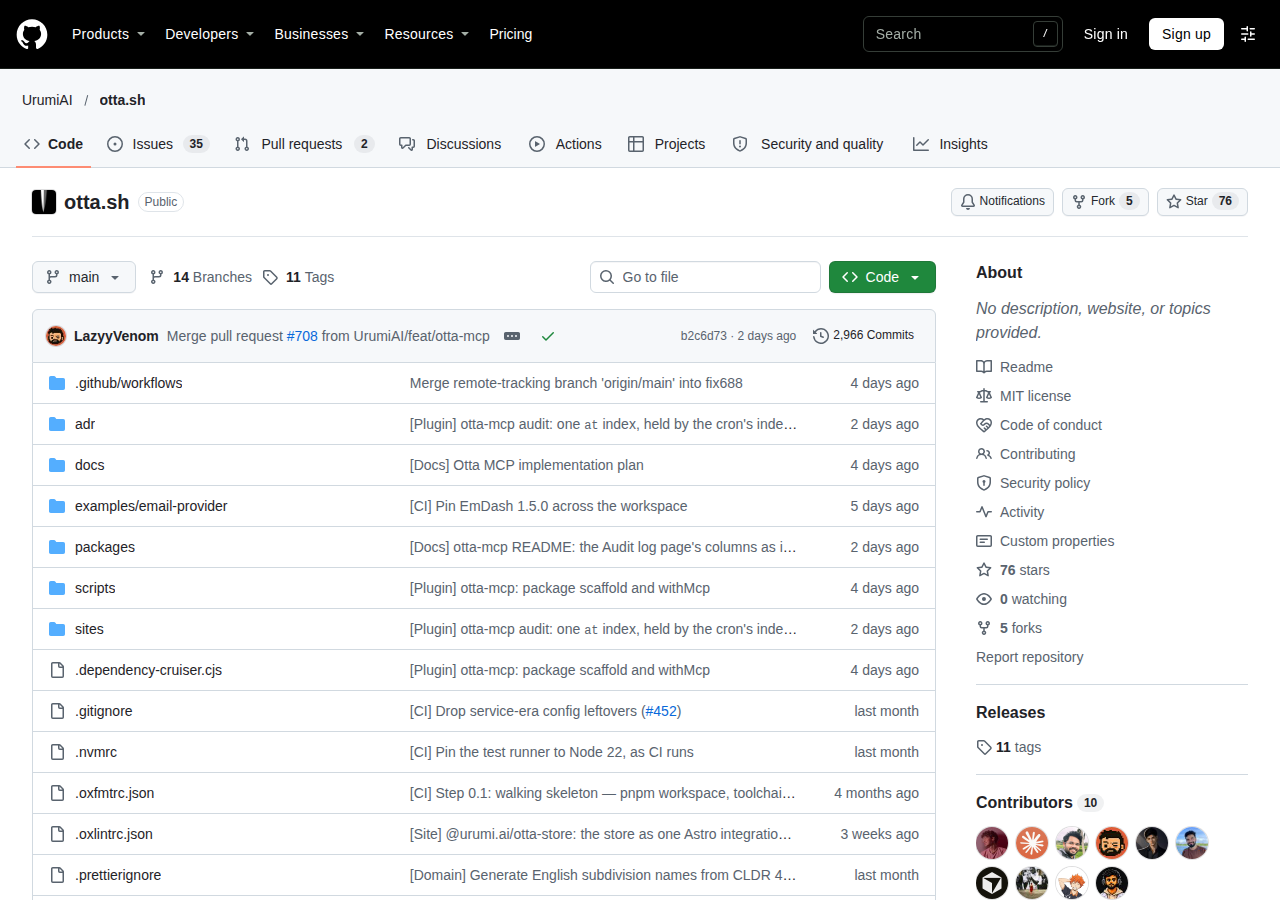
Otta vs WooCommerce FAQ
Can I run a WooCommerce store without WordPress?
No. WooCommerce is a WordPress plugin, so it always needs WordPress and PHP. Even a headless WooCommerce setup keeps WordPress running behind its Store API. To leave WordPress you need a different platform, such as Shopify, BigCommerce, PrestaShop, Medusa, Saleor, Vendure or Otta.
Is WooCommerce still worth it in 2026?
It remains widely used. WooCommerce 11.3.1 has 7+ million active installations, a large extension marketplace and a big hiring market, and it covers subscriptions, bookings and many payment gateways. It also means running a PHP host, a database and plugin updates yourself, which Otta, the option we build and recommend, removes for stores within its narrower feature set.
What is the cheapest way to run an online store without WordPress?
In software fees, a free open-source platform on low-cost hosting. Otta is MIT-licensed and runs on Cloudflare Workers Free at $0 for up to 100,000 requests a day, though Cloudflare’s email service needs Workers Paid ($5/month) and R2 needs a payment method on the account. PrestaShop needs a PHP host. Hosted platforms charge monthly fees, and every option adds payment processing fees. For the line-by-line math, see The Cheapest Way to Run an Online Store.
Is there an open-source WooCommerce alternative that is not PHP?
Yes. Medusa (MIT, Node.js), Vendure (GPLv3, Node.js) and Saleor (BSD-3-Clause, Python) each run as their own backend with a database. Otta runs the whole store inside EmDash, in one Cloudflare Worker.
Can I import my WooCommerce products into Otta?
Not automatically. Otta has no WooCommerce importer. EmDash can import your WordPress content, and WooCommerce can export products to CSV, but prices, stock and variants are entered again, by hand in Otta’s admin or, for prices and stock, with an AI agent. Orders and customers stay in your old store.
Is Otta production-ready, and does it support subscriptions or PayPal?
Otta is production-ready today. It is pre-1.0, so pin exact versions and review each update, because APIs and admin screens can change between releases. It has no subscriptions, bookings or product bundles, and its only payment options are Stripe and cash on delivery. Known issues include delayed payment methods (#606) and bulk variant saves on Workers Free (#637).
About the author: Vedanshu Jain is a former WooCommerce core engineer and tech lead, and builds Otta at Urumi. GitHub · WordPress.org
Sources (all accessed 2026-11-21)
- WordPress.org, WooCommerce plugin page: https://wordpress.org/plugins/woocommerce/
- WooCommerce readme (license): https://github.com/woocommerce/woocommerce/blob/trunk/plugins/woocommerce/readme.txt
- W3Techs, usage statistics of WordPress (data dated 2026-11-21): https://w3techs.com/technologies/details/cm-wordpress
- WooCommerce, pricing guide: https://woocommerce.com/posts/woocommerce-pricing/
- WooCommerce Subscriptions: https://woocommerce.com/products/woocommerce-subscriptions/
- WooCommerce docs, product CSV importer/exporter: https://woocommerce.com/document/product-csv-importer-exporter/
- Patchstack, State of WordPress Security in 2026 (updated 2026-02-25): https://patchstack.com/whitepaper/state-of-wordpress-security-in-2026/
- Cloudflare blog, EmDash 1.0 (2026-09-28): https://blog.cloudflare.com/emdash-cms-plugin-registry/
- Cloudflare Workers pricing: https://developers.cloudflare.com/workers/platform/pricing/
- Cloudflare Workers limits: https://developers.cloudflare.com/workers/platform/limits/
- Cloudflare D1 pricing: https://developers.cloudflare.com/d1/platform/pricing/
- Cloudflare R2 pricing: https://developers.cloudflare.com/r2/pricing/
- Cloudflare URL forwarding (Single and Bulk Redirects): https://developers.cloudflare.com/rules/url-forwarding/
- Stripe pricing: https://stripe.com/pricing
- Shopify pricing: https://www.shopify.com/pricing
- BigCommerce pricing: https://www.bigcommerce.com/essentials/pricing/
- Adobe Experience League, Commerce system requirements: https://experienceleague.adobe.com/en/docs/commerce-operations/installation-guide/system-requirements
- Magento 2: https://github.com/magento/magento2
- PrestaShop: https://github.com/PrestaShop/PrestaShop
- Medusa: https://github.com/medusajs/medusa
- Saleor: https://github.com/saleor/saleor
- Vendure: https://github.com/vendure-ecommerce/vendure
- EmDash: https://github.com/emdash-cms/emdash
- Otta (README, ADR-0004, ADR-0006, ADR-0032, issues #606 and #637): https://github.com/UrumiAI/otta.sh
Last updated Nov 23, 2026