 Urumi.AI
Best EmDash Plugins (2026): 332 Listings Audited
EmDash plugins for SEO, forms, email and commerce, checked on the registry on 2026-11-21: versions, permissions, licenses, sandbox rules.
Updated 2026-11-21.
Disclosure: we build Otta, one of the commerce plugins below, and installed no other plugin on this page; everything else comes from each plugin’s public registry listing or product page, plus the cited Cloudflare and EmDash docs.
What are the best EmDash plugins right now?
The right EmDash plugins depend on the job. As of 2026-11-21, SEO & Schema Markup or SEOdash cover SEO, Freeform or QuixForms cover forms, SMTP covers email, and for commerce we recommend Otta, which we build. Otta installs from npm or a Deploy button, not the registry, and runs in-process without sandbox isolation. Sandboxed plugins install from the registry with permissions you approve; native plugins install from npm with full access.
The short version: most registry plugins ask for few permissions, but as of 2026-11-21, 23 of the registry’s 332 plugins (6.9%) request unrestricted network access and 46% link no source code, so read the Permissions panel before you install. We also reviewed 23 plugins by hand, a separate sample, and recorded each one’s full Permissions panel.
Try the Otta playground (a disposable store that lasts about an hour, with no account and no card payments) · Deploy to Cloudflare · Star Otta on GitHub to follow releases on the way to 1.0.
How we would pick for a typical site
- Blog or publication: SEO & Schema Markup (or SEOdash if you want scores), plus SMTP or Resend for email.
- Brochure site with a contact form: QuixForms, an email provider plugin (SMTP or Resend) and SEO & Schema Markup.
- Small shop with simple products: Otta (our product), from npm or the Deploy button.
- Shop that must install from the admin, inside the sandbox: Otta does not meet this requirement. It is not in the registry and runs without sandbox isolation, and we make no commerce recommendation for this case.
- Store with variants, cash on delivery and coupons, installed from npm: Otta (our product).
Quick scan (values from each plugin’s registry page on 2026-11-21; "Updated" is the listing’s structured dateModified, in UTC):
| Plugin | What it does | Registry permissions | Install path | Updated |
|---|---|---|---|---|
| SEO & Schema Markup | JSON-LD schema, pages-to-fix list, Google preview, redirects import | 5 | Registry | 2026-11-18 |
| SEOdash | SEO score, schema, site audit, IndexNow, publishing rules | 5 | Registry | 2026-11-19 |
| Freeform | Form builder, submissions inbox, webhooks, optional AI features | 2 | Registry | 2026-11-19 |
| QuixForms | Form builder with conditional rules and an inbox | 2 | Registry | 2026-11-20 |
| SMTP | Transactional email through many named providers | 2 | Registry | 2026-09-30 |
| DashCommerce Lite | Cart, Stripe hosted Checkout, stock, orders admin | 2 | Registry | 2026-10-24 |
| DinkusKit Commerce | Products, prices and orders; checkout through DinkusKit Payments | 4 | Registry | 2026-11-01 |
| Otta | Commerce with variants, Stripe, cash on delivery, coupons, admin | n/a (not in registry) | npm or Deploy button | On npm |
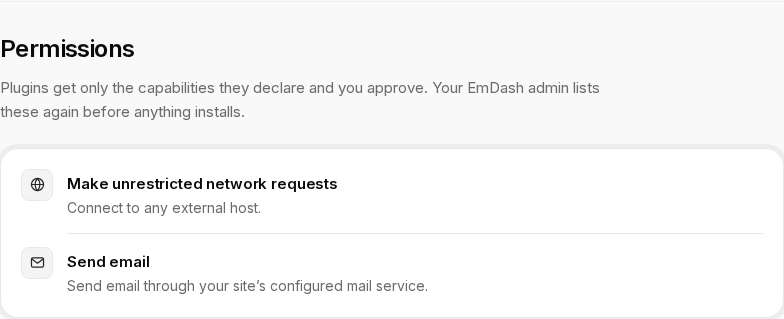
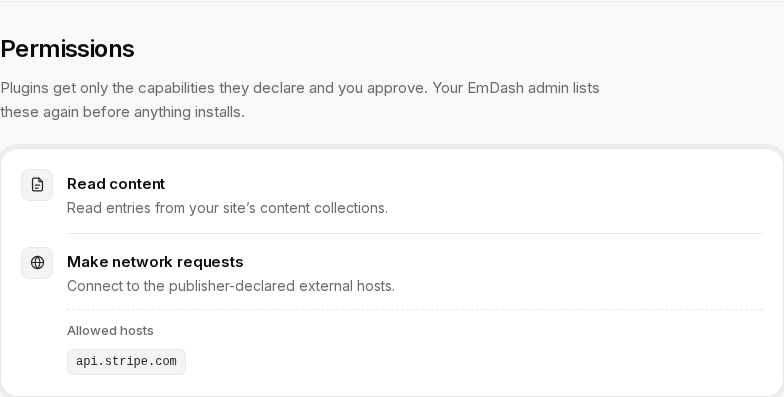
A permission count is not comparable on its own. Freeform’s two permissions include "Make unrestricted network requests" (any host), while DashCommerce Lite’s two allow network access to
api.stripe.comonly. Open the Permissions panel, not just the number.
On this page: How plugins work · Registry by the numbers · How we chose · SEO · Forms and email · Smaller plugins · Ecommerce · Install · Choose safely · FAQ
How do EmDash plugins work?
EmDash plugins come in two kinds: sandboxed plugins, which run isolated with only the permissions you approve, and native plugins, which run inside the site with full access. Sandboxed plugins install from the registry inside your admin. Native plugins install from npm and need a redeploy to change. This page calls the two kinds "sandboxed" and "native". A sandboxed-format plugin registered in the site process is called "in-process".
| Sandboxed | Native | |
|---|---|---|
| Runs in | An isolated runtime with its own private storage | The site’s own process |
| Access | Only the permissions an administrator approves | Everything the site can reach |
| Installs from | The registry, inside the EmDash admin (or npm) | npm, plus a redeploy |
| Admin screens | Block Kit only | Block Kit or React |
| Format label in code | standard | native |
Each sandboxed plugin is isolated
Cloudflare’s EmDash 1.0 announcement (2026-09-28) describes the model this way: "Each plugin runs in an isolated runtime with access to its own private storage, but not to the site’s content, media, users, secrets, environment, filesystem, or network. It gains additional abilities only when they are declared by the plugin and approved by the site administrator." The same post says: "On Cloudflare, EmDash runs each plugin as a Dynamic Worker through the Worker Loader." On Node.js, EmDash runs sandboxed plugins inside a separate workerd process.
You approve permissions, and again on risky updates
The registry shows every permission before you install, using labels such as "Read content", "Make network requests" (with the allowed hosts listed) and "Send email". Your EmDash admin shows them again in a consent dialog. According to the EmDash docs on installing plugins, "Registry updates require another confirmation when they add permissions or MCP tools, or when a route changes from authenticated to public."
The registry has signed records, not a central owner
The EmDash registry is built on AT Protocol. Publishers sign package and release records with their own account, and EmDash checks "the plugin’s checksum, package name, version, requested access, and any required build provenance" against that signed record instead of trusting the catalog’s copy (Cloudflare, 2026-09-28). The post also notes that "The registry supports free plugins today."
Where a plugin runs depends on how it is registered
The EmDash docs describe the two formats. A sandboxed-format plugin can still be registered to run in the site process:
| Install path | Runs in | Change needs a redeploy | React admin pages | On Cloudflare |
|---|---|---|---|---|
| Registry, from the admin | Sandbox runner | No | No (Block Kit only) | Workers Paid (Worker Loader) |
npm, listed in sandboxed: [] | Sandbox runner | Yes | No | Workers Paid (Worker Loader) |
npm, listed in plugins: [] | Site process, no isolation | Yes | Native format only | No Worker Loader needed |
Native plugins are the only kind that can ship React admin pages, Portable Text rendering components or page fragments. The docs allow moving a sandboxed-format plugin into plugins: [] to run it in-process, with a clear warning: "Without a sandbox runner active, treat every plugin as a native plugin for trust purposes."
What the sandbox costs on Cloudflare
The EmDash sandbox runner on Cloudflare "requires the Workers Paid plan and a worker_loaders binding named LOADER" (EmDash docs). Cloudflare’s Dynamic Workers pricing page (last updated 2026-06-11) says Dynamic Workers "are currently only available on the Workers Paid plan", with 1,000 unique Dynamic Workers included per month, then $0.002 per Dynamic Worker per day. Workers Paid has a minimum charge of $5 USD per month per account (page last updated 2026-11-18). Without the binding, you can still browse the registry, but installs fail with SANDBOX_NOT_AVAILABLE. Plugins registered in plugins: [] do not use Dynamic Workers. For a deeper look, see Sandboxed Plugins: Why a Store Plugin Shouldn’t Have Full Database Access.
What does the EmDash plugin registry look like in numbers?
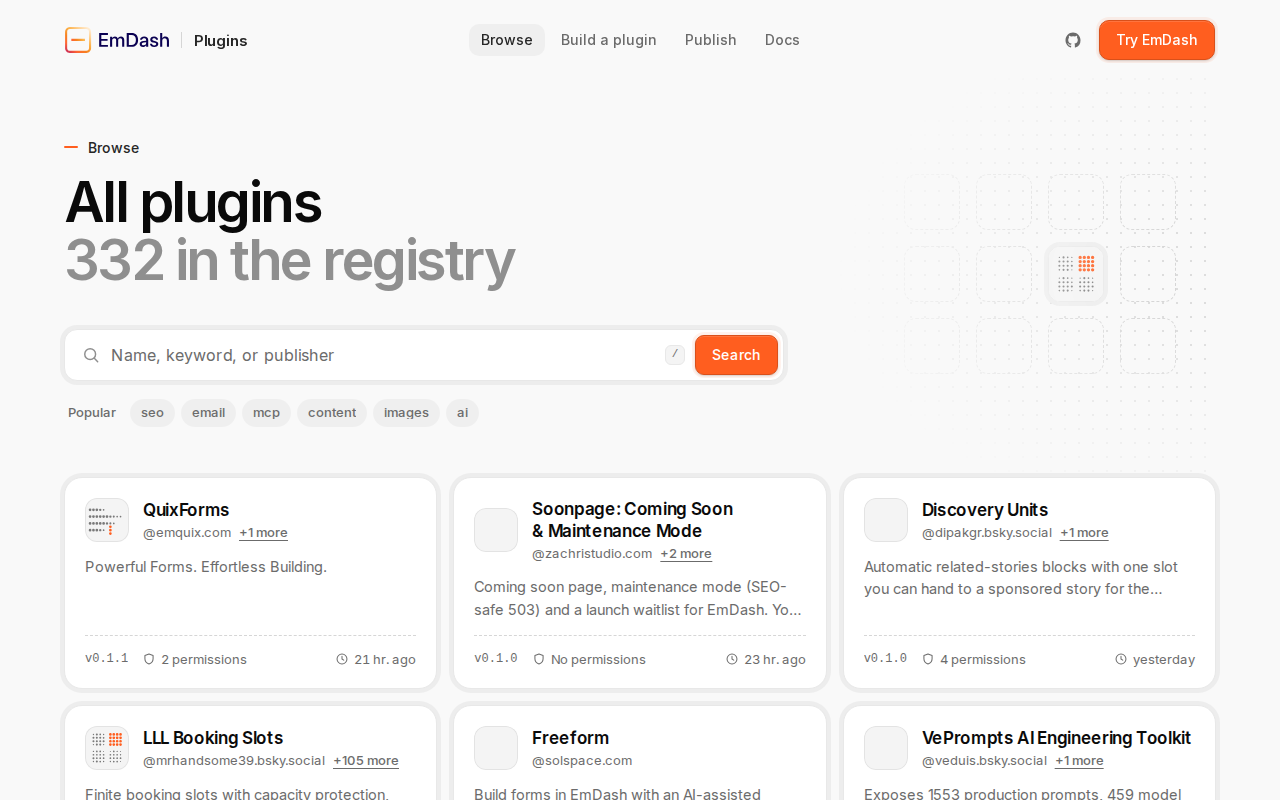
As of 2026-11-21, the EmDash plugin registry listed 332 plugins; 23 of them (6.9%) request unrestricted network access and 153 link no source repository. We downloaded all 332 registry detail pages on 2026-11-21 and counted what each one shows:
| Measure (all 332 listings, as of 2026-11-21) | Count | Share |
|---|---|---|
| Request "Make unrestricted network requests" (any host) | 23 | 6.9% |
| Request no permissions at all | 53 | 16.0% |
| Link no source repository | 153 | 46.1% |
| Show a "Listed" date on or after EmDash 1.0 (2026-09-28) | 325 | 97.9% |
| Licensed MIT | 325 | 97.9% |
The last two rows share a count by coincidence: seven listings carry a "Listed" date before 1.0, and a different seven use a license other than MIT (Elastic-2.0, Apache-2.0, GPL-3.0-only and two custom licenses).
How to re-check: open any listing and read its Details box (Version, Updated, Listed, License, Source) and its Permissions tab. The "332 in the registry" count is on the All plugins page. We plan to repeat this count.
Almost the whole registry is younger than EmDash 1.0, and nearly half of it links no source code. That is why "has a source link" is our first criterion below.
How did we choose these EmDash plugins?
We reviewed 23 plugins by hand on 2026-11-21, a separate sample from the registry-wide count above, and picked a plugin only if it met all four criteria below. Within a category, picks are the closest fit for the job on these criteria, not a quality ranking.
| Criterion | How we checked | Date |
|---|---|---|
| 1. Source repository linked | "Source" field on the listing | 2026-11-21 |
| 2. Released after EmDash 1.0 (2026-09-28) | "Updated" and "Listed" dates | 2026-11-21 |
| 3. License stated | "License" field | 2026-11-21 |
| 4. Permissions fit the job | Every entry in the Permissions panel; named hosts preferred over unrestricted network access | 2026-11-21 |
Otta against the same criteria: Otta is our own product and is not in the registry, so these criteria were not used to pick it. We recommend it for the reasons in the Otta section below, and you should weigh that as the vendor’s view. On GitHub and npm it has linked source, an MIT license and releases after EmDash 1.0; it has no registry Permissions panel to read.
What this page cannot confirm: code quality, performance or security. We did not install the third-party plugins; feature descriptions are the publishers’ own words. Otta is described from its own source code. Registry pages change daily, so permission lists and "no permissions" findings are true as of 2026-11-21 only.
Who this list is for: developers evaluating EmDash after its 1.0 release on 2026-09-28, and agencies moving client sites from WordPress. The community awesome-emdash list is a good place to look further.
Findings from the 23 plugins we reviewed by hand: two request unrestricted network access (Freeform and Coldtill Crypto Payments). Four request no permissions: JPEG XL Image Optimizer, plus three setup guides that point to software installed separately (DashCommerce Setup, Buyblock and Cookieless Analytics Companion). "No permissions" on a listing does not always mean the plugin’s code runs in the sandbox.
Left out: Cloudflare Email Sending (@cfreear.bsky.social, v0.1.2) links no source and was last modified 2026-06-27, before 1.0; Cloudflare’s 1.0 post calls it "one of many plugins available in the new EmDash plugin registry". DinkusKit Commerce (Beta) (v0.9.0-beta.2) is omitted in favor of the stable v0.8.0. Two other EmDash commerce projects had no registry listing on 2026-11-21 and may be distributed elsewhere: Ritely, whose 2026-04-06 post describes an ecommerce plugin it is building (its site said "Coming Soon" on 2026-11-21), and Catalog Studio (Katalore), whose vendor site offers a catalog plugin and a separate early-access commerce kit.
What are the best EmDash SEO plugins?
Pick: SEO & Schema Markup for a fix-list approach and WordPress redirect imports; SEOdash if you want scores and publishing rules. EmDash core already handles titles, descriptions, sitemaps, canonical URLs and the "hide from search engines" switch, so SEO plugins add to it rather than replace it. Choose one of the first two; both write structured data, and running both would overlap.
| Plugin (as of 2026-11-21) | Publisher | Version | License | Permissions | Best for | Source |
|---|---|---|---|---|---|---|
| SEO & Schema Markup | @moorage.dev | 0.3.2 | MIT | Read content, Read content structure, Read bylines, Read redirects, Manage redirects | Fixing a list of pages; trade-off: no score | listing |
| SEOdash | @stevenorechow.me | 1.0.3 | GPL-3.0-only | Read content, Read content structure, Block publishing, Read taxonomies, Make network requests (api.indexnow.org) | Scoring content and enforcing publishing rules; trade-off: can block publishing | listing |
| IndexNow | @tagperfect.eu | 1.2.6 | MIT | Read content, Read content structure, Make network requests (six IndexNow hosts) | Pinging IndexNow engines; trade-off: does nothing else | listing |
SEO & Schema Markup deliberately skips scores: its listing says "No score and no traffic light: a list that can reach zero." It imports redirect CSVs from Redirection, Yoast SEO Premium or Rank Math, which helps WordPress migrations. SEOdash suits you if you want a score, content analysis and rules such as requiring alt text before publishing; note its "Block publishing" permission. It includes IndexNow, so add the standalone IndexNow plugin only if you use neither.
What are the best EmDash forms and email plugins?
Pick: QuixForms for the narrowest permissions (it talks only to challenges.cloudflare.com); Freeform for feature depth; SMTP for email delivery. Forms plugins in EmDash usually split into a sandboxed backend (builder and inbox) and a separate front-end renderer you add to your theme. Email delivery is a site-wide setting: forms plugins "Send email" through whichever provider plugin you install.
| Plugin (as of 2026-11-21) | Publisher | Version | License | Permissions | Best for | Source |
|---|---|---|---|---|---|---|
| Freeform | @solspace.com | 1.4.3 | MIT | Make unrestricted network requests, Send email | Building feature-rich forms with webhooks and CSV export; trade-off: any-host network access | listing |
| QuixForms | @emquix.com | 0.1.1 | MIT | Make network requests (challenges.cloudflare.com), Send email | Building forms with conditional rules; trade-off: version 0.1 | listing |
| SMTP | @masonjames.com | 0.4.1 | MIT | Make network requests (named provider hosts), Provide the email transport | Sending through one of many providers; trade-off: long host list | listing |
| Resend | @msale.com | 0.1.1 | MIT | Make network requests (api.resend.com), Provide the email transport | Sending through Resend only; trade-off: one provider | listing |
Freeform has the broadest feature list, and its network permission is unrestricted; its FAQ says the optional AI features need an OpenAI key you add. QuixForms talks only to Cloudflare Turnstile and is upfront about its limits: "Payments, uploads, signatures, autoresponders, integrations and automatic retention are not included." Both need a companion renderer to show a form on your public site. For delivery, SMTP names every provider host it may contact (SendGrid, Postmark, Mailgun, Resend and others); Resend (and the similar Resend Email by @vcode.sh, v0.1.0) is the minimal option if you already use Resend. The first-party forms and webhook-notifier plugins in the EmDash repository are also options.
Which smaller registry plugins are worth knowing?
Options, not picks: these analytics and image plugins are small and new, and one listing makes a plan claim we could not reconcile with the EmDash docs. Cloudflare Web Analytics’ listing says "No cron or sync; runs on Workers Free", but a registry install goes through the sandbox runner, which the EmDash docs say needs Workers Paid on Cloudflare. We did not test it; ask the publisher which install path that claim covers.
| Plugin (as of 2026-11-21) | Publisher | Version | License | Permissions | What it does | Meets all four criteria? |
|---|---|---|---|---|---|---|
| Cloudflare Web Analytics | @chiji.tech | 0.6.1 | MIT | Make network requests (api.cloudflare.com) | Visits and top pages from Cloudflare Web Analytics, inside the admin | Yes |
| JPEG XL Image Optimizer | @rapier.website | 0.2.1 | MIT | None | Makes a JPEG XL copy of each image; serves the original to browsers that cannot show it | No (no source link) |
| Cookieless Analytics Companion | @infinitnet.bsky.social | 1.0.0 | Apache-2.0 | None (setup guide) | Guided setup for a separate analytics plugin; review that plugin’s access too | Yes |
Two of the three request no permissions, but one of those is a setup guide for software that runs elsewhere, so "None" is not a safety signal on its own.
Which EmDash ecommerce plugins exist?
Pick: Otta, which we build, if you accept an npm install and a plugin that runs in-process without sandbox isolation. This section also includes plugins that are not on the registry, including ours. The EmDash docs say React admin pages need the native format, and Buyblock’s listing notes that "Payment buttons on public pages need a trusted plugin, and EmDash only installs those from npm." A list limited to the registry would leave out every commerce plugin that installs from npm.
DashCommerce, DinkusKit and Vendwick are actively maintained competitors of Otta. Order below: registry installs first, then npm, then vendor download; alphabetical within each group. See also our guide to adding a store to EmDash.
| Plugin (as of 2026-11-21) | Install from | Payments | Variants | Permissions |
|---|---|---|---|---|
| DashCommerce Lite | Registry | Stripe hosted Checkout | No (simple products) | 2 |
| DinkusKit Commerce | Registry | Stripe via DinkusKit Payments | Not stated | 4 |
| emdash-stripe | Registry | Stripe Checkout sessions | Not stated | 4 |
| Moksa Commerce Core | Registry | Add-on gateways | Not stated | 3 |
| Stripe Checkout for EmDash | Registry | Stripe Checkout | Not stated | 5 |
@dashcommerce/core (via DashCommerce Setup) | npm | Stripe | Yes, per DashCommerce | n/a (native) |
| Buyblock | npm (registry has a setup guide) | PayPal buttons | No cart | 0 (guide) |
| Otta | npm or Deploy button | Stripe, cash on delivery | Yes | n/a (not in registry) |
| Vendwick | Vendor download | Stripe, PayPal, Razorpay, Polar | 8 product types, plans | n/a (native) |
"Not stated" means the listing does not say. Cloudflare plan: any plugin installed from the registry runs in the sandbox runner, which the EmDash docs say needs Workers Paid on Cloudflare; only DashCommerce Lite’s listing states this itself. Otta’s Workers Free result applies to its in-process install, not to a sandbox install, so it is not a like-for-like comparison with the registry plugins.
DashCommerce Lite and DashCommerce
DashCommerce Lite (v0.2.0, MIT, requires EmDash 1.3 or later) turns a products collection into a shop with a cart, Stripe’s hosted Checkout, stock tracking, refunds and an orders admin. Its listing says: "It runs as a sandboxed plugin, so there is nothing to install from npm." It requires Workers Paid, supports simple products only, and accepts Stripe methods that confirm later, such as SEPA Direct Debit. Variants, subscriptions and order emails are in the MIT-licensed npm package @dashcommerce/core, and the Lite listing says: "Do not install it alongside @dashcommerce/core".
DinkusKit Commerce
DinkusKit Commerce (v0.8.0, MIT; minimum EmDash version not stated on the listing) manages products, prices and orders inside EmDash. Its four permissions are Read unsaved edits, Read media, Send email, and Make network requests to payments.dinkuskit.com, coupons.dinkuskit.com, ship.dinkuskit.com and dinkuskit.com, so checkout depends on DinkusKit’s hosted service. Checkout comes from the separate DinkusKit Payments plugin (v0.5.0) and shipping labels from DinkusKit Ship (v0.3.1), whose listing says it runs in sandbox mode and that "Sandbox and practice labels are not valid postage". The Commerce listing says you supply the storefront and that "the current Registry build does not provide managed inventory or coupon checkout."
Smaller registry commerce plugins
- emdash-stripe (@jameswelbes.bsky.social, v0.1.1, MIT, listed 2026-11-16): Stripe checkout sessions, order tracking and email receipts.
- Moksa Commerce Core (@moksaweb.com, v0.1.3, MIT): the base of a suite with many add-ons (subscriptions, loyalty, affiliate, Taiwanese payment gateways); its description lists products, cart, checkout, orders and stock holds.
- Stripe Checkout for EmDash (@ecommerceave.com, v0.10.6, MIT): Buy Now buttons, webhooks and refund tracking; note it asks for "Manage content".
- Coldtill Crypto Payments (v1.0.0, MIT): connects to a self-hosted Coldtill gateway and requests unrestricted network access.
None of the four listings states a minimum EmDash version.
Buyblock
Buyblock by @zachristudio.com (v0.1.0, MIT) adds PayPal Buy Now buttons to pages without a cart. Its registry entry is a setup guide with no source link; the plugin itself installs from npm. The free plan covers up to 5 products and the last 30 days of orders.
Otta
Disclosure: we build Otta. Otta is an open-source commerce plugin for EmDash that runs products, cart, checkout, orders and inventory inside the CMS on Cloudflare Workers, with no separate backend, database server or Redis. It adds variants, Stripe and cash-on-delivery payments, coupons and a React admin. It is on npm as @urumi.ai/otta-* (MIT, requires EmDash ^1.5.0), and a Deploy to Cloudflare button creates a whole store. It is built to be set up and run with an AI agent: through EmDash’s MCP endpoint, an agent you authorize can create and edit product content with EmDash’s own content tools and use the opt-in @urumi.ai/otta-mcp package to set prices and stock and manage orders, coupons, shipping, tax, reports and settings. It is not in the registry; its commerce plugin is sandbox-format but registered in-process, and its React admin needs the native format.
Why Otta runs on Workers Free, and what that costs. The store template registers both Otta plugins in plugins: [] with no sandbox runner, so it uses no Worker Loader and no Dynamic Workers. The template README records the full Deploy button flow run end to end on Workers Free on 2026-11-10, on the template’s earlier release (EmDash 1.3.1, Otta 0.2.0). The cost of that choice is isolation: Otta runs as trusted code in the site process, so you trust it the way you trust any native plugin.
Cloudflare’s EmDash 1.0 post (2026-09-28) said: "Urumi is using their WooCommerce expertise to release EmDash’s first eCommerce plugin." That sentence names Urumi, the team behind Otta. Several registry commerce plugins have been listed since.
Trade-offs:
- Not in the registry: no one-click install from the admin and no sandbox isolation.
- Otta is production-ready today. It is pre-1.0, so pin exact versions and review each update, because APIs and admin screens can change between releases. The current release requires EmDash
^1.5.0. - Stripe methods that confirm days later (SEPA, ACH, Bacs, bank transfer) end in an expired order and an automatic refund (issue #606).
- On Workers Free, saving a product with more than about 16 to 20 sized variants can fail (issue #637).
Workers Free setup and its limits are in EmDash Store Template: Deploy to Cloudflare in One Click and the template README.
Vendwick
Vendwick is a commercial native EmDash plugin sold by download from a third party ("Vendwick is a native EmDash plugin", per its product page, checked 2026-11-21). Its license is commercial: $249 lifetime or $59 per year. Per the vendor page, it sells eight product types, including software, license keys, downloads, services, events, physical goods, WordPress plugins and WordPress themes, with Stripe, PayPal, Razorpay and Polar. The product page says version 0.2.0 "needs EmDash 1.5 or later" and that "The store pages use Vendwick’s own layout, not your theme’s". Vendwick’s vendor also publishes an EmDash plugins guide.
How the commerce plugins differ
| Capability | Plugins that offer it |
|---|---|
| One-click install from the admin, simple products, Stripe | DashCommerce Lite |
| Registry install with a hosted payments and shipping service | DinkusKit Commerce |
| Sandbox isolation for your store plugin | DashCommerce Lite, DinkusKit Commerce (Otta runs in-process) |
| A few Buy Now buttons, no cart | Stripe Checkout for EmDash, emdash-stripe, or Buyblock (PayPal) |
| Variants, cash on delivery and coupons on Workers Free, and you accept an npm install | Otta (our recommendation) |
| Selling software licenses and subscriptions, with a commercial, vendor-supported product | Vendwick |
For the fuller comparison, see how to choose an EmDash commerce plugin.
How do you install an EmDash plugin?
An EmDash plugin installs one of two ways: sandboxed plugins from the registry inside your admin, or native plugins from npm with a redeploy.
From the registry (sandboxed):
- Confirm your Worker has a
worker_loadersbinding namedLOADERand is on Workers Paid. - Find the plugin at plugins.emdashcms.com and choose "Open in EmDash", or open Registry in your admin and search for its public name.
- Review the publisher, permissions and verification status.
- Select Install and confirm the permissions in the consent dialog.
From npm (native, or a sandboxed-format package you register yourself):
- Install the package, pinned to an exact version, for example
pnpm add -E <package>@<version>. - Register it in
astro.config.mjsunderplugins: []orsandboxed: [], as the package’s instructions say. - Redeploy.
Some npm plugins need more than one package and their own descriptors; follow each plugin’s README. The EmDash repository’s first-party plugins (ai-moderation, ai-search, atproto, audit-log, color, embeds, field-kit, forms, webhook-notifier) install this way.
How do you choose EmDash plugins safely?
Choose EmDash plugins by reading what each one is allowed to do, not how many permissions it lists.
- Read the Permissions panel, not the count. Named allowed hosts are narrower than "Make unrestricted network requests".
- Check that the listing links a source repository and states a license; 46.1% of registry listings linked no source as of 2026-11-21.
- Prefer plugins updated since 1.0 (2026-09-28).
- Avoid two plugins doing the same job, such as two SEO plugins writing JSON-LD, or DashCommerce Lite alongside
@dashcommerce/core. - Treat permissions such as "Manage redirects", "Manage content" and "Block publishing" as powerful: an approved permission still authorizes that action.
- Pin native plugins to exact versions; they run with the site’s full access.
- Remember that a "No permissions" listing may be a setup guide for software that runs outside the sandbox.
FAQ
Where do I find EmDash plugins?
Sandboxed plugins are in the official registry at plugins.emdashcms.com (332 listings as of 2026-11-21), and in the Registry screen of your EmDash admin. Native plugins, such as Otta or @dashcommerce/core, are published on npm and registered in your project’s astro.config.mjs.
Are EmDash plugins safe?
Sandboxed EmDash plugins can only do what you approve, but what you approve varies a lot. As of 2026-11-21, 23 of the registry’s 332 listings (6.9%) request unrestricted network access, 53 (16.0%) request no permissions, and 153 (46.1%) link no source code. Native plugins have full access to the site. Read each Permissions panel and prefer listings with a source link.
Do EmDash plugins need Cloudflare Workers Paid?
On Cloudflare, sandboxed plugins do: the sandbox runner uses Dynamic Workers through the Worker Loader, which Cloudflare’s pricing page says are only available on Workers Paid (as of 2026-11-21). Plugins registered in-process do not use Dynamic Workers; check each plugin’s own requirements.
What is the difference between sandboxed and native EmDash plugins?
Sandboxed plugins run in an isolated runtime, can only use the permissions you approve, install from the admin without a redeploy, and use Block Kit for admin screens. Native plugins run in the site process with full access, install from npm with a redeploy, and can ship React admin pages, Portable Text components and page fragments.
Is there an ecommerce plugin for EmDash?
Yes, several. Registry options include DashCommerce Lite, DinkusKit Commerce, Moksa Commerce Core, emdash-stripe and Stripe Checkout for EmDash. npm options include @dashcommerce/core, Otta (open source) and Buyblock; Vendwick is a commercial vendor download. They differ mainly in install path, payment methods, variant support and the Cloudflare plan they need.
Can I use WordPress plugins in EmDash?
No. EmDash is a TypeScript CMS built on Astro, so PHP plugins do not run in it. Some EmDash plugins help with migration, such as SEO & Schema Markup’s import of WordPress redirect CSVs. For stores, see Migrate WooCommerce to EmDash: What Moves, What Doesn’t.
About the author: Vedanshu Jain is a former WooCommerce core engineer and tech lead, and builds Otta at Urumi. GitHub · WordPress.org
Sources
- EmDash plugin registry, All plugins and each linked listing, including DinkusKit Payments and DinkusKit Ship (checked 2026-11-21)
- Cloudflare, EmDash 1.0 and the plugin registry (2026-09-28)
- EmDash docs: Plugins overview, Installing plugins, Choosing a format
- Cloudflare docs: Dynamic Workers pricing (updated 2026-06-11), Workers pricing (updated 2026-11-18)
- Vendwick product page (checked 2026-11-21)
- Ritely, Building the First EmDash Ecommerce Plugin (2026-04-06, checked 2026-11-21)
- Otta: source on GitHub, store template, npm registry (
npm view @urumi.ai/otta-plugin, 2026-11-21)
Browse further: the EmDash plugin registry is the source of truth; versions here are as of 2026-11-21. Spotted an error or a missing plugin? Open an issue and we will correct it.
If you want to try the in-process option: Try the Otta playground (a disposable store that lasts about an hour, with no account and no card payments) · Deploy to Cloudflare · Star Otta on GitHub to follow releases on the way to 1.0.
Last updated Nov 23, 2026